

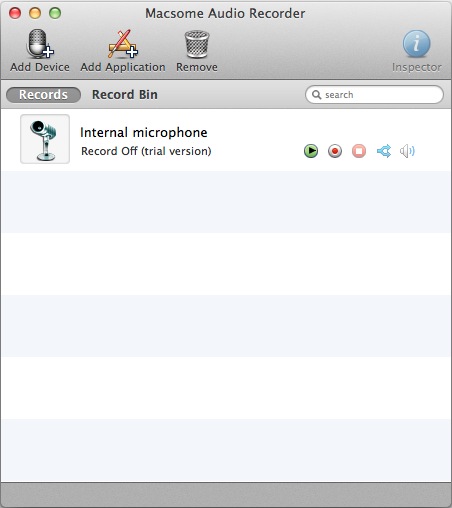
Macsome Audio Recorder can record from two different types of sources, PC devices and applications. Click below examples for help with:
Here is the detail steps of recording audio on Mac, including:
Macsome Audio Recorder customize Recording settings to improve audio quality from any application, set time recording, save the recording directly into MP3, AAC files, burn recorded files to MP3 CDs, and audio CDs.
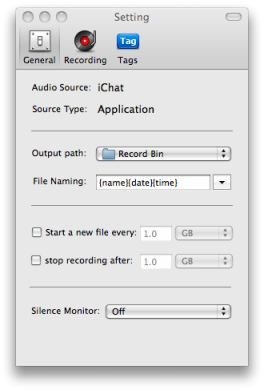
You may record audios to MP3 or AAC file format. And there are many options for output files, including file format, file size, file name, audio quality, etc.
You may add ID tags for the recorded files for easy searching & management.
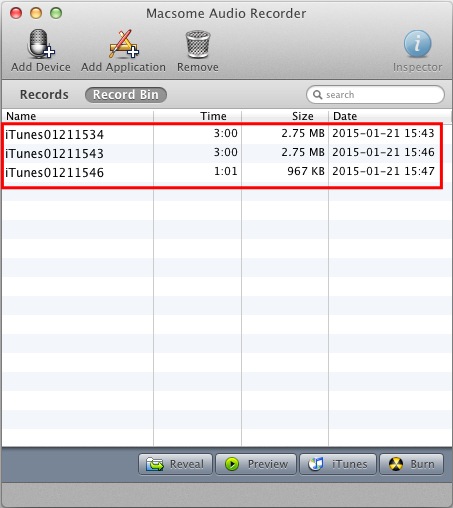
Easily search & manage files in RecordBin. Split a big recorded audio file to small pieces. Burn audio files from RecordBin directly to CD disc.
You may also update ID Tags for recorded audio files.
Record input/source from a microphone, streaming audio from the Internet, external input devices (CDs, LP, music cassettes, phone line) as well as other applications like iTunes, DVD Player.
The built-in silence monitor will help detect the muted sections and control recording the sections or not.
Pause recoding during silence and start a new recording when the sound starts again. This option is especially useful when recording streaming audio and net congestion temporarily stops the stream.
The Record Bin is used for organizing and post-processing recorded files.
You can split recording files by setting or by split button, to split a big file to small pieces.
The ID Tags setting allows you to add information tags to MP3, AAC files or CD Tracks. When you split a big book file to several small files, the ID Tags will be preserved, too.
You can burn your recorded audio files to CDs.

Free customer service is available for trial version users.

Checkout through safe and trusted platforms like 2CHECKOUT.

Conversion fails to help you? 30 days money back guarantee.

Email response within 24 hours & Live Chat.

Convert audio files to MP3, AAC formats for iPod, iPod Touch and other MP3 players.



 English
 日本語
日本語
"It worked perfectly. I can record any sound i need. Thanks. "
"I like the recorder! I will share it with my friends. "