


Small but functional, Macsome Audio Splitter is an incredible MP3 Splitter which is specially designed for Mac users and at the same time it is a complete freeware and very easy to use.
With Macsome Audio Splitter, you can cut off the needless segment and only extract the brilliant part you like for your music, lecture and other audio files. The ID tags will be preserved while splitting and the sound quality is just the same as the original audio files, so you can enjoy them at their best in your MP3 or other audio players.
To sum up, as a free audio cutter, Macsome Audio Splitter can help you split MP3 on Mac, cut MP3 free and edit ID tags of unprotected MP3, AAC (including M4A, M4B and AAC) audio files.
Preview of Macsome Audio Splitter
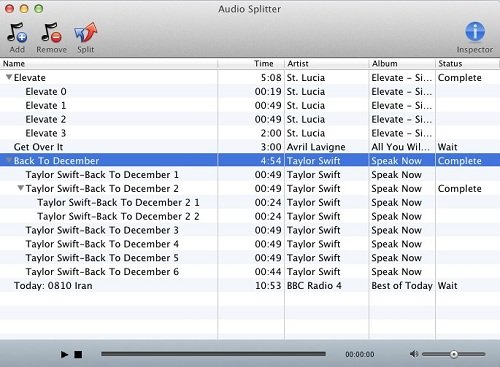
Add -> Add unprotected MP3, AAC files to the software.
Remove -> Remove the selected audio files.
Split -> Split the chosen audio file according to settings.
Inspector -> Show Summary, Tags and Artwork of the selected audio file.
Name -> The name of each added audio file.
Time -> The original duration of each audio file.
Artist -> The artist of each added file.
Album -> The album of each added audio file.
Status -> The splitting status of each file.
FAQs (Frequently Asked Questions)
How can I find the output files easily and quickly?
Macsome Audio Splitter is very considerate, for it offers you the easiest and quickest way to retrieve the output files. When the splitting is finished, you can right click the audio file on the file list and choose Shown in Finder option, then you can locate your output files.
Does this software support batch conversion?
With Macsome Audio Splitter, you can add multiple files at a time, but you can not split them in a batch. Each file has different total time, and you must set split and output options and split them one by one.
What formats does Macsome Audio Splitter support?
Input formats: unprotected MP3, AAC (including M4A, M4B and AAC)
Output formats: MP3, AAC
System Requirements
To install and use Macsome Audio Splitter, the following system requirements are necessary:
Mac OS X 10.4.x, 10.5.x, 10.6.x
At lease 512M physical RAM
1G Hz Intel or Power PC processor, or above
At least one DVD-ROM
1024*768 resolution display or higher


 English
 日本語
日本語