



 Belinda Raman
Want to convert Bandcamp to WAV? Bandcamp is a music platform where artists and independent labels sell their music directly to fans in digital formats, including lossless audio. Whether you need WAV files for DJing, music production, archiving, or high-quality playback, this guide covers the most reliable ways to download Bandcamp music as WAV files while preserving the original audio quality. We'll start with Bandcamp's official download option and then explore alternative tools, so you can find the method that best fits your needs, whether you prioritize audio quality, convenience, or downloading multiple tracks at once.
- 🎧 Why Choose WAV from Bandcamp?
- ⬇️ Method 1. Download WAV from Bandcamp (Official Method)
- 📚 Method 2. Bulk Download Your Bandcamp Collection and Purchases as WAV
- ⭐ Method 3. Use a Desktop Bandcamp to WAV Downloader - Macsome Music One [Recommended]
- 🌐 Method 4. Online Bandcamp to WAV Converters
- ❓ Frequently Asked Questions About Downloading Bandcamp to WAV
Why Choose WAV from Bandcamp?
WAV is an uncompressed, lossless audio format that preserves the quality of the source audio. Depending on the file provided by the artist, it may contain CD-quality audio (16-bit/44.1 kHz) or higher-resolution audio. Downloading Bandcamp music as WAV is particularly useful for audio production, DJing, CD burning, and other workflows that require uncompressed audio. Here are the main benefits of choosing WAV:
- Uncompressed audio quality: WAV can store PCM audio without lossy compression, making it suitable for professional audio editing, mixing, and production.
- Wide software compatibility: WAV is supported by most digital audio workstations (DAWs), audio editors, DJ applications, and media players.
- Ideal for CD burning: WAV files can be used in audio CD authoring workflows without requiring an initial lossy compression step.
- Flexible audio editing: WAV files are convenient for trimming, mixing, applying effects, and incorporating music into production projects.
A few things to keep in mind: Bandcamp WAV downloads generally don't include embedded metadata or album artwork, unlike FLAC downloads. WAV files also take up more storage space than FLAC files of comparable audio quality. If you mainly listen to music or want to preserve track information and cover art, FLAC may be a more practical choice. However, if your software or workflow specifically requires uncompressed audio, WAV is an excellent option.
Method 1. Download WAV from Bandcamp (Official Method)
The easiest and most reliable way to download Bandcamp music as WAV is to use Bandcamp's official download option. This method is available for music you've purchased or claimed through a gift or download code, provided WAV is offered for that release. It also lets you get the artist's original downloadable audio without using a third-party converter.
Bandcamp offers several audio formats for eligible downloads, including WAV, FLAC, AIFF, ALAC, MP3 320, MP3 V0, AAC, and Ogg Vorbis. If you need uncompressed audio for music production, DJing, or CD authoring, WAV is a suitable choice. Keep in mind that WAV files generally require more storage space than FLAC files of comparable audio quality.
Step-by-Step Guide to Downloading Bandcamp Music as WAV
Step 1. Sign in to your Bandcamp account
Visit Bandcamp.com and sign in to the account associated with your purchase. Open your Collection to find your purchased music, or check the relevant purchase or download page available through your account. Select the album or track you want to download.
Step 2. Open the available download options
Look for the Download button or link on the release page or in your Collection. Depending on the page layout, you may see an audio format selector displaying an option such as MP3 320 or FLAC. Click it to view the available formats.
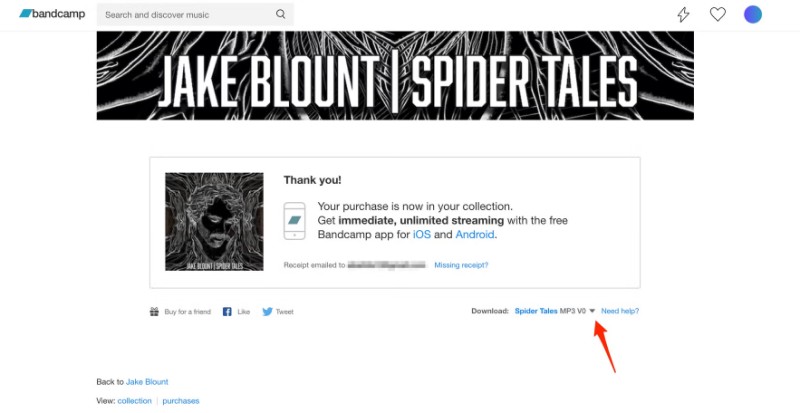
Step 3. Select WAV
Choose WAV from the format list if it is available for the release.
- WAV is available: Select it and continue to the download step.
- WAV is unavailable: Choose another offered format. FLAC is a good lossless alternative that preserves audio quality while using less storage space in typical cases.
Available formats can vary by release and download option, so check the list before proceeding.
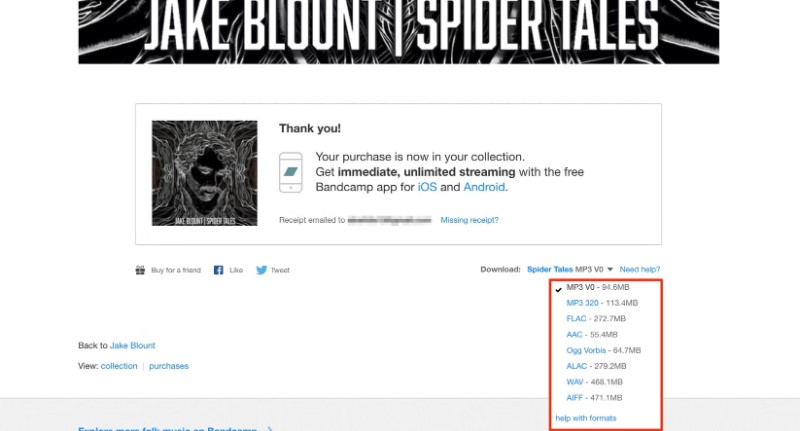
Step 4. Download your WAV files
Click the download link or button to start downloading. For an album, Bandcamp may provide a ZIP archive containing the tracks, along with accompanying files such as artwork or release information, depending on the download.
Step 5. Extract and check the downloaded files
- Open your computer's Downloads folder or the location you selected for downloads.
- Extract the ZIP archive if the music was downloaded in a compressed folder.
- Check that the audio files use the
.wavextension. - Open a track in a compatible audio player or editor, such as VLC, Audacity, or your preferred DAW, to confirm that it plays correctly.
Useful Tips for Bandcamp WAV Downloads
- Check your available storage: WAV files are larger than compressed formats. File size varies with audio duration, sample rate, and bit depth; CD-quality stereo WAV audio typically uses around 10 MB per minute.
- Keep your purchase accessible: You can generally revisit eligible purchases to download the available formats again, subject to Bandcamp's current access and download policies.
- Claim gift or code downloads first: If you received music as a gift or through a Bandcamp download code, follow the redemption instructions before accessing the download options.
- Use a desktop browser when needed: If the mobile app doesn't offer the format or download controls you need, try Bandcamp in a desktop browser.
Note: Bandcamp does not provide a one-click bulk download for your entire collection. Each release must be downloaded individually.
Method 2. Bulk Download Your Bandcamp Collection and Purchases as WAV
If you've purchased dozens or hundreds of releases on Bandcamp, downloading them one by one is tedious. A bulk downloader can help you select multiple releases at once and queue the downloads automatically.
Recommended tool: Batchcamp – Bulk Bandcamp Downloader.
Batchcamp: Bulk Bandcamp Downloader is a free browser extension (available for Chrome and Firefox) that is specifically designed for bulk-downloading music you already own on Bandcamp. It supports every format Bandcamp offers for your purchases — including MP3, FLAC, WAV, AIFF, ALAC, AAC, and Ogg Vorbis — when the artist has enabled that format.
Batchcamp only works with music you’ve purchased or claimed. It cannot unlock WAV (or any other format) if the release doesn’t offer it, and it never accesses your login credentials or payment information.
Step-by-Step Guide to Bulk Downloading Bandcamp Music as WAV
Step 1. Install the Batchcamp extension
Go to the Chrome Web Store or Firefox Add-ons marketplace and search for Batchcamp: Bulk Bandcamp Downloader (developer: deejay.tools / hyphmongo). Review the permissions and recent updates, then install it. The extension is free.
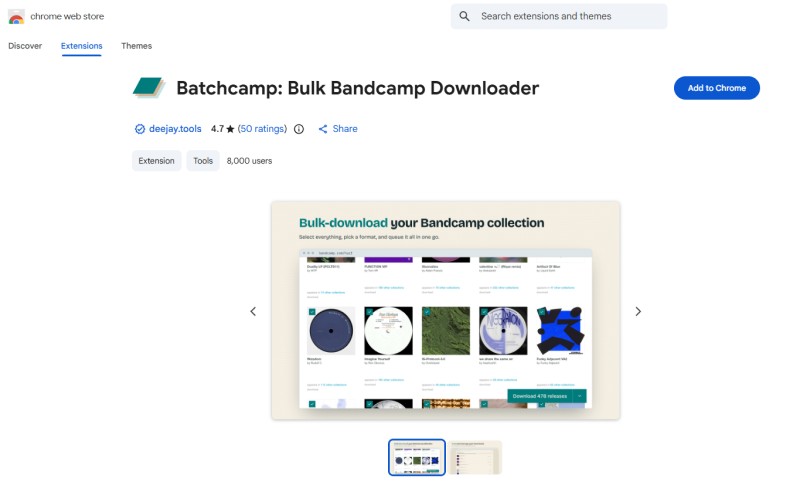
Step 2. Sign in to Bandcamp and open your library
Visit Bandcamp.com and sign in to the account that owns the purchases. Navigate to your Collection page or Purchases page.
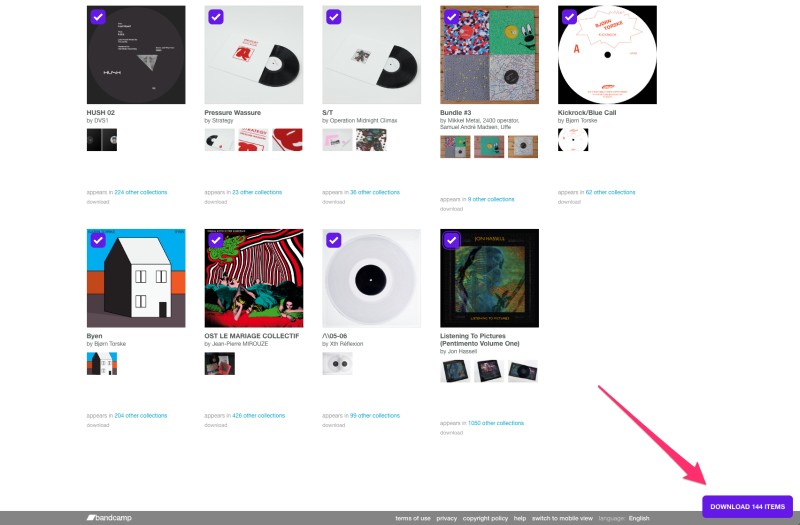
Step 3. Select the releases you want
Once the extension is active, checkboxes appear next to each release. You can:
- Tick individual albums/tracks.
- Hold Shift and click to select a range.
- Use Select All to load and select your entire collection.
- Use the "Undownloaded" option (if available) to grab only releases you haven't downloaded yet.
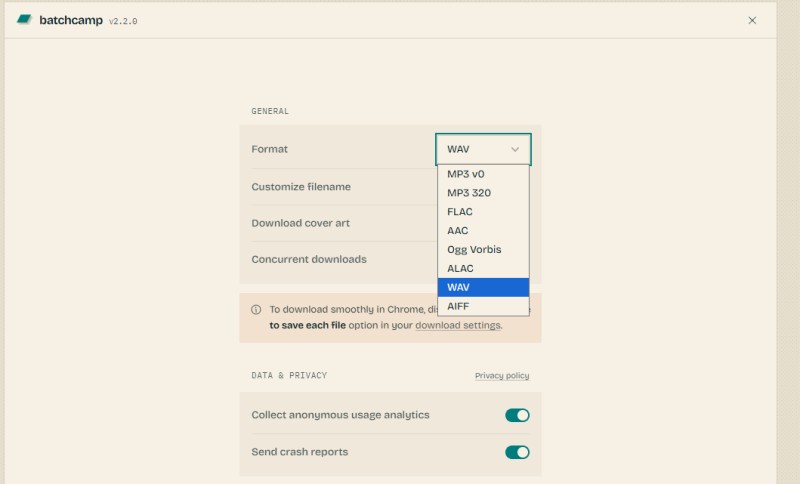
Step 4. Choose WAV as the download format
Open the Batchcamp options (usually by clicking the extension icon) and set the preferred format to WAV. You can also set the number of concurrent downloads.
Note: WAV will only be available for releases that the artist has enabled. Releases without WAV will download in the next best available format or be skipped depending on the extension's settings.
Step 5. Start the bulk download
Click the Download button. Batchcamp will queue the selected releases and begin downloading them. A dedicated downloads tab lets you monitor progress, pause/resume, retry failed items, or reveal files in your folder. Keep the browser open until the queue finishes.
Useful Tips for Bulk Bandcamp Downloads
- Disable "Ask where to save each file": In Chrome or Firefox settings, turn off the prompt that asks for a save location for every download. This allows the queue to run unattended.
- Start with a small batch: Large collections can total many gigabytes (WAV files are especially large). Test with 5–10 releases first to confirm format, file naming, and folder structure.
- Use the "already downloaded" marking: Batchcamp remembers what you've previously downloaded, so you can easily skip completed releases on future runs.
- Verify the files: After downloading, check that the files have the
.wavextension and open a few tracks in a media player or DAW to confirm they play correctly. - Cover art and naming: The extension can save cover art and apply custom filename templates (e.g., {artist} - {title}).
Alternative: Bandcamp Download Userscripts
Some users prefer userscripts such as Bandcamp-Greasy (via Tampermonkey or Greasemonkey). These scripts can add bulk-download controls to your Collection page and support formats including WAV. However, they are older and may break when Bandcamp updates its website. Always check the original GitHub page and recent user feedback before relying on them.
Important: Browser extensions and userscripts are third-party tools, not official Bandcamp products. Review their permissions carefully. Use them only for music you are authorized to download. They cannot make WAV available when a release does not offer that format.
Method 3. Use a Desktop Bandcamp to WAV Downloader - Macsome Music One
If you need a convenient all-in-one desktop solution that goes beyond purchased music, Macsome Music One is a strong choice. This Windows and Mac converter lets you download and convert Bandcamp audio (along with many other platforms) into high-quality formats such as WAV, FLAC, AIFF, ALAC, AAC, and MP3.
Unlike browser extensions that mainly work with your own Bandcamp collection, Macsome Music One offers greater flexibility. You can batch-process tracks and albums in Download Mode or capture audio in real time with Recording Mode. It also preserves ID3 metadata and album artwork when available, making it easier to keep your library well organized.
Key Features of Macsome Music One
- Download music from Bandcamp, Beatport, SoundCloud, Spotify, Tidal, YouTube Music, and more.
- Save Bandcamp tracks in WAV, MP3, AAC, FLAC, AIFF, or ALAC format.
- Batch download multiple tracks, albums, and supported purchases.
- Preserve available ID3 tags, including song title, artist, album, and artwork.
- Retain the original audio quality available from the source.
- Explore additional tools for audio conversion, tag editing, radio, and podcasts.
Available for macOS and Windows. Output quality and available features depend on the source and settings.
How to Convert Bandcamp Music to WAV with Macsome Music One
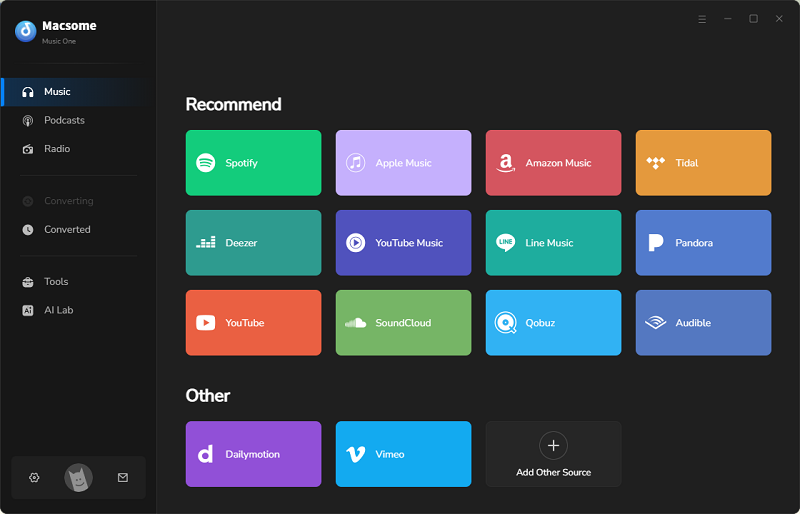
Step 1. Download, install, and launch Macsome Music One on your computer. Select Bandcamp from the list of supported music services. The Bandcamp web player will open automatically, allowing you to browse music and choose the appropriate download mode.
Step 2. Open the Bandcamp album you want to download and click Click to add. Select the tracks you want, then click Add to import them into Macsome Music One.
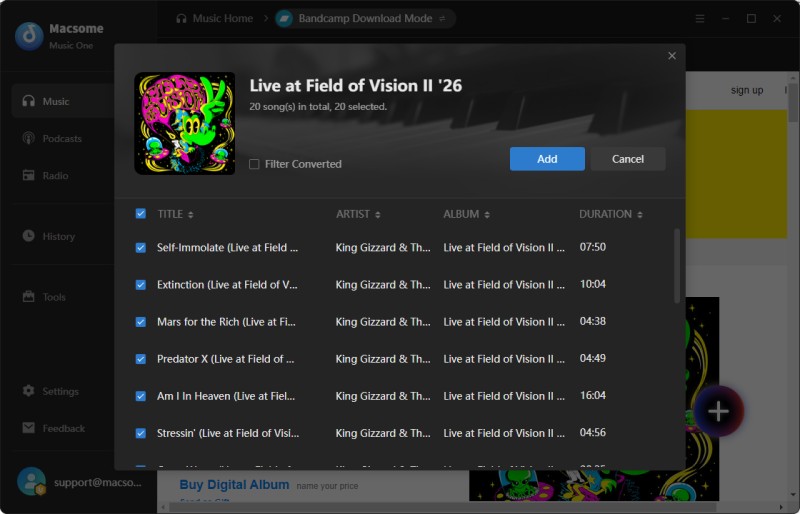
Step 3. Open Settings and select WAV as the output format. Macsome Music One also supports MP3, AAC, FLAC, AIFF, and ALAC. You can choose a destination folder to keep your downloaded files organized.
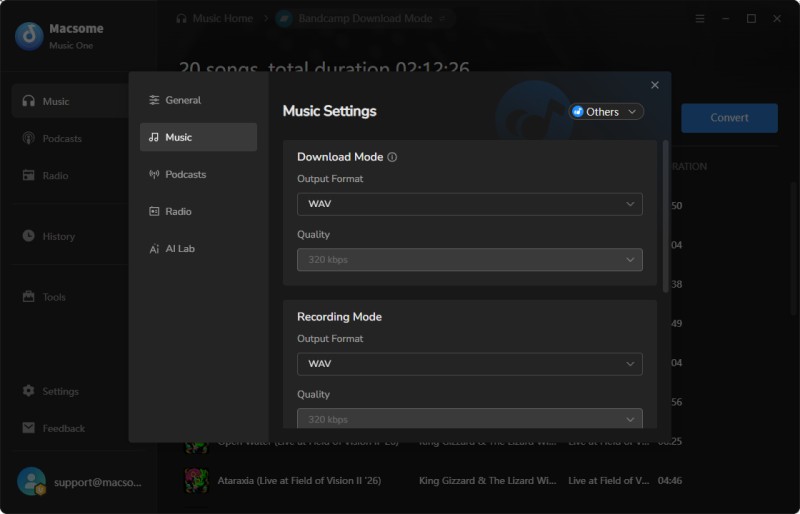
Step 4. Once you've finished adjusting the settings, click Convert to start downloading the selected Bandcamp tracks as WAV files. When the process is complete, open History in the left sidebar and click the folder icon to locate your downloaded files.
Why Use a Desktop Bandcamp to WAV Converter?
- Flexible output formats: Choose WAV or another supported audio format to suit your playback, editing, or production needs.
- Better file organization: Save downloaded tracks to a designated folder and keep supported song metadata, such as titles and artist names, organized.
- Useful for audio production: WAV files are uncompressed audio files commonly used for editing, mixing, and other production workflows. However, converting a lossy source to WAV won't restore audio data that was already lost.
- Support for multiple music services: Macsome Music One works with various supported music platforms, including Bandcamp, Spotify, Tidal, SoundCloud, and Beatport, so you can manage music from more than one source with a single tool.
Method 4. Online Bandcamp to WAV Converters
If you only need to download a few tracks occasionally and prefer not to install any software or browser extensions, online Bandcamp converters can be a quick option. These web-based tools let you paste a Bandcamp track or album URL and convert the available audio into WAV (and often MP3, FLAC, or other formats). Several online tools can help you download Bandcamp tracks as WAV files. Options worth trying include SSBandcamp Downloader, A2Z Tools Bandcamp Audio Downloader, and BandChamp Album Downloader. These web-based tools generally follow the same process.
How to download Bandcamp tracks to WAV online:
Step 1. Open Bandcamp and copy the URL of the track you want to download.
Step 2. Visit one of the online converters listed above and paste the URL into the input box.
Step 3. Click the Download button and wait for the available options to appear.
Step 4. Select WAV from the output format list and download the file to your computer.
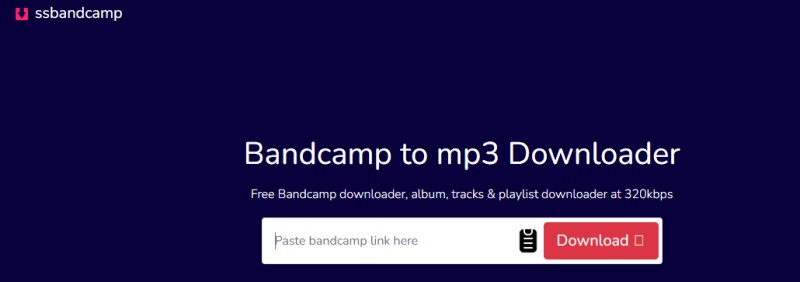
Limitations: Online converters are convenient for occasional downloads, but their availability and reliability can vary. Some tools may offer only certain formats, impose download limits, display ads, or fail to process particular tracks. Also, a WAV file is not necessarily lossless in source quality. Converting compressed audio to WAV will not restore audio data that has already been lost.
If you need to download multiple tracks regularly or want more control over output formats and file organization, a desktop tool such as Macsome Music One may be a more practical option.
Frequently Asked Questions About Downloading Bandcamp to WAV
- What's the best way to get Bandcamp music as WAV for free?
- Look for free or name your price releases on Bandcamp and download them officially in WAV when the format is offered. For paid releases, the only legitimate way to obtain true high-quality WAV is to purchase the music. Free online converters usually only provide lower-quality streaming previews.
- Are Bandcamp WAV downloads truly lossless?
- Yes. When you download WAV through Bandcamp's official purchase option, you receive the uncompressed, lossless master that the artist uploaded. This is the highest quality format Bandcamp offers.
- Is WAV better than FLAC on Bandcamp?
- Both are lossless and contain the same audio data. WAV is uncompressed and more universally compatible with older software and hardware, while FLAC is compressed (smaller file size) and widely supported by modern players and libraries. Choose WAV if maximum compatibility is your priority; choose FLAC if you want to save storage space without quality loss.
- Why is WAV not available for some Bandcamp downloads?
- Artists and labels choose which formats to offer. Some releases only include compressed formats (MP3, AAC, etc.) or limited lossless options (FLAC only). If WAV is missing from the download menu, the artist has not enabled it for that release.
Conclusion
Downloading Bandcamp music to WAV is straightforward when you pick the right approach. For purchased tracks, Bandcamp’s official download option is the best choice whenever WAV is available. Online converters work well for occasional needs. If you regularly download multiple tracks and want an efficient way to manage your audio library, Macsome Music One is our top recommendation. It supports convenient batch downloads, flexible output formats including WAV, and helps you organize your music more effectively.
For anyone who frequently downloads from Bandcamp or prefers a dedicated desktop solution, give Macsome Music One a try.