


 Belinda Raman
YouTube is often blocked on school networks, workplace Wi-Fi, and other restricted networks, making it difficult to watch videos when you need them. Unblocked YouTube sites offer an alternative by routing YouTube traffic through web proxies or alternative frontends, so you can access videos without opening the standard YouTube website directly.
In this guide, we'll compare some of the best unblocked YouTube sites available in 2026, focusing on free options, ease of use, streaming performance, and their main limitations. You'll also find practical safety tips, solutions for common access problems, and an offline option for watching supported YouTube content without relying on a restricted network. Whether you're accessing YouTube from a school Chromebook, workplace network, or another restricted connection, this guide will help you choose an option that fits your needs.
- Part 1. What Are Unblocked YouTube Sites?
- Part 2. Best Unblocked YouTube Sites in 2026
- Part 3. Unblocked YouTube Sites Comparison
- Part 4. What to Do If an Unblocked YouTube Site Doesn't Work
- Part 5. How to Download Audio from YouTube for Offline Listening
- Part 6. Frequently Asked Questions About Unblocked YouTube Sites

Part 1. What Are Unblocked YouTube Sites?
Unblocked YouTube sites are third-party services that provide an alternative way to access YouTube when the official website is restricted by a school, workplace, library, or other network. They typically use web proxy technology or alternative YouTube frontends to retrieve and display video content through a different web interface.
How Do They Work?
Most of these services use one of two approaches: web proxies or alternative YouTube frontends.
1. Web Proxies
A web proxy acts as an intermediary between your browser and YouTube. Depending on the service, you can enter a YouTube URL or search for a video, and the proxy attempts to load the content through its own website.
This method is convenient because it usually requires no software installation. However, free proxy services may have slower speeds, ads, redirects, or limited video playback.
2. Alternative YouTube Frontends
Alternative frontends provide a different interface for accessing publicly available YouTube content. Invidious and Piped are examples. Depending on the instance, they may offer a simpler interface and fewer advertisements than the standard YouTube website.
However, individual instances can become unavailable, overloaded, or affected by changes to YouTube, so their reliability can vary.
Why Is YouTube Blocked?
YouTube may be restricted for several common reasons:
- Bandwidth management: Video streaming can consume significant network resources.
- Distraction control: Schools and workplaces may restrict entertainment websites.
- Content filtering: Administrators may limit access to platforms with a wide range of content.
- Security policies: Some networks restrict websites as part of their internet usage or security rules.
Since these restrictions are controlled by the network or device administrator, alternative access services are not guaranteed to work everywhere. Their availability, speed, and features can also change over time.
With that in mind, let's compare some of the best options in 2026 and see how they differ in features, performance, and availability.
Part 2. Best Unblocked YouTube Sites in 2026
Different services offer different ways to access YouTube when the official website is restricted. Some are designed for simple video streaming, while others focus on privacy, a cleaner interface, or lightweight browsing. The options below are worth considering based on their features, performance, and availability.
1. CroxyProxy
⭐ Best for: YouTube video streaming
CroxyProxy is a browser-based web proxy that supports websites such as YouTube. One of its advantages is that you do not need to install additional software or configure a proxy manually. You can open the service in your browser and enter the YouTube address you want to access.
CroxyProxy is particularly useful when your main goal is to watch YouTube videos through a web browser. It also supports video and audio playback, making it more practical than proxies that only handle basic web pages.

Pros:
- Easy to use in a browser
- Supports YouTube video and audio playback
- No additional software required
- Can work on Chrome OS
Cons:
- Performance depends on the proxy server
- Ads may appear
- The proxy itself may be blocked by some networks
2. ProxySite
⭐ Best for: Simple YouTube access
ProxySite is a traditional web proxy with a dedicated option for accessing YouTube. Its straightforward interface makes it easy to use without installing an application or changing system-wide network settings.
ProxySite also provides different server locations. Depending on your network and the selected server, this can affect connection speed and accessibility when browsing or streaming YouTube.

Pros:
- Simple browser-based interface
- Dedicated YouTube proxy
- Free to use
- Multiple server options
Cons:
- Speed can vary between servers
- Streaming performance may not be consistent
- Some networks may block the proxy
3. 4everproxy
⭐ Best for: Choosing proxy servers
4everproxy is a free web proxy that provides more control over the connection than some basic proxy websites. You can choose from different server and IP locations before opening a website.
This can be useful if one server is slow or unavailable. For YouTube streaming, however, performance still depends on the distance to the selected server and the current proxy load.

Pros:
- Free web proxy
- Multiple server locations
- IP-location choices
- Supports HTTPS connections
Cons:
- Different servers can have different speeds
- Video playback may be slower than direct YouTube access
- Availability can change
4. hide.me Proxy
⭐ Best for: Privacy-conscious browsing
hide.me provides a free browser-based proxy that can be used without installing a separate application. The service offers a simple way to route browser traffic through a proxy server when accessing websites.
For users who care about privacy when accessing restricted websites, hide.me is worth considering. However, a browser proxy is not a complete replacement for a full VPN, especially when broader device-level protection is required.

Pros:
- Works directly in a browser
- No software installation required for the web proxy
- Multiple proxy locations
- HTTPS support
Cons:
- Free proxy locations are limited
- Streaming speed can vary
- It may not work on every restricted network
5. Invidious
⭐ Best for: A lightweight YouTube alternative
Invidious is an open-source alternative frontend for YouTube. Instead of using the standard YouTube interface, it provides a simpler interface for browsing and watching YouTube content.
Its lightweight design can be useful on devices or networks where the standard YouTube experience is slow. However, Invidious is different from a traditional web proxy, and the availability of public instances can change.

Pros:
- Lightweight interface
- Open-source project
- Designed as an alternative YouTube frontend
- Can be less resource-intensive than the standard YouTube interface
Cons:
- Public instances may become unavailable
- Features can differ from YouTube
- Not every instance has the same performance
6. Piped
⭐ Best for: Clean YouTube alternative interface
Piped is another alternative frontend for YouTube. It provides a clean interface for accessing YouTube content without relying on the standard YouTube website interface.
Piped can be an interesting option if you want a lightweight viewing experience with fewer elements than the regular YouTube interface. As with other alternative frontends, however, availability and performance can depend on the specific public instance.

Pros:
- Clean and lightweight interface
- Alternative way to access YouTube content
- Supports video and audio streams
- Useful for users who prefer a simpler interface
Cons:
- Public instances can change or go offline
- Performance varies between instances
- Some YouTube features may not be available
Part 3. Unblocked YouTube Sites Comparison
While these unblocked YouTube sites serve a similar purpose, their actual browsing experience can be quite different. Some prioritize simplicity, while others give you more control over the connection or provide a cleaner alternative interface. The comparison below focuses on practical differences you may notice when using each service.
| Site | Type | Ease of Use | Streaming | Ads/Redirects | Reliability & Speed |
|---|---|---|---|---|---|
| CroxyProxy | Web Proxy | Paste URL and browse | Supports direct video playback | Ads may appear | Generally responsive, but speed can vary |
| ProxySite | Web Proxy | Simple URL-based access | Suitable for basic video playback | Ads and redirects may occur | Usually simple to connect, performance varies |
| 4everproxy | Web Proxy | Requires choosing proxy options | Video playback depends on server | Ads may appear | Server choice can affect speed and stability |
| hide.me Proxy | Web Proxy | Paste URL and connect | Suitable for normal browsing and playback | Fewer intrusive elements | Limited proxy locations can affect performance |
| Invidious | YouTube Frontend | Choose an available instance | Lightweight video playback | Typically fewer ads | Highly dependent on instance availability |
| Piped | YouTube Frontend | Use a public instance | Clean interface with video playback | Typically fewer ads | Speed and reliability vary by instance |
What Makes These Sites Different?
The biggest difference is the way they access YouTube. CroxyProxy, ProxySite, 4everproxy, and hide.me Proxy work as traditional web proxies, so the basic process is usually straightforward: open the service, enter a YouTube URL, and load the page through the proxy. 4everproxy is somewhat different because server selection can influence the connection you get.
Invidious and Piped are alternative YouTube frontends rather than conventional web proxies. They generally provide a simpler interface and fewer advertising elements, but they rely on individual public instances. If an instance is overloaded, unavailable, or blocked by your network, you may need to try another one.
In practice, there is a trade-off between simplicity, playback experience, and reliability. Traditional proxies are generally easier for quick access, while alternative frontends can offer a cleaner experience but may require more trial and error when choosing an available instance.
Part 4. What to Do If an Unblocked YouTube Site Doesn't Work
Even a working unblocked YouTube site can stop working without notice. A page may fail to open, a video may remain stuck on loading, or the site may work for one video but not another. This does not always mean that the service has completely stopped working.
The first step is to identify where the problem occurs. Is the website itself unavailable, or does the website load normally but fail to play a particular video? The difference can help you find the right solution without wasting time.
1. The Website Won't Open
If the entire website fails to load, first check whether the problem is limited to that domain. Open another website in the same browser to confirm that your internet connection is working normally.
If other websites load normally but the unblocked YouTube site does not, the service itself may be temporarily unavailable. Free proxy and alternative frontend services can experience downtime, server overload, domain changes, or maintenance.
In this situation, repeatedly refreshing the same page usually will not help. Check the service again later or use another available option from your comparison list.
2. The Website Loads but the Video Won't Play
A site can load correctly while its video player fails. This can happen when the third-party service cannot retrieve the video data correctly or when a particular YouTube feature is not supported.
Try a different video to determine whether the problem affects the entire service or only one piece of content. If other videos play normally, the original video may be unavailable through that particular service.
You can also try:
- Reloading the video page once.
- Opening the video in a new browser tab.
- Trying a standard-resolution version if multiple quality options are available.
- Testing another video to compare playback.
3. The Video Keeps Buffering
Constant buffering is usually a performance problem rather than an access problem. Third-party services may have fewer server resources than YouTube, especially when many users are watching videos at the same time.
If the service provides different playback qualities, lowering the video resolution can reduce the amount of data required for streaming. You can also compare the same video on another service to determine whether the problem is specific to the current server.
If other websites and video services work normally while only one unblocked YouTube site buffers, the third-party service is more likely to be the bottleneck.
4. Only Some YouTube Videos Are Unavailable
If some videos work while others do not, the problem may be related to the individual video rather than the unblocked YouTube site.
Third-party services may not support every type of YouTube content. For example, a particular service may have difficulty with live streams, age-restricted videos, region-specific content, private videos, playlists, or recently uploaded videos.
Try another publicly available video from the same channel. If that video works, the issue is likely related to the original content rather than your browser or internet connection.
5. The Site Works on One Device but Not Another
If the same service works on your phone but not your computer, or works in one browser but not another, the problem may be related to the local browser environment.
Before assuming that the service is unavailable, try these basic checks:
- Refresh the page: A temporary loading error may disappear after a fresh request.
- Try another browser: This can help determine whether the problem is browser-specific.
- Check JavaScript and media settings: Some alternative frontends rely on browser features that may have been disabled.
- Clear the site's cached data: Outdated cached files can occasionally interfere with page loading.
6. Check Whether the Service Itself Is Down
Sometimes there is nothing wrong with your device or connection. The third-party service may simply be experiencing an outage.
A few signs point to a service-side problem:
- The homepage does not load on multiple devices.
- Multiple videos fail to play.
- Search results stop appearing.
- The site repeatedly returns server or playback errors.
- The service was working previously but suddenly stopped without any changes on your device.
When several of these symptoms occur at the same time, waiting for the service to recover or choosing another option is usually more effective than changing your browser settings repeatedly.
7. When Should You Try Another Site?
If you have confirmed that your internet connection and browser are working normally but the service continues to fail, switching to another unblocked YouTube site may be the simplest solution.
This is particularly useful when the problem is caused by a service-specific outage, unsupported video type, overloaded server, or domain that is no longer available. Since third-party YouTube services can change over time, having more than one option can make access more reliable.
Quick Troubleshooting Checklist
| Problem | Likely Cause | What to Try |
|---|---|---|
| Website won't open | Service outage or domain unavailable | Test another website and try the service later |
| Video won't play | Playback or content compatibility issue | Try another video or playback option |
| Video keeps buffering | Server load or slow connection | Lower quality or try another service |
| Only one video fails | Video-specific restriction or unsupported content | Test another video from the same channel |
| Works on another device | Browser or local settings | Try another browser or clear cached data |
| Nothing works anywhere | Service-side outage | Wait or choose another available service |
Part 5. How to Download Audio from YouTube for Offline Listening
If you mainly want to listen to music, podcasts, interviews, or other audio from YouTube, relying on an unblocked YouTube site every time can be inconvenient. These sites may stop working, contain intrusive ads, or require you to stay online during playback. Downloading the audio instead gives you a more convenient way to keep the content locally and listen to it offline.
Macsome Music One provides a straightforward way to download audio from YouTube and save it to your computer. You can choose from multiple output formats, including MP3, AAC, WAV, FLAC, AIFF, and ALAC, and select the output quality according to your needs. Once the files are saved locally, you can play them without returning to an online YouTube site each time.
Download Audio from YouTube with Macsome Music One
- Download audio from YouTube and other supported music platforms
- Convert YouTube audio to MP3, AAC, WAV, FLAC, AIFF, or ALAC
- Choose the output quality based on your listening needs
- Download multiple songs or audio files in batch
- Save downloaded audio files to a local folder for offline playback
- Manage and organize downloaded music and audio files on your computer
- Provides a convenient alternative to repeatedly using online YouTube downloader sites
How to Download Audio from YouTube with Macsome Music One
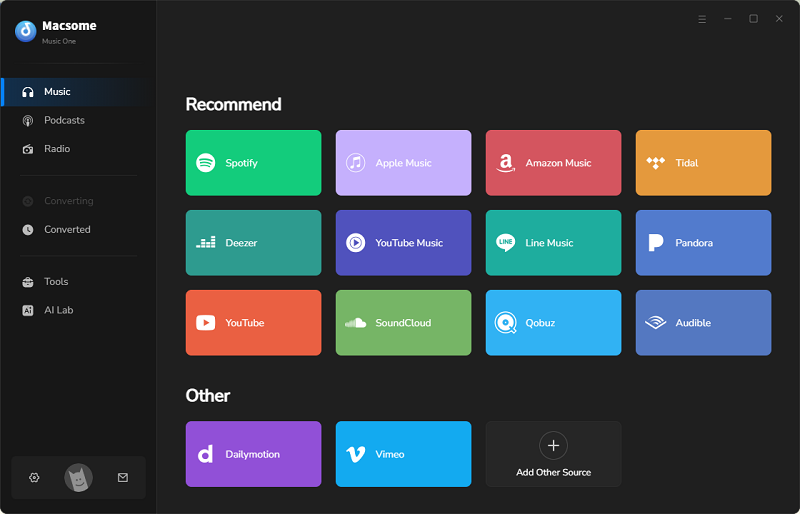
Step 1. Download, install, and launch Macsome Music One on your computer. Popular streaming platforms are listed on the main interface. Select the YouTube module to open the built-in YouTube player. Sign in with your YouTube account.
Step 2. Select an output format and folder according to your offline listening needs. Macsome Music One supports MP3, AAC, WAV, FLAC, AIFF, and ALAC formats, so you can select the one that works best with your devices or players. To adjust the audio quality, file naming, or other download options, click "More settings."
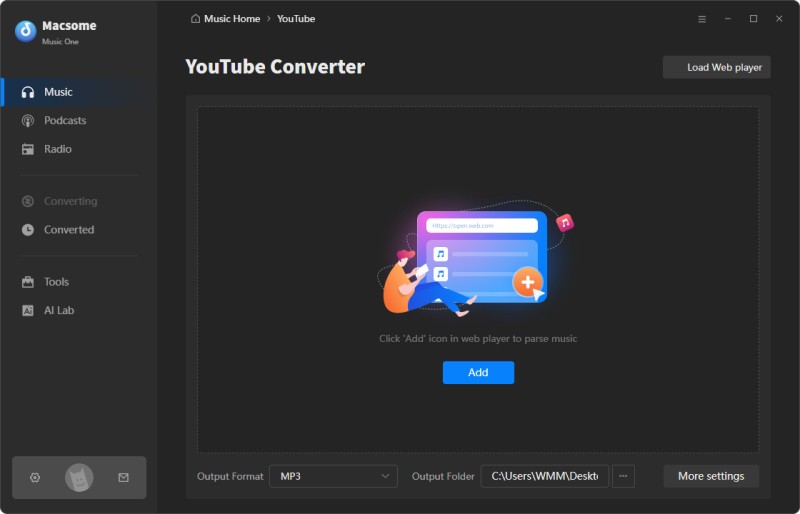
Step 3. Open YouTube in the built-in player and browse for the video containing the audio you want to save. Click "Click to sdd" to load the video, then click Add to add it to the download list. If you want to save multiple audio tracks for offline listening, use "Add More" to add additional YouTube videos.
Step 4. After adding the content you want to save, click "Convert" to start the download. Macsome Music One will download the audio according to your selected settings. When the task is finished, open the History section on the left and click the Folder icon to locate your downloaded audio files and listen to them offline.
Part 6. Frequently Asked Questions about Unblocked YouTube Sites
- Are Unblocked YouTube Sites Safe to Use?
- The safety of an unblocked YouTube site depends on the service you use. Some free proxy sites may display aggressive ads, open unexpected redirects, or collect browsing information. Avoid entering passwords, payment details, or other sensitive information through an unfamiliar proxy. For better security, use reputable services and keep your browser and security software up to date.
- Can Unblocked YouTube Sites Play Videos in HD?
- It depends on the proxy service, your internet connection, and the way the proxy handles YouTube traffic. Some services may support HD playback, while others reduce video quality to improve loading speed or limit bandwidth. If a video keeps buffering, lowering the playback quality may provide a smoother experience.
- Why Is YouTube Audio Delayed When Using a Proxy?
- A proxy adds another connection between your browser and YouTube, which can increase latency. Server distance, network congestion, and proxy bandwidth can all affect playback. If the video and audio become noticeably delayed, switching to another server or using a more direct connection may help.
- Can I Use an Unblocked YouTube Site on a School or Work Network?
- Technically, some proxy services may work on restricted networks, but access policies vary by school, workplace, or organization. Using a proxy to bypass network restrictions may violate local rules or acceptable-use policies. Check the applicable network policy before using an unblocked YouTube site.
- Do Unblocked YouTube Sites Work on Mobile Devices?
- Many browser-based proxy services can be accessed from phones and tablets without installing an additional app. However, mobile compatibility varies between services. Some may have limited layouts, slower playback, or problems with full-screen video. A mobile browser with JavaScript enabled usually provides the best compatibility.
- Can I Download YouTube Audio Instead of Streaming It?
- An unblocked YouTube site is mainly intended for accessing or streaming YouTube content through a different connection. If your goal is to save audio for offline listening, a dedicated YouTube audio downloader is more practical. Macsome Music One can download audio from YouTube and save it locally in commonly used formats, making offline playback more convenient.
Final Thoughts
Unblocked YouTube sites can be a convenient free option when official YouTube is restricted at school, work, or on a managed Chromebook. However, availability and performance can change quickly. Choose a service that works for your situation, avoid entering sensitive account information, and be prepared to switch to another option if a site becomes blocked, unavailable, or too slow.
If your goal is to listen to YouTube content offline, downloading the audio can be a more reliable approach than depending on a third-party site every time. Tools like Macsome Music One let you download audio from YouTube and save it locally for offline listening.
Want a more reliable way to keep your favorite YouTube audio? Try Macsome Music One and enjoy your downloads whenever you want.