



 Belinda Raman
Converting SoundCloud tracks to AIFF is the perfect way to keep them in lossless, uncompressed quality. Unlike MP3 or AAC, AIFF preserves every detail of the original recording. This makes it ideal for DJs, music producers, audiophiles, and Apple users who want high-quality SoundCloud music to enjoy offline. Whether you want to download individual tracks or entire playlists for professional use, AIFF ensures your music retains full fidelity.
Although SoundCloud hosts millions of songs, it does not offer a built-in option to export music in AIFF format. Playlists cannot be downloaded directly, and the official download option only works if the uploader provides the track in AIFF format. This makes it difficult for users who want to convert SoundCloud playlists to AIFF or maintain a high-quality offline music library.
This guide will introduce two reliable methods for downloading SoundCloud to AIFF so that you can finally enjoy your SoundCloud music in AIFF format—perfect for offline listening, mixing, and professional audio work!
Method 1: How to Convert SoundCloud to AIFF in Batch with Macsome Music One
First, we'll walk you through the most reliable and efficient way to convert SoundCloud music to AIFF by using a professional, third-party desktop converter. This is especially useful if you need to download multiple tracks or entire playlists at once.
Macsome Music One is the top-recommended tool for this purpose. It enables you to batch download SoundCloud tracks, albums, and full playlists to AIFF while preserving original audio quality and complete metadata, including title, artist, album, and artwork. In addition to AIFF, Macsome Music One also supports downloading SoundCloud music to MP3, AAC, WAV, FLAC, and ALAC, giving you full flexibility to choose the format that best fits your listening or editing needs.

Main Features of Macsome Music One
- Download SoundCloud tracks, albums, and playlists to AIFF.
- Download music from Spotify, Apple Music, Tidal, YouTube Music, etc.
- Convert music to MP3, AAC, WAV, FLAC, or ALAC with high quality.
- Support batch downloading at up to 10x faster speed.
- Almost all the ID3 tags will be preserved.
- Freely remove vocals and instruments from music.
- Export music to iTunes or Apple Music with one click.
How to Download SoundCloud Tracks and Playlists to AIFF with Macsome Music One
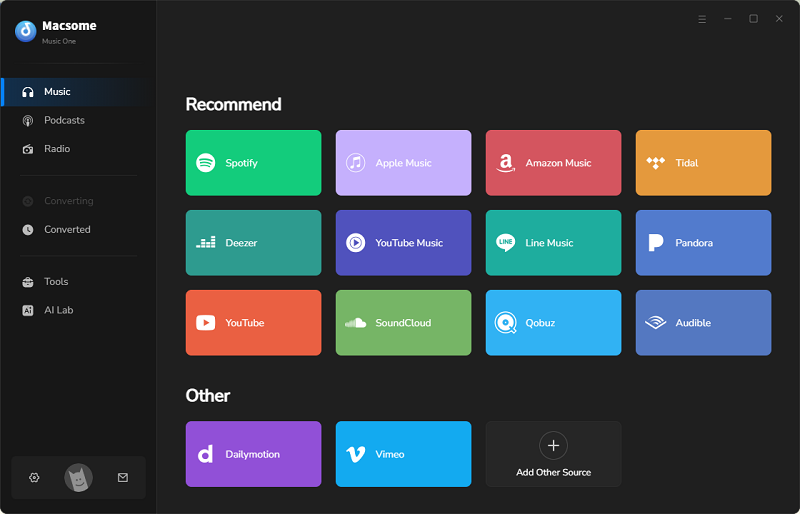
Step 1. Open Macsome Music One on your computer and select the "SoundCloud" option on the home screen. The SoundCloud web player will start at the same time. Then, log in to your SoundCloud account. Both free and paid SoundCloud accounts are available.
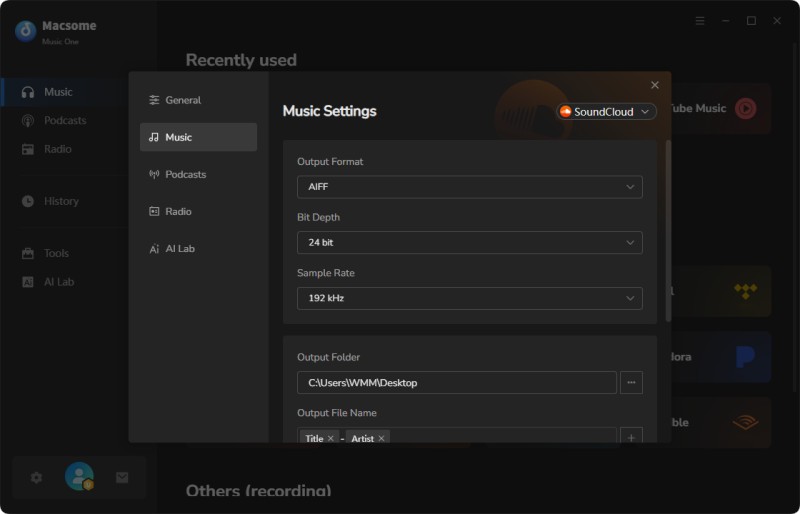
Step 2. In the "Settings" window, select AIFF as the output format and customize the sample rate and bit depth as desired. You can also change the output folder where the downloaded SoundCloud songs will be saved.
Step 3. Go to the SoundCloud web player and select the tracks or playlists that you want to download. Click the "Click to add" button.
Entire playlists can be added with one click.
Step 4. Click the "Convert" button to begin the download. Macsome will batch download SoundCloud music and save it as local AIFF files on your computer. Once finished, tap the "History" tab, you will find the SoundCloud tracks saved to your local folder. Now you are able to play the AIFF files in any media player or import them into DJ or music production software.
Pros
- Convert SoundCloud music to AIFF, MP3, FLAC, WAV, AAC, or ALAC format.
- Download SoundCloud tracks, albums, and playlists in batches.
- Download music from Spotify, Apple Music, Tidal, Qobuz, etc.
- Record music from Dailymotion, BBC Sounds, Beatport, Bandcamp, etc.
- Built-in useful tools, such as a free vocal remover, tag editor, etc.
Cons
- Need to download.
Method 2: Download AIFF from SoundCloud Officially (When Available)
SoundCloud offers an official way to download AIFF files, but it has limitations. You can only download a track in AIFF format if the uploader has enabled downloads and originally uploaded the file in AIFF format. Consequently, this option applies to only a small number of tracks and does not support playlist downloads.
Most songs on SoundCloud are not available as AIFF files, so official AIFF downloads are rare and entirely dependent on the creator's settings.
Official Way to Download Individual SoundCloud Tracks to AIFF
Step 1. Open the SoundCloud web player and browse for the track you want to download.
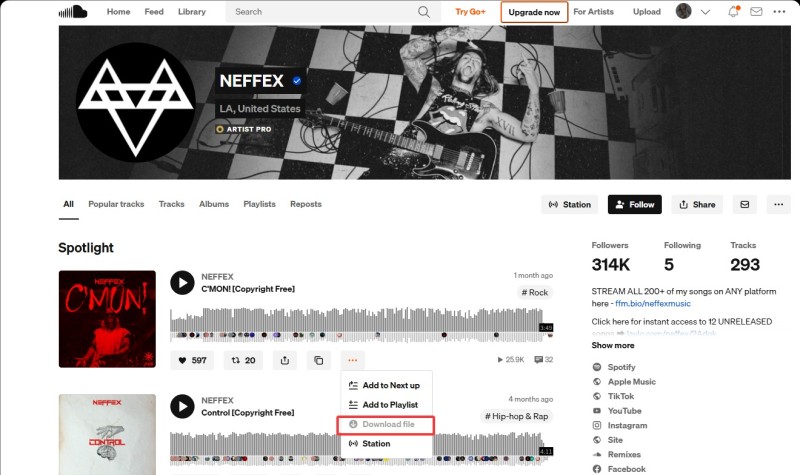
Step 2. Then, check to see if the track is downloadable. Click the "More" button (three dots) below the waveform. Only tracks for which the uploader has enabled the "Download file" button can be downloaded.
Step 3. Click the "Download file" button to save the track as an AIFF file directly to your computer.
Pros
- AIFF downloads from SoundCloud provide uncompressed, lossless audio quality.
- Downloads are officially allowed by the artist.
- No re-encoding or quality loss.
Cons
- Most SoundCloud tracks and playlists don’t support AIFF downloads.
- Not practical for playlists or bulk downloads.
- The available download format may be MP3 or WAV instead of AIFF.
FAQs about Downloading SoundCloud Music to AIFF
- Can I get AIFF files from SoundCloud?
- SoundCloud accepts AIFF uploads from creators, but streaming is always in compressed formats, such as MP3 or OGG. You can only download an AIFF file if the creator uploaded it in that format and enabled downloads. Otherwise, AIFF files aren't directly available.
- Can I download any SoundCloud track as AIFF?
- Not always. SoundCloud only allows official downloads if the track creator has enabled them and uploaded the audio in AIFF or another compatible, high-quality format. Otherwise, you’ll need a third-party tool, such as Macsome Music One.
- Is there a free online SoundCloud to AIFF converter?
- Although some websites claim to convert SoundCloud tracks to AIFF, such as converterfactory.com, these tools rarely work in practice. After testing, most tracks fail to download. Currently, there is no reliable, free, online tool that can convert SoundCloud music to AIFF.
- What is the best way to get AIFF from SoundCloud?
- Reputable desktop software like Macsome Music One allows you to download tracks, albums, or playlists in AIFF format while preserving the original audio quality and metadata. It's the most practical solution for high-quality SoundCloud audio.
Summary
In this guide, we've covered two effective ways to download SoundCloud music to AIFF format. Macsome Music One is a reliable and convenient solution for downloading entire playlists or multiple tracks in batches. It preserves full metadata and delivers high-quality, lossless audio. The official SoundCloud download option is also available but only works for individual tracks uploaded in AIFF by the creator, making it suitable for occasional downloads.
With these methods, you can enjoy your favorite SoundCloud music in uncompressed AIFF format. It's perfect for offline listening, professional mixing, and archiving your library. Start converting your SoundCloud tracks to AIFF today with Macsome Music One and experience studio-quality audio anytime, anywhere.