



 Belinda Raman
Many users looking for a free way to download music online eventually come across Lucida.to, a tool often promoted as a free music downloader for popular streaming platforms. But what exactly is Lucida.to, how does it work, and is Lucida.to safe to use?
In this in-depth Lucida.to review, we take a closer look at its features, supported platforms, safety concerns, and common issues such as Lucida.to not working or being down. We'll also discuss its pros and cons and, more importantly, introduce the best Lucida alternative for users who want a more reliable, secure, and long-term solution for downloading music.
- Part 1. What is Lucida.to?
- Part 2. How to Use Lucida.to to Download Music Online for Free
- Part 3. Is Lucida.to Safe and Legal?
- Part 4. How to Fix It If Lucida.to Is Not Working
- ⭐ Part 5. Best Lucida.to Alternative: Macsome Music One (Safe, Stable & High-Quality Downloads)
- Part 6. Frequently Asked Questions (FAQs) About Lucida.to
Part 1. What is Lucida.to?
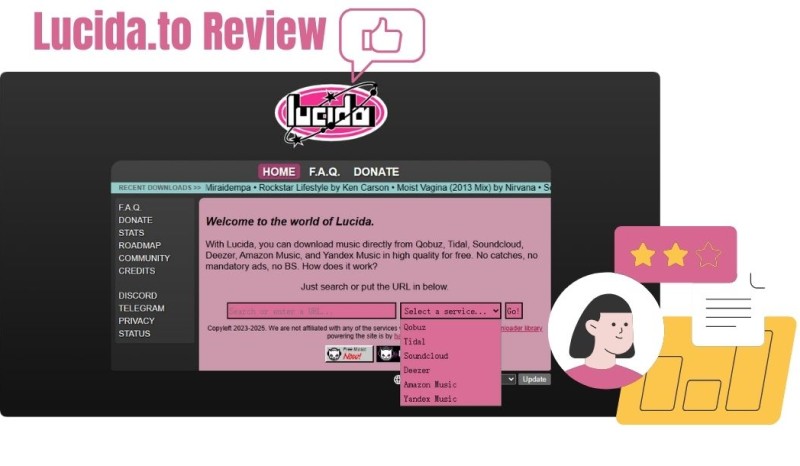
Lucida.to (also known as Lucida.co) is a free online music downloader that allows users to extract high-bitrate audio from several popular streaming platforms. It supports services such as Qobuz, Tidal, SoundCloud, Deezer, Amazon Music, and Yandex Music. It enables downloads in formats such as FLAC and MP3 without requiring registration or a subscription.
Unlike official streaming apps, which restrict offline listening to premium users, Lucida.to operates in a legal gray area by directly ripping audio streams from these platforms. The website has a minimalist web interface with a simple search bar where users can paste music URLs or enter keywords and select the desired source service. Lucida.to is aimed at users who want quick access to high-quality music downloads without installing software or paying subscription fees. However, as a browser-only tool, Lucida.to lacks dedicated desktop or mobile apps. Users may also experience occasional downtime, domain changes, or inconsistent download success rates.
Key Features of Lucida.to
- Multi-Platform Support: Downloads music from multiple services like Qobuz, Tidal, Deezer, SoundCloud, etc.
- High-Quality Downloads: Options for FLAC (lossless) and MP3 (up to 320 kbps), preserving original audio fidelity where possible.
- No Registration Required: Works without login or paid subscription.
- Batch Downloads: Handle entire playlists or albums in one go, saving time for bulk users.
- Metadata Preservation: Automatically includes tags like artist, album, and cover art, though users report occasional inconsistencies.
- Community Focus: Includes a FAQ, donation options, and plans for Discord/Telegram bots to enhance accessibility.
Pros and Cons of Lucida.to
Pros
- Free and Accessible: No costs or subscriptions make it ideal for budget-conscious users.
- High-Quality Rips: Delivers genuine decrypted files from sources, often in lossless formats.
- User-Friendly Interface: Simple search and paste functionality suits beginners.
- Batch Capabilities: Efficient for downloading large collections quickly.
- No Mandatory Ads: Enjoy a clean experience without any intrusive interruptions.
Cons
- Unreliable Performance: Frequent slowdowns, timeouts, and server issues.
- Metadata Problems: Tags may be incomplete or inaccurate, necessitating manual corrections.
- Limited Support: There is no official app or customer service, and it relies on community forums.
- MP3 Conversion Issues: Some users have reported receiving lower actual bitrates than advertised.
Part 2. How to Use Lucida.to to Download Music Online for Free
Lucida.to is easy to use, making it accessible even for non-tech-savvy users. Here's a step-by-step guide:
Step 1. Go to lucida.to and make sure that JavaScript is enabled, as it is required.
Step 2. Enter the name of a song, artist, or album, or paste a link from supported services like Qobuz, Tidal, SoundCloud, Deezer, Amazon Music, or Yandex Music. For this example, we'll select Tidal. Find the playlist you want to download, copy the link, and paste it into the Lucida.co input field. There is no need to select a platform; it will be selected automatically. Click "Go!"
Step 3. From the "Convert to" drop-down menu, you can select your preferred file format and bitrate, such as Original format (highest quality), FLAC, MP3, OGG Vorbis, Opus, M4A, or WAV.
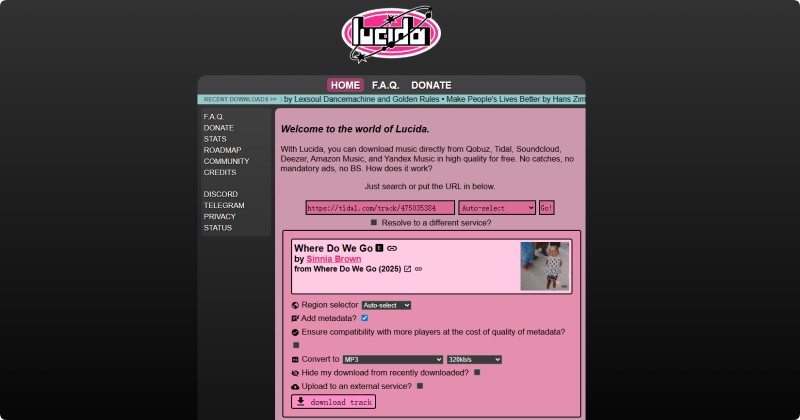
Step 4. Click "download full playlist" to start downloading. Once the download is complete, you can save the files as a ZIP file to your computer. You can download the single track by clicking the "download track" button.
Part 3. Is Lucida.to Safe and Legal?
The picture is mixed when evaluating whether Lucida.to is safe and legal—many users and independent website safety tools raise caution flags. Several online website reputation checkers give Lucida.to a relatively low trust score, indicating that it may pose potential security risks or reliability issues.
⚠️ Safety & Legitimacy Concerns
Lucida.to has been identified as suspicious or untrustworthy by multiple independent site-checking services and security scanners.
- Gridinsoft gave it a very low trust score, classifying it as a suspicious website and warning that it might host misleading content or malware.
- Scam Detector rated its trustworthiness quite low and advised caution.
- ScamAdviser gave this site a trust score of 0, indicating potential scam activity. This is especially concerning given the site's recent creation and lack of clear ownership.
⚖️ Legal & Ethical Notes
- Downloading or redistributing music from streaming services without permission generally violates the services' terms of use and may infringe on copyright laws. Tools like Lucida operate in a legal gray area or outside legal norms in many jurisdictions.
- Even if the site itself were legitimate, using it could violate the terms of service and potentially local copyright rules.
Lucida.to is widely considered to be a risky and suspicious website. Its legitimacy and safety are questionable, and using it could put your device or data at risk and potentially violate legal terms. If you need offline music, it’s safer to use the official download or offline features provided by streaming services.
Part 4. How to Fix It If Lucida.to Is Not Working
If Lucida.to is not working properly, the issue is usually related to site downtime, domain changes, browser conflicts, or limitations caused by its web-based stream ripping method. Since Lucida.to does not rely on official APIs, temporary failures and instability are relatively common. You can try the following solutions to troubleshoot the problem.
1. Check Website Status and Domain Availability
Start by confirming whether the Lucida.to website is accessible. Try opening the site in a different browser or on another device. If the page fails to load entirely, the domain may be temporarily down or has been changed.
2. Clear Browser Cache and Disable Extensions
Cached browser data or certain extensions may interfere with Lucida.to's scripts and prevent the site from loading correctly. Clearing your browser cache and cookies, then temporarily disabling ad blockers or privacy-related extensions, can often restore normal functionality.
3. Try a Different Network
In some cases, network restrictions or ISP-level blocking may affect access to streaming resources. Switching from Wi-Fi to mobile data, or using a different network, may help resolve loading or download issues.
4. Verify the Input URL or Keywords
Ensure that you are using a valid music link or correct keywords from a supported streaming service. Invalid, incomplete, or unsupported URLs may cause Lucida.to to fail silently without returning any results.
5. Wait and Retry Later
Lucida.to may temporarily stop working due to server overload or changes on the source streaming platforms. In many cases, waiting 30-60 minutes and retrying is enough to resolve short-term issues.
If Lucida.to continues to malfunction after trying the steps above, the problem is likely caused by ongoing site instability or domain changes. In such cases, using a dedicated and stable music downloader like Macsome Music One offers a more reliable solution without frequent interruptions.
Part 5. Best Lucida.to Alternative: Macsome Music One
Macsome Music One is widely regarded as the best alternative to Lucida.to. Unlike web-based stream-ripping tools, it delivers a stable, secure, and reliable downloading experience. It supports multiple streaming platforms, including Spotify, Apple Music, Amazon Music, Tidal, SoundCloud, Qobuz, YouTube Music, and more, and can also record audio from video sites and other platforms such as Dailymotion, Vimeo, BBC Sounds, Beatport, and Bandcamp. Users can download songs, albums, playlists, and podcasts in MP3, FLAC, or WAV formats while preserving original quality and ID3 tags.
Macsome Music One supports batch downloads of albums and playlists, making it easy to convert large collections at once. Separately, podcasts and radio stations can be downloaded for free. Additional features include CD burning and vocal removal. With a clean, ad-free interface and consistently stable performance, it provides a high-quality, risk-free alternative to free online tools like Lucida.to.
Main Features of Macsome Music One
- Download music from Spotify, Apple Music, Tidal, YouTube Music, SoundCloud, Qobuz, etc.
- Convert streaming music to MP3, AAC, WAV, FLAC, AIFF, or ALAC with high quality.
- Record music from popular sites, such as Dailymotion, Vimeo, BBC Sounds, Beatport, Bandcamp, etc.
- Support batch downloading at up to 10x faster speed.
- Almost all the ID3 tags will be preserved.
- Freely remove vocals and instruments from music.
- Export music to iTunes or Apple Music with one click.
How to Use Macsome Music One to Download Streaming Music
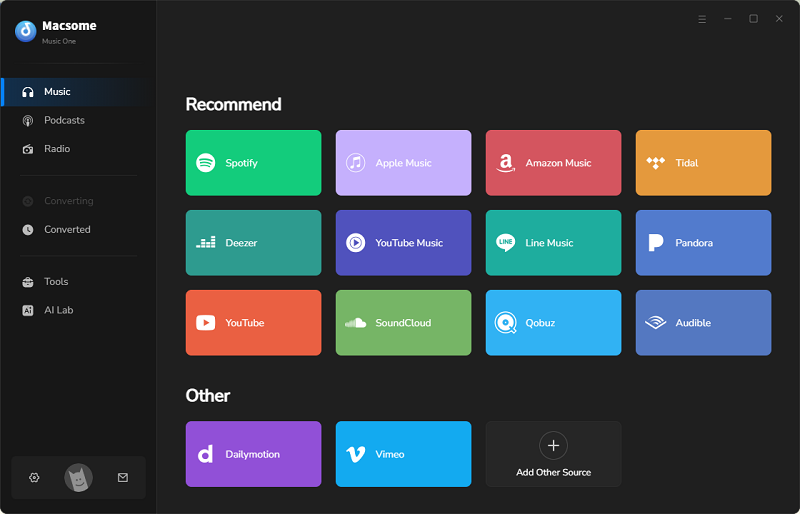
Step 1. Download, install, and launch Macsome Music One. You'll see a clean interface with options like YouTube, Spotify, Apple Music, and more. Select the music streaming platform you'd like to download from. Here, we select Spotify.
Step 2. You can choose from the following output formats: MP3, FLAC, WAV, AIFF, or ALAC. Selecting "Recommended" will give you the same quality as the original files. You can also set an output folder to save the downloaded tracks. Tap the "More settings" tab and choose your preferred bitrate. 320 kbps is recommended for the best quality. You can also adjust other settings.
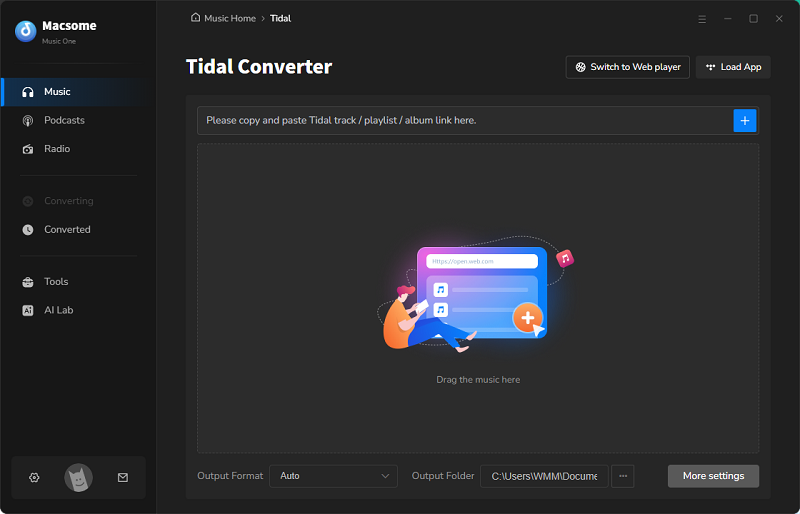
Step 3. You can find the tracks or playlists in the Spotify app or web player, then click the "Click to add" button, and the tracks will be listed in a new window. Click "Add" when you are finished selecting. If you'd like to download multiple videos at once, click the "Add More" button to import more playlists.
Step 4. Finally, click the "Convert" button to begin the download. Once complete, click "History" > "Folder" to locate the downloaded music files. The MP3 file will appear in your chosen output folder.
Part 6. Frequently Asked Questions (FAQs) About Lucida.to
1. Does Lucida.to download directly from Spotify, or does it use another source?
Lucida.to only supports direct downloads from a limited set of platforms, including Qobuz, Tidal, SoundCloud, Deezer, Amazon Music, and Yandex Music. It does not support Spotify or any other unlisted sources. Pasting a Spotify link into the Lucida input field may cause timeouts or failed downloads. Instead, users can search by keywords, such as the track title or album, to find content.
2. What audio qualities and formats does Lucida.to support?
Lucida claims to support high-quality audio downloads, including MP3 (up to 320 kbps) and lossless (up to 24-bit/192 kHz FLAC) FLAC files (Qobuz, Tidal, and SoundCloud), depending on the source platform. Actual quality may vary based on the original stream and server stability.
3. Why are metadata/tags sometimes wrong or missing?
Although metadata (artist, album art, and track information) is pulled from the source, inconsistencies can occur due to platform differences or ripping errors. Many users manually fix the tags afterward using tools like Macsome Tag Editor or Mp3tag.
Conclusion
After reading this Lucida.to review, it's clear that while the platform offers a free and simple way to download music online, it has occasional downtime, limited support, and legal uncertainties. As a safer and more reliable Lucida.to alternative, Macsome Music One provides dedicated 24/7 professional support, stable performance, flexible format options, and high-quality audio output. It allows batch downloads from Spotify, YouTube Music, SoundCloud, Tidal, Deezer, and other popular platforms in MP3, FLAC, or other formats.
Don't settle for risky or limited downloads! Get Macsome Music One now and enjoy fast, safe, and hassle-free high-quality music anytime!