



 Belinda Raman
Hunting for a reliable SoundCloud artwork downloader to capture stunning, high-resolution cover images of your favorite tracks? A good downloader lets you bypass SoundCloud's compressed player previews and instantly save high-quality artwork from songs, albums, playlists, or artist profiles. These tools are perfect for music bloggers, graphic designers, DJs, content creators, and dedicated album art collectors. They make it effortless to build a visual music library, create eye-catching thumbnails, and organize offline collections. This up-to-date guide reviews the best free online SoundCloud artwork downloaders, convenient browser extensions, and powerful professional options—all tested and ready to use.
- 🎵 Part 1. What Is SoundCloud Artwork?
- 🌐 Part 2. Free Online SoundCloud Artwork Downloaders
- 1. SoundCloudDownloader
- 2. SoundCloudMate SoundCloud Artwork Downloader
- 3. SpaceMedia
- 4. MusicFetcher SoundCloud Artwork Downloader Online
- 🛠️ Part 3. SoundCloud Artwork Downloader Extensions
- ⭐ Part 4. Professional SoundCloud Downloader with Full Artwork & Metadata Preservation
- ❓ Part 5. Frequently Asked Questions about SoundCloud Artwork Downloaders
Part 1. What Is SoundCloud Artwork?
SoundCloud artwork refers to the cover images attached to tracks, playlists, albums, or artist profiles on the SoundCloud platform. These visuals, typically uploaded by creators, serve as the primary graphic representation of the music, helping listeners quickly identify songs, albums, or collections at a glance.
Most SoundCloud artwork consists of square images—such as song cover art, album artwork, playlist covers, or promotional artist graphics—that are automatically resized and optimized for various screen sizes and player displays. While the platform shows compressed versions in the interface, the original files uploaded by creators are usually available in significantly higher resolutions, making them ideal for downloading with a reliable SoundCloud artwork downloader for personal use, sharing, or creative projects.
Typical SoundCloud Artwork Sizes Include:
SoundCloud primarily uses square (1:1 aspect ratio) cover images for tracks, albums, playlists, and profiles. The platform automatically resizes and compresses uploaded artwork for display in players, search results, and embeds (e.g., small thumbnails or standard views).
| Display Type | Resolution | Description / Notes |
|---|---|---|
| Player Thumbnail | 100 × 100 | Small preview thumbnails used in search results, mobile feeds, and compact views on the SoundCloud player. |
| Standard Artwork | 500 × 500 | Common default displayed size in the SoundCloud web and app player interface. |
| High Resolution Artwork | Up to 3000 × 3000 | The original uploaded quality (or maximum available) is often fetched by SoundCloud artwork downloaders for the best sharpness and detail. |
Using a SoundCloud artwork downloader lets you retrieve the original, high-quality version of an image instead of the compressed preview.
Part 2. Free Online SoundCloud Artwork Downloaders
Free online SoundCloud artwork downloaders are web-based tools that allow users to extract cover art from SoundCloud tracks without installing software. These tools are user-friendly, requiring only a track URL to fetch high-quality images quickly. We've personally tested several options that work seamlessly in 2026, ensuring they easily extract high-quality images and track details from SoundCloud songs. They support various resolutions and often include metadata like artist and title, making them ideal for casual users looking for a no-cost SoundCloud artwork downloader solution.
1. SoundCloudDownloader - scloudplaylistdownloader.app
The free SoundCloud artwork downloader at scloudplaylistdownloader.app is a simple, no-frills online tool that lets you easily grab 300x300 pixel cover artwork (along with key track details like title, artist, and upload info).
It also doubles as a full-featured SoundCloud downloader, enabling you to save individual songs, albums, and entire playlists as MP3 files in up to 320kbps quality—all completely free and without any subscription required. Additionally, the site stands out by supporting downloads of SoundCloud Go+ premium content (typically locked behind a paywall) in 256kbps M4A format (audio-only).
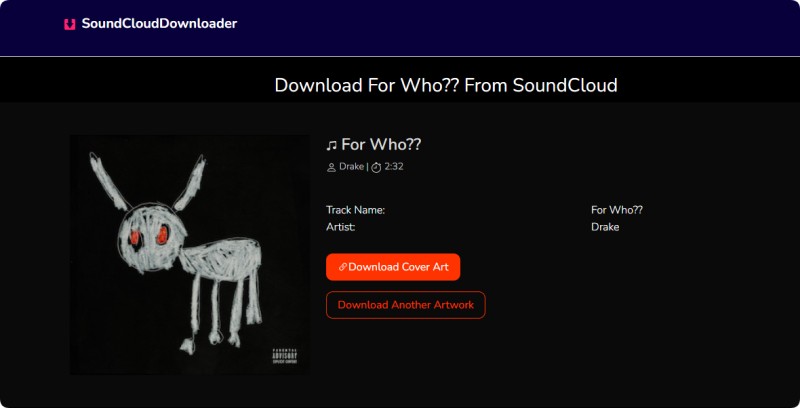
- Step 1. Paste the SoundCloud track URL into the input field on https://scloudplaylistdownloader.app/soundcloud-artwork-downloader/. Click "Download."
- Step 2. The tool processes the link to generate a downloadable image file that includes the artist and title in the filename.
- Step 3. Click the "Download Cover Art" button, and the tool will retrieve the cover image. Then, save the image to your device.
Pros:
- Simple interface with no registration required.
- Includes artist and title metadata in the download.
- Fast processing for quick results.
Cons:
- Limited to 300x300 resolution only.
- No options for higher-quality sizes.
2. SoundCloudMate SoundCloud Artwork Downloader - soundloadmate.com
SoundLoadMate offers a free, clean, and focused online tool designed specifically for downloading high-quality cover artwork from tracks and albums. It fetches the highest available resolution — often Full HD or original quality — without compression. This makes it perfect for wallpapers, playlists, or personal collections.
Unlike broader downloaders, this tool is artwork-only and does not support audio downloads on this page. However, the main site offers separate SoundCloud song and playlist MP3 downloading. It works entirely in the browser with no installation needed.
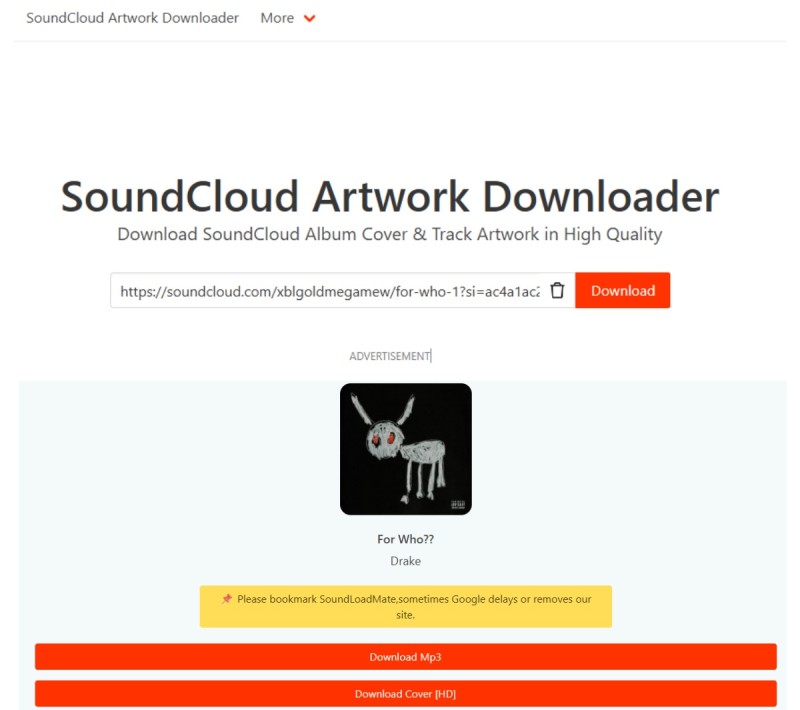
- Step 1. Copy the SoundCloud track or album URL (click "Copy Link" on SoundCloud).
- Step 2. Paste the link into the input field on https://soundloadmate.com/soundcloud-artwork-downloader-1 and click "Download".
- Step 3. Preview the fetched high-quality image, then click "Download Cover [HD]" to save the JPG file directly to your device.
Pros:
- Downloads in the highest available resolution (Full HD/original quality).
- Preview feature before saving — ensures you get the right image.
- Completely free, unlimited downloads, no registration or ads.
- Fast processing and works on all devices/browsers.
Cons:
- Artwork-only; no track metadata or audio download on this page.
- Limited to public tracks (private content not supported).
3. SpaceMedia - spacemedia.uk
The SoundCloud Artwork and Metadata Downloader at spacemedia.uk is a straightforward, free online utility that allows you to extract high-quality cover artwork along with useful track/playlist metadata from any public SoundCloud song, album, playlist, or artist profile. It's especially handy for collectors who want both the image and details like title, artist, and description in one go.
Focused purely on artwork + metadata extraction (no audio downloads), it's quick, ad-light, and ties into the site's broader free music distribution services for artists.
- Step 1. Copy the SoundCloud URL of the track, album, playlist, or artist profile.
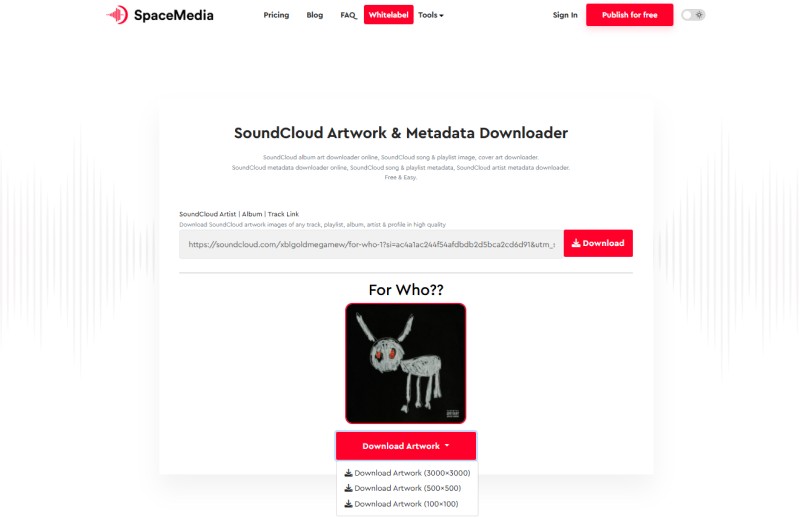
- Step 2. Paste it into the input field on https://spacemedia.uk/soundcloud-artwork-and-metadata-downloader and process the link. Click the "Download" button.
- Step 3. Once the track is processed, the tool will display the artwork preview along with the available resolutions, including 3000×3000, 500×500, and 100×100. Select the resolution you want and save the cover art on your device.
Pros:
- Downloads high-quality artwork + extracts metadata (title, artist, etc.).
- Supports tracks, playlists, albums, and artist profiles.
- Free, easy, and no registration required.
Cons:
- Limited details on exact resolution (depends on original upload).
- No built-in audio download feature.
- The site also promotes music distribution services (may feel slightly promotional).
4. MusicFetcher SoundCloud Artwork Downloader Online - musicfetcher.com
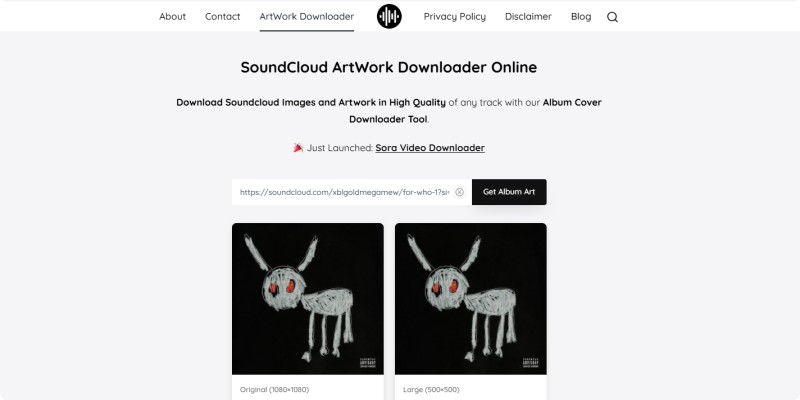
The free SoundCloud Artwork Downloader at musicfetcher.com is a simple, no-nonsense online tool for instantly saving high-quality album covers and track artwork from any SoundCloud song, playlist, or album. It pulls the best available resolution directly, avoiding blurry screenshots and making it ideal for enhancing your music library, phone wallpapers, or sharing.
This page focuses exclusively on artwork (though the main site offers MP3 downloads separately). It's fast, ad-free in use, and requires zero sign-up.
- Step 1. Copy the SoundCloud track, playlist, or album URL.
- Step 2. Paste the link into the input box on https://musicfetcher.com/soundcloud-artwork-downloader/ and click "Get Album Art".
- Step 3. Once the artwork loads, you'll find different resolutions: Original (1080×1080), Large (500×500), Medium (200×200), and Small (50×50). Tap "Download" to save the high-quality image to your device.
Pros:
- High-quality/best-available resolution artwork downloads.
- Supports tracks, playlists, and albums easily.
- Super simple, fast, free, and no account needed.
- Great for personal use like, playlists or wallpapers.
Cons:
- Some tracks lack artwork (depends on upload).
- No metadata export or audio download on this specific tool.
- Resolution varies based on the original SoundCloud upload.
Part 3. SoundCloud Artwork Downloader Extensions
SoundCloud artwork downloader extensions are browser add-ons that integrate directly with Chrome and other browsers. These extensions allow you to seamlessly extract artwork while browsing SoundCloud. These tools are ideal for frequent users who want one-click downloads without leaving the platform. We've tested extensions that effortlessly grab high-quality cover art, making them a convenient alternative to online SoundCloud artwork downloaders. They often work in real time, capturing images as you listen.
5. SoundCloud Artwork Getter - Chrome Extension
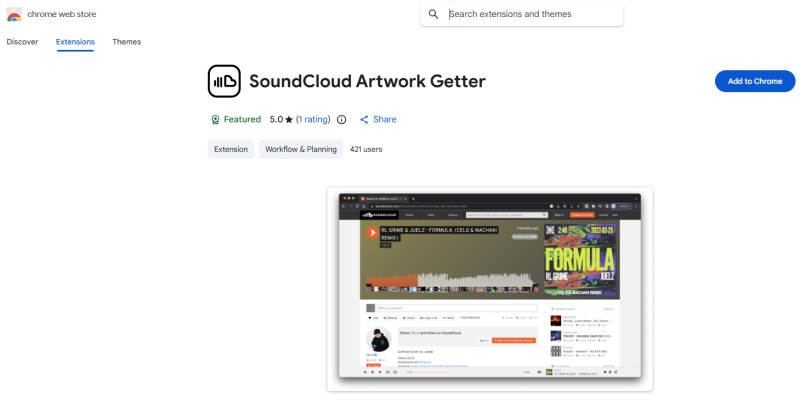
SoundCloud Artwork Getter is a lightweight, free Chrome extension that makes grabbing artwork from SoundCloud tracks incredibly simple and instant. Once installed, it detects the current track's cover art directly from the player page—no need to copy URLs or visit external sites.
It copies the artwork (typically in high/original resolution available from SoundCloud) straight to your clipboard for easy pasting into any app, document, or image editor. Ideal for quick grabs while browsing playlists or discovering new music.
- Step 1. Install the extension from the Chrome Web Store at https://chromewebstore.google.com/detail/soundcloud-artwork-getter/gmmjiolejimemigfopgfcjlfmgifpocf. Click the "Add to Chrome."
- Step 2. Navigate to any SoundCloud track page (song, album, or playlist view where artwork is visible).
- Step 3. Click the extension icon in your Chrome toolbar. The artwork is automatically copied to your clipboard—paste it (Ctrl+V / Cmd+V) wherever you need it (e.g., Photoshop, Notes, wallpaper settings).
Pros:
- Instant access—no URL copying or external tools required.
- Grabs high-resolution/original artwork directly from SoundCloud source.
- Lightweight, fast, and doesn't impact browser performance.
- High user rating (around 5.0 stars) and minimal permissions.
Cons:
- Limited to Chrome (and Chromium-based browsers) only.
- Copies to the clipboard instead of direct file download (extra paste step needed).
- Requires "read and change site data" permissions, which may concern privacy-focused users.
6. Open SoundCloud Coverart - Chrome Extension
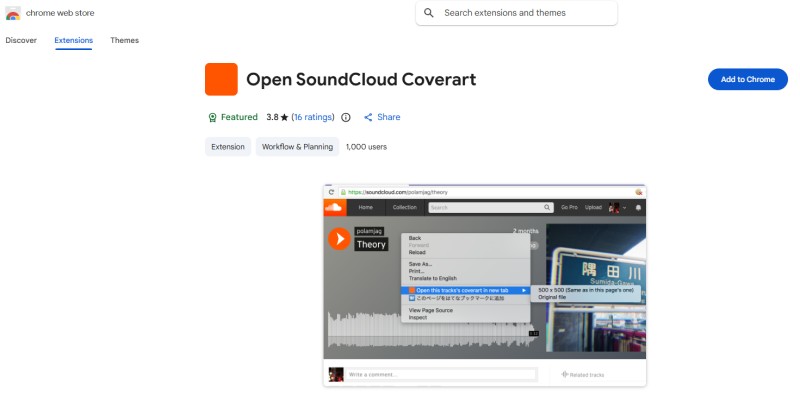
Open SoundCloud Coverart is a simple, focused Chrome extension dedicated to extracting raw, unprocessed cover artwork from SoundCloud tracks. It adds a convenient right-click option to open the artwork in a new tab at its best available resolution (often 500x500 or full original size up to 1080x1080, depending on the upload).
Perfect for users who want direct access to clean, high-quality JPGs without any middleman sites or complicated steps. No audio features—just pure artwork grabbing.
- Step 1. Install the extension from the Chrome Web Store at https://chromewebstore.google.com/detail/open-soundcloud-coverart/ofiobobdcodlnokoiljcaamamndgelcd and add it to Chrome.
- Step 2. Open any SoundCloud track page and locate the visible cover artwork (usually in the player or header).
- Step 3. Right-click on the artwork area (or sometimes on the tab/context menu), select "Open this track's coverart in new tab" (or similar option). The raw image opens in a new tab—right-click and "Save image as..." to download.
Pros:
- Access to raw/original-quality images (up to full resolution SoundCloud provides).
- No ads, no extra interfaces—clean and straightforward.
- Works offline after install (no server dependency once on the page).
- Lightweight with positive feedback for reliability on public tracks.
Cons:
- Basic interface; right-click method may feel less intuitive for complete beginners.
- Occasional compatibility hiccups after major SoundCloud UI updates (though developer usually fixes them quickly).
- Limited to Chrome; no direct batch/playlist support.
Part 4. Professional SoundCloud Downloader with Full Artwork & Metadata Preservation
If you're serious about building a high-quality offline music library from SoundCloud, Macsome Music One stands out as the top professional desktop solution. This powerful, all-in-one streaming music converter and downloader is excellent at downloading SoundCloud tracks, albums and playlists, while automatically preserving high-quality album artwork and complete ID3 metadata, including the title, artist, album, track number, year and more.
Unlike free online tools that are limited to basic extractions, Macsome retrieves original-resolution artwork (depending on the source file on SoundCloud) directly from your downloaded files. It supports both free SoundCloud accounts and Go+ premium content and can convert to lossless formats such as MP3 (up to 320 kbps), FLAC, WAV, AIFF, AAC, or ALAC. This makes it perfect for audiophiles, DJs, or anyone who wants clean, tagged files with stunning cover art intact. Additionally, it provides a free Tag Editor that allows you to personalize the cover art for the downloaded tracks.
Key Features of Macsome Music One for SoundCloud
- Download SoundCloud tracks, albums, playlists & Go+ premium content.
- Convert to MP3 (320kbps), AAC, WAV, FLAC, AIFF, or ALAC.
- Embed high-resolution cover artwork automatically.
- Keep full ID3 tags: title, artist, album, track number, year, artwork, etc.
- Batch download playlists/albums at up to 10x speed, ad-free.
- Built-in SoundCloud player — no extra browser needed.
- Works with free & Go+ accounts; offline access to premium tracks.
- Bonus: tag editor, vocal remover, local file converter & more.
How to Use Macsome SoundCloud Artwork Downloader?
Macsome Music One makes it easy to download entire SoundCloud tracks, albums, and playlists as local files while automatically embedding original cover artwork and complete ID3 metadata. Follow these simple steps for offline access with perfect tagging and visuals:
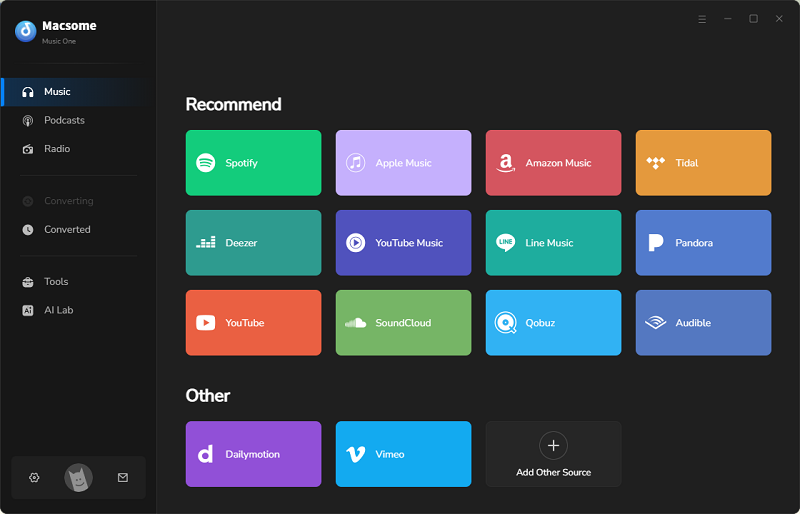
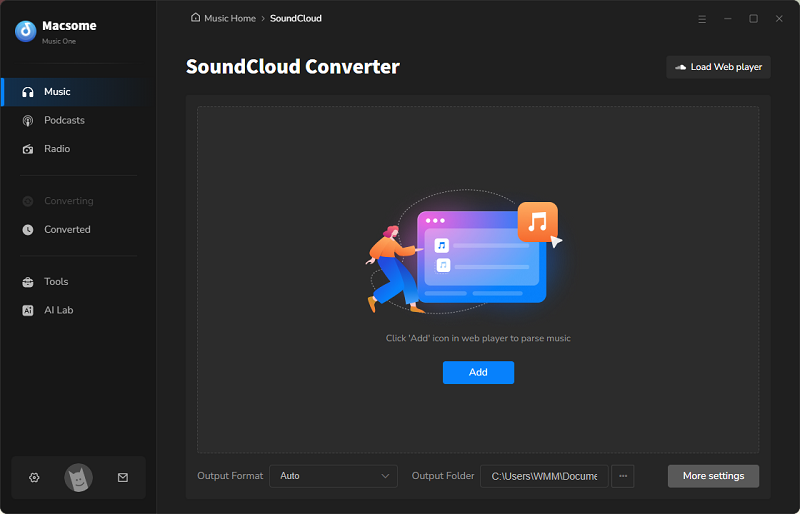
- Download, install, and launch Macsome Music One on your Windows or macOS computer. Select the "SoundCloud" module — the built-in SoundCloud web player opens automatically. Log in to your SoundCloud account (free or Go+).
- Click the "Settings" icon (bottom-left) to customize: Choose MP3, AAC, WAV, FLAC, AIFF, or ALAC as output format, set quality up to 320kbps, and select your preferred save folder. (Artwork and metadata are preserved by default in all formats.)
- In the SoundCloud player, browse or open your desired playlist or album. Click "Click to add" to load tracks into the download list. You can add multiple playlists at once.
- Hit "Convert" to start batch downloading. Macsome processes at up to 10x faster speed, embedding high-res cover artwork (original resolution from SoundCloud) and ID3 tags into each file.
- Once you have finished, go to the "History" tab in the left-hand sidebar and click on the folder icon to open your output directory. Your files will be perfectly tagged, with the artwork visible in any media player (iTunes, VLC, etc.). You can transfer them to your phone, car, or DJ software without any hassle.
Tips: For best results, use MP3 320kbps or lossless FLAC/WAV if you prioritize audio + artwork quality. Macsome handles private/public tracks (if logged in) and avoids ads/limits of the free SoundCloud app.
Pros:
- Automatically embeds original high-resolution artwork and full ID3 tags (artist, title, album art, lyrics where available).
- Batch downloads for entire albums/playlists at up to 10x speed; supports lossless formats (FLAC/WAV/AIFF) for premium quality.
- Works with free SoundCloud accounts and unlocks Go+ premium tracks/albums offline.
- Standalone desktop app — no browser dependency, ads, or API limits; multi-platform support (Windows/macOS).
- Bonus features: vocal remover, tag editor, CD burner, and downloads from other platforms (Spotify, Apple Music, etc.).
Cons:
- Not free — offers a trial (first 1 minute per track), full version requires purchase (monthly/yearly/lifetime plans).
- Requires installation (desktop software, ~10MB); not an instant online tool.
- Artwork resolution depends on SoundCloud's original upload (but is preserved better than most free tools).
Part 5. Frequently Asked Questions about SoundCloud Artwork Downloaders
1. What is the typical resolution of SoundCloud artwork I can download?
Most free online tools and extensions download artwork at 300x300 pixels, which is the standard size displayed on SoundCloud tracks. However, some advanced tools and extensions (e.g., SoundCloudMate and Open SoundCloud Coverart) can grab higher resolutions, such as 500x500 pixels, or even the original/full size (up to 1080x1080+ pixels, if provided by the uploader). Professional tools such as Macsome Music One can get the original resolution directly into downloaded audio files.
2. Why do some tracks have no artwork or low-resolution images?
The availability of artwork depends entirely on the uploader. Many older or user-uploaded tracks use low-resolution (100x100 or 300x300) thumbnails, or no thumbnail at all. Tools cannot create missing artwork; they only extract what is on the SoundCloud servers. If a track has no cover art, check the artist's profile or related albums/playlists.
3. Is downloading SoundCloud artwork legal and safe?
Yes, it's generally fine for personal, non-commercial use (e.g., for wallpapers or organising your library) and doesn't violate SoundCloud's terms as long as you're not redistributing or profiting. The tools fetch images directly from the official SoundCloud servers (no hosting is involved). However, avoid uploading modified artwork to SoundCloud or other platforms without permission, as this could breach copyright or community guidelines. Reputable tools (like those in this series) are free of charge and have good trust ratings — no malware has been reported in recent reviews.
4. Can I download artwork from private tracks or Go+ premium content?
Free online tools and extensions usually only work with public tracks (no login required). To access and embed artwork from premium tracks, albums, or playlists, log in via a tool like Macsome Music One (which supports SoundCloud login) for private or Go+ locked content. Note that extensions may require you to stay on the page while logged in.
5. How do I download artwork in bulk (e.g., entire playlist or album)?
Free online tools often support playlist and album URLs, and may offer ZIP files or individual downloads. Extensions such as Open SoundCloud Coverart work on a per-track basis (right-click on each track individually). For true batch processing with embedded artwork in audio files, we recommend Macsome Music One. With this software, you can download SoundCloud songs and playlists as MP3 or FLAC files, and it automatically handles the artwork and metadata for all tracks.
Conclusion
Finding the right SoundCloud artwork downloader doesn't have to be complicated. Browser extensions such as SoundCloud Artwork Getter allow you to instantly download high-resolution images directly from SoundCloud pages. Meanwhile, free online tools like MusicFetcher and SpaceMedia offer the highest-quality original covers, often with full metadata preserved, for tracks, albums, playlists, and artists.
Macsome Music One is a comprehensive, all-in-one SoundCloud artwork downloader. It supports the batch downloading of tracks, albums, and playlists while preserving high-quality cover art and ID3 tags, including artwork. Macsome Music One offers lossless audio quality, fast processing, and seamless offline library organization without sacrificing visuals or metadata.
Are you ready to take your SoundCloud music collection to the next level with stunning covers and perfect tagging? Download Macsome Music One today and start preserving stunning covers with perfect metadata.