



 Belinda Raman
Looking for a quick way to download SoundCloud tracks as MP3 files without installing desktop software? KlickAud is a browser-based SoundCloud downloader that lets you paste a track URL and convert it into an audio file for download. Its simple, no-installation approach can be convenient for users who want to save SoundCloud tracks for offline listening.
But is KlickAud safe to use? Is KlickAud legal, and could it expose you to malware, intrusive ads, or suspicious redirects? If you're considering KlickAud, understanding its potential risks is important before downloading anything.
In this KlickAud review, we’ll explain how KlickAud works, look at its features, safety and legal considerations, and show you how to use KlickAud step by step. We’ll also discuss what to do if KlickAud is down or not working and introduce some reliable KlickAud alternatives if you need a safer and more convenient way to download and convert SoundCloud music.
Contents
Part 1. What Is KlickAud SoundCloud to MP3 Converter
KlickAud is a free, web-based SoundCloud downloader and MP3 converter that allows users to download audio from public SoundCloud tracks directly through a browser. The basic process is simple: copy a SoundCloud track URL, paste it into KlickAud, and generate a downloadable audio file without installing dedicated software. The service is designed to support various types of SoundCloud content, including songs, tracks, remixes, and podcasts.
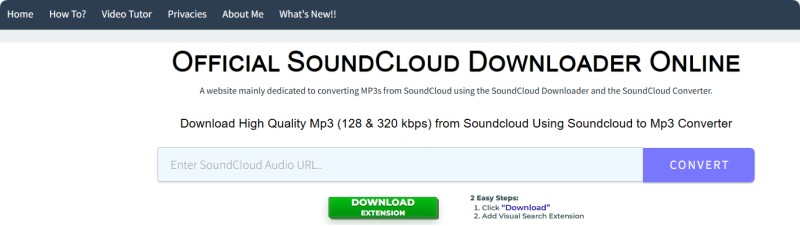
KlickAud has been available since 2017 and has operated under several domains over the years, including KlickAud.com and KlickAud.co, before moving to KlickAud.org. The project was reportedly started as a personal hobby and later developed into a larger online SoundCloud downloading service.
As a browser-based SoundCloud-to-MP3 converter, KlickAud focuses on simplicity rather than requiring users to install a desktop application. It currently advertises MP3 downloads at different quality levels, including 128 kbps and 320 kbps. However, available features, download quality, and supported domains may change over time, so users should check the service's current functionality before relying on it.
KlickAud Features
- SoundCloud to MP3 Conversion: KlickAud lets users convert SoundCloud track URLs into downloadable MP3 files directly from a web browser.
- Supports Various SoundCloud Content: The service is designed to process different types of SoundCloud content, including tracks, songs, remixes, and podcasts.
- No Software Installation: As a browser-based downloader, KlickAud does not require users to install a dedicated desktop application.
- Simple URL-Based Workflow: Users can copy a SoundCloud URL, paste it into KlickAud, and follow the on-screen instructions to start the download.
- Cross-Device Accessibility: Because KlickAud runs in a web browser, it can be accessed from computers and mobile devices with a compatible browser.
- Free Online Service: KlickAud is available as a free online SoundCloud downloading and conversion service, although availability and features may change over time.
Pros and Cons of KlickAud
Pros
- Free to use for basic SoundCloud-to-MP3 downloads
- Simple URL-based conversion process
- No software installation required
- Convenient for occasional single-track downloads
Cons
- Free downloads may be limited to lower audio quality
- Ad-heavy experience, with a short video ad required to unlock downloads
- Downloaded files may lack basic ID3 tags and include "KLICKAUD" in the filename
- No batch downloads or playlist support
Part 2. Is KlickAud Safe?
KlickAud is a third-party, browser-based SoundCloud downloader, so users do not need to install a dedicated application. However, the site has a relatively ad-heavy browsing experience, which is an important factor to consider when evaluating its safety and usability.
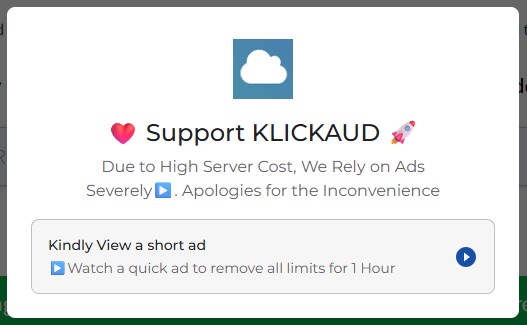
During our testing, KlickAud required us to watch a short video advertisement before downloading. The site states that watching a quick ad can remove all limits for one hour. In our test, the advertisement lasted approximately 15 seconds. In addition to this video ad, we also encountered other advertisements in different areas of the website, including near the top of the page.
Overall, we did not find malware in the KlickAud download we tested, but users should still exercise caution when using the website. The combination of a required video ad and additional advertisements around the site can make the download process less convenient. Access KlickAud directly, avoid suspicious ads and pop-ups, and do not download unfamiliar software or browser extensions prompted by third-party advertisements.
Part 3. Is KlickAud Legal?
Whether using KlickAud to download SoundCloud content is legal depends on the content, your rights to it, and how you use the downloaded file. KlickAud is simply a tool for processing SoundCloud URLs; using it does not automatically give you permission to download copyrighted music.
Downloading music that you own, that the creator has explicitly made available for download, or that you have permission to use is generally different from downloading copyrighted content without authorization. Copyright laws and exceptions can vary by country or region.
KlickAud should not be used to bypass copyright restrictions. Before downloading a SoundCloud track, check whether the creator or copyright holder has authorized the download and make sure your intended use complies with the laws applicable to you.
Part 4. How to Use KlickAud SoundCloud Downloader
If you want to use KlickAud to download an authorized SoundCloud track, the process is relatively simple. You only need the SoundCloud track URL and a web browser. Follow the steps below to learn how to use KlickAud SoundCloud Downloader.
Step 1. Find and Copy a SoundCloud Track URL: Open SoundCloud and find the track you want to download. Make sure that the track is available for download, or that you have the copyright owner's permission to save it. Then, open the track and copy its URL from the address bar. Alternatively, you can use SoundCloud's Share option to copy the track link.
Step 2. Open KlickAud and Paste the URL: Visit the KlickAud website in your browser and paste the copied SoundCloud track URL into the input field. Make sure the link is complete and points to the correct track.

Step 3. Start the Conversion: Click the "CONVERT" button to process the SoundCloud link. KlickAud requires a short video ad to unlock downloads, and the site states that the unlocked access lasts for one hour.
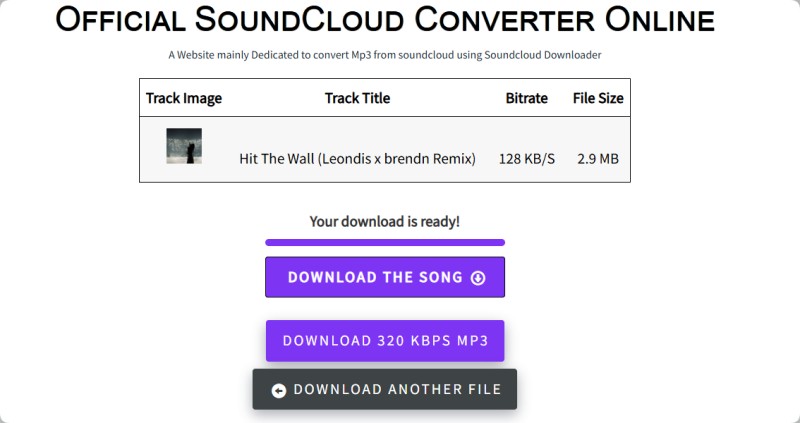
Step 4. Download the MP3 File: Once KlickAud finishes processing the track, click the "DOWNLOAD THE SONG" button to save the MP3 file to your computer. Be aware that the "DOWNLOAD 320 KBPS MP3" button redirects you to a paid software offer instead of directly downloading the track.
That's it. KlickAud offers a simple way to convert individual SoundCloud tracks to MP3. However, if you encounter problems using the service or need features such as batch downloads, playlist support, or more output formats, there are a few alternatives worth considering.
Part 5. What If KlickAud Is Down or Not Working?
If KlickAud is down, not loading, or fails to process a SoundCloud link, the problem may be caused by a temporary server issue, maintenance, a domain change, or a compatibility problem with a particular SoundCloud URL.
If KlickAud is not working for you, try these troubleshooting steps:
- Refresh and try again later: If KlickAud is temporarily unavailable, refreshing the page or waiting a while may resolve the issue.
- Check the SoundCloud URL: Make sure you copied the complete and correct URL of the track you want to download.
- Try another browser: Cached data, browser settings, or extensions can sometimes interfere with online downloader websites.
- Try an alternative: If KlickAud repeatedly fails to process tracks or remains unavailable, consider using a dedicated SoundCloud downloader instead.
If KlickAud continues to be unavailable or you frequently encounter failed conversions or other issues, switching to a more reliable alternative may be more convenient than repeatedly trying the same online service.
Part 6. Best KlickAud Alternative for SoundCloud Downloads
One option worth considering is Macsome Music One. Unlike a browser-based downloader, it is a desktop application that lets you download SoundCloud tracks, albums, and playlists in up to 320 kbps MP3, with support for batch downloads. It also supports multiple output formats, including MP3, AAC, WAV, FLAC, AIFF, and ALAC, while preserving available metadata such as track titles, artists, and album artwork. This makes it a practical choice for users who want to organize and manage an offline music library.
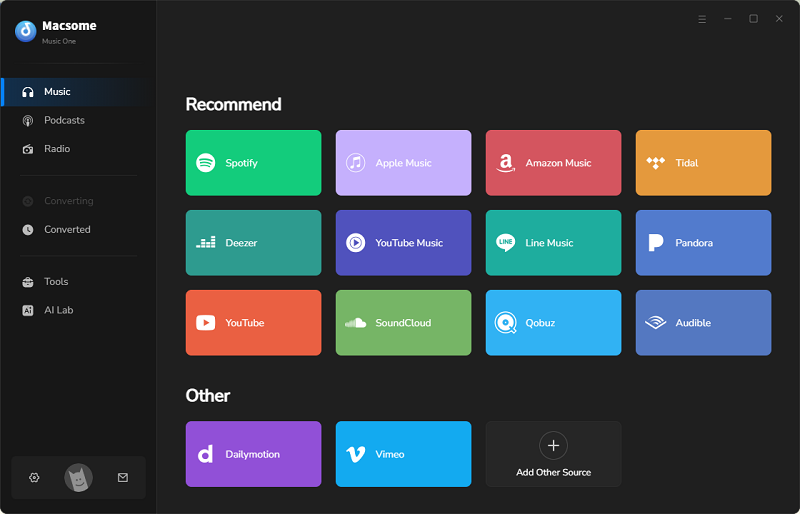
Beyond SoundCloud, Macsome Music One supports other popular music services, including Spotify, Apple Music, Amazon Music, Tidal, Deezer, Pandora, YouTube, Qobuz, and YouTube Music. This makes it a more flexible option for users who download music from multiple platforms.
Main Features of Macsome Music One
- Download SoundCloud music as MP3 at up to 320 kbps.
- Download SoundCloud tracks, albums, and playlists in batches.
- Convert SoundCloud music to MP3, AAC, WAV, FLAC, AIFF, or ALAC.
- Download music from Spotify, Apple Music, Tidal, YouTube Music, and other supported platforms.
- Support batch downloading at up to 10x faster speed.
- Preserve available ID3 tags, including titles, artists, and album artwork.
- Compatible with both SoundCloud Free and Go+ accounts.
- Export downloaded music to iTunes/Apple Music with one click.
How to Download SoundCloud Music to MP3 with Macsome Music One?
Step 1. Launch Macsome Music One and select the "SoundCloud" module. The SoundCloud web player will open automatically. Log in to your SoundCloud account to access your music.
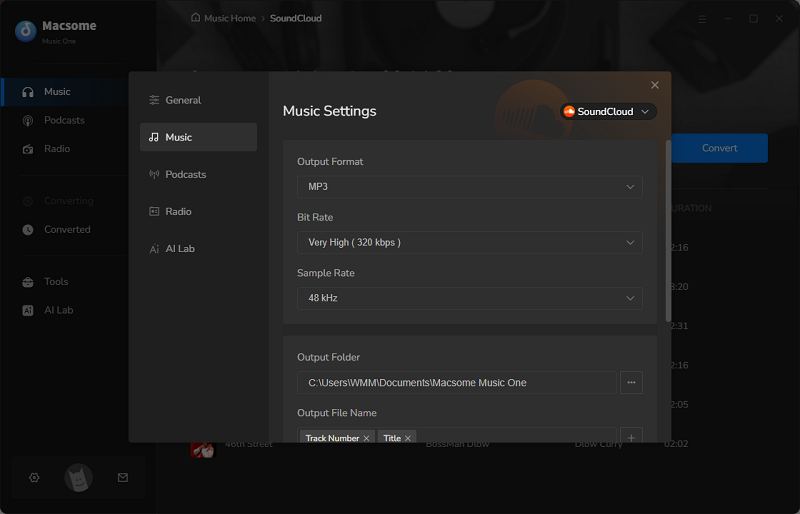
Step 2. Open "Settings" and choose MP3 as the output format. You can also customize the bitrate, sample rate, output folder, and file naming options, with MP3 quality available at up to 320 kbps.
Step 3. Open the SoundCloud track, album, or playlist you want to download. Click "Click to add" to select the songs you want, then click "Add". You can use "Add More" to import additional playlists for batch downloading.
Step 4. Click "Convert" to start downloading the selected SoundCloud music as MP3 files. When the process is complete, go to "History" > "Folder" to find your downloaded files.
Part 7. FAQs About KlickAud SoundCloud Downloader
- Does KlickAud require a SoundCloud account?
- No. KlickAud is a browser-based SoundCloud downloader, so you generally do not need to create a separate KlickAud account or install desktop software. However, access to specific SoundCloud content may depend on the availability and restrictions of the original track.
- Can I download SoundCloud playlists with KlickAud?
- No. KlickAud is mainly designed for downloading SoundCloud tracks individually and does not provide a convenient batch playlist download feature. If you need to download multiple SoundCloud songs or playlists at once, Macsome Music One supports batch downloading.
- Does KlickAud support 320 kbps MP3 downloads?
- The available audio quality depends on the source audio and the current capabilities of the KlickAud service. Selecting a higher MP3 bitrate does not necessarily improve sound quality if the original source has a lower bitrate. If you need more control over output quality and formats, Macsome Music One supports MP3 output up to 320 kbps as well as WAV, FLAC, AAC, AIFF, and ALAC.
- Can I use KlickAud on my phone?
- Yes. Since KlickAud is web-based, you can access it through a compatible browser on a smartphone or tablet without installing a desktop application. However, the experience may vary depending on your device, browser, and the advertisements or redirects displayed by the website.
- Why is my SoundCloud link not working on KlickAud?
- A SoundCloud link may fail because the track has been removed or made private, the URL is incorrect, the content is restricted, or KlickAud is temporarily unable to process the link. Check that the track is still available and that you copied the correct URL. If the problem continues, try KlickAud again later or consider using an alternative downloader.
Final Verdict
Overall, this KlickAud review finds it to be a convenient choice for occasional SoundCloud-to-MP3 downloads, especially for users who prefer a simple browser-based solution. However, its ad-supported experience, limited batch and playlist support, and basic metadata handling make it less suitable for users who need more control or plan to download music regularly. Before using KlickAud, make sure you have the necessary rights or permissions to download the content, and exercise caution when navigating advertisements, pop-ups, and redirects.
For users who need more than occasional single-track downloads, Macsome Music One offers a more flexible KlickAud alternative. It supports batch downloads, SoundCloud playlists, MP3 output up to 320 kbps, multiple output formats, and ID3 tag preservation, along with downloads from other popular music platforms. It is a better fit for users who want to download and manage a larger SoundCloud music library with more control over output quality and file organization.