



 Belinda Raman
M4A (MPEG-4 Audio) is a high-quality, compressed audio format widely supported by Apple devices, iTunes, and most modern media players. It delivers excellent sound quality while keeping file sizes small, making it ideal for mobile listening and offline playback.
Many users want an easy way to convert SoundCloud to M4A for free so they can enjoy music offline on iPhone, iPad, Mac, Android devices, car audio systems, or portable media players. Whether you need to save a single track, an entire playlist, or a podcast from SoundCloud, a reliable converter can make the process fast and hassle-free. In this guide, we’ll explore the best free online tools and desktop solutions to help you download high-quality SoundCloud audio in M4A format.
Part 1. Why Convert SoundCloud to M4A?
SoundCloud is primarily a streaming platform, which means users cannot natively download tracks in high-quality audio formats for offline use. As a result, many listeners look for a way to save their favorite music for playback on different devices.
Converting SoundCloud tracks to M4A format is especially useful for users who want better compatibility with Apple devices, smaller file sizes without significant quality loss, and a smoother offline listening experience. It also makes it easier to organize and transfer audio files across iPhone, iPad, Mac, Android devices, and car systems. In many cases, users also prefer M4A over other formats because it balances audio quality and compression efficiency, making it ideal for everyday listening and mobile storage.
Part 2. Best Free Online SoundCloud to M4A Converters (Tested & Working in 2026)
To find reliable SoundCloud to M4A converters, we tested multiple online downloader websites based on audio quality, conversion speed, usability, and download stability. After filtering out unreliable or non-working tools, the following five options successfully converted SoundCloud tracks into downloadable M4A files.
#1 SoundCloudRips — Simple SoundCloud to M4A Downloader
Link: https://soundcloudrips.com/
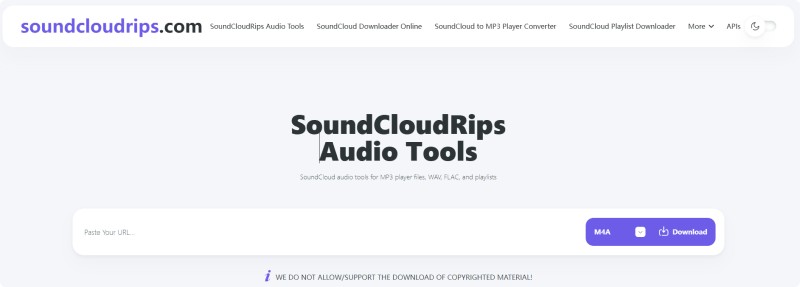
SoundCloudRips is one of the few online tools that can successfully convert SoundCloud tracks to M4A format. After pasting a SoundCloud URL, the website redirects users to a secondary page where the audio processing starts automatically. In testing, the downloaded files averaged around 161 kbps and preserved partial ID3 metadata, including song title and artist information. The interface closely resembles DownCloud-style downloaders (downcloud.cc), suggesting that they may use a similar backend system.
How to Use SoundCloudRips SoundCloud to M4A Downloader
- Step 1. Visit the official SoundCloudRips website and select M4A as the output format from the dropdown menu.
- Step 2. Copy the SoundCloud track URL you want to download, then paste it into the input field on SoundCloudRips.
- Step 3. Click the Download button. The tool will begin fetching the audio file. Note that playlist downloads are not supported.
- Step 4. Click Download again to save the file to your device. Be cautious: a new window may open with third-party ads—avoid downloading any unrelated files for security reasons.
Pros:
- Free to use
- Supports M4A, MP3, and other formats
- Preserves partial ID3 metadata
- No account required
Cons:
- Frequent redirect ads
- Audio quality is limited to around 161 kbps
- Unstable user experience
#2 SCloudPlaylistDownloader — Reliable SoundCloud to M4A Tool
Link: https://scloudplaylistdownloader.com/
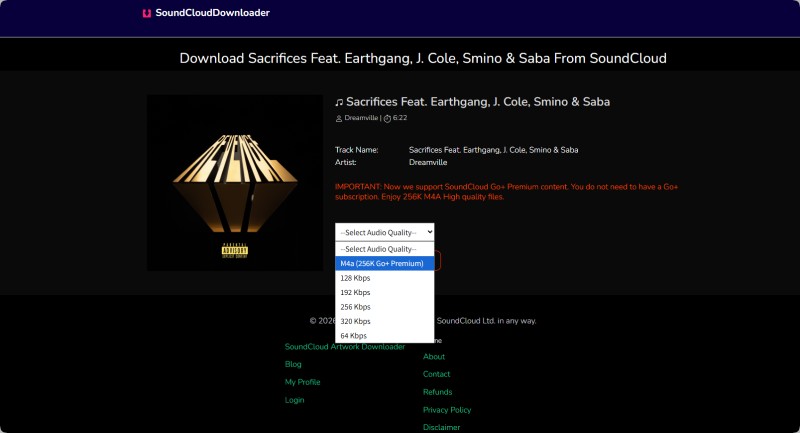
SCloudPlaylistDownloader is a reliable online SoundCloud to M4A converter designed with a strong focus on ID3 metadata preservation. Compared with most free online tools, it delivers more accurate tag retention, including artist name, album, cover art, and track title.
The tool supports high-quality SoundCloud conversion with up to 256 kbps M4A and 320 kbps MP3 output. Individual downloads work well, but full playlist support and unlimited usage require a paid subscription starting at $7.99 per month. It is particularly suitable for users who need high-quality SoundCloud to M4A or MP3 downloads with preserved metadata, especially when working with single tracks rather than full playlists.
How to Use SCloudPlaylistDownloader SoundCloud to M4A Converter
- Step 1. Open SoundCloud and locate the track or playlist you want to download. Copy its URL.
- Step 2. Paste the SoundCloud link into the input box on SCloudPlaylistDownloader and wait for the tool to analyze the content.
- Step 3. Click Generate Download Links on the results page, then select M4A from the audio format or quality options.
- Step 4. Wait for processing to complete, then download the final M4A file to your device.
Pros:
- Strong ID3 tag preservation (artist, album, cover, title)
- Supports converting single SoundCloud tracks to M4A or MP3
- Stable and consistent conversion performance
Cons:
- Slower processing speed compared to premium tools
- Free version only allows limited playlist downloads (first 2 tracks)
#3 CutYT — Clean, Fast Multi-Format SoundCloud to M4A Converter
Link: https://www.cutyt.com/soundcloud
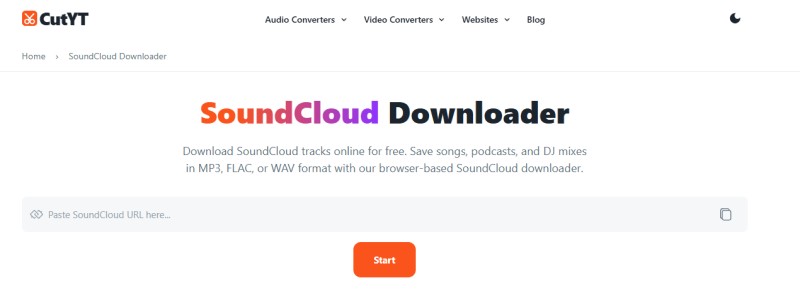
CutYT is a browser-based audio converter that allows users to download and convert SoundCloud tracks quickly without ads or registration. The interface is minimal and straightforward—simply paste a SoundCloud URL, select your preferred output format, and start the conversion instantly.
It supports multiple audio formats including, M4A, MP3, FLAC, WAV, and other common audio types. In testing, conversion speed was fast and stable, with output quality typically around ~160 kbps depending on the source. The tool also includes basic editing features, such as trimming audio segments before download.
How to Use CutYT SoundCloud to M4A Converter
- Step 1. Open SoundCloud and copy the track, podcast, or DJ mix URL from the address bar or share button.
- Step 2. Paste the link into CutYT and choose your desired output format, such as M4A, MP3, or FLAC.
- Step 3. Click 'Download M4A now' to start processing, then save the file to your device.
Pros:
- Completely ad-free interface
- Fast and stable conversion speed
- Supports multiple audio formats (M4A, MP3, FLAC, WAV)
Cons:
- Limited ID3 metadata preservation
- No advanced playlist processing features
- Occasional download failures depending on source availability
#4 Loader.to — Multi-Platform Audio Converter
Link: https://loader.to/
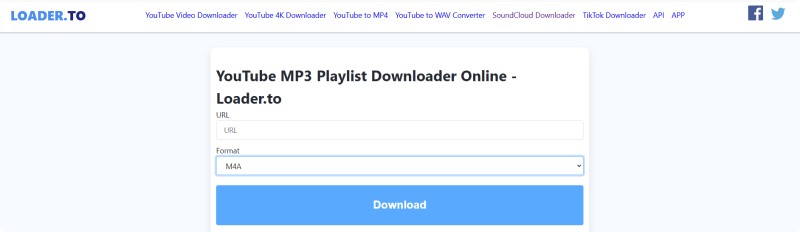
Loader.to is a multi-platform online media converter that supports downloads from sources, such as YouTube and other video platforms. It also offers SoundCloud link processing, although the actual audio source appears to be primarily YouTube-based rather than direct SoundCloud extraction.
The tool provides a simple workflow for converting audio to multiple formats, such as M4A and MP3. In terms of output quality, the tested tracks were delivered at approximately 159–161 kbps, which is acceptable for casual listening but not high-fidelity audio. Conversion speed was generally stable, but may vary depending on server load and traffic conditions.
How to Use Loader.to SoundCloud to M4A Converter
- Step 1. Paste a SoundCloud or YouTube-based audio link into the input box on Loader.to.
- Step 2. Select M4A as the desired output format.
- Step 3. Click Download and follow any redirect prompts until the file becomes available for download. However, during testing, clicking the 'Download' button may redirect users to third-party pages before the final file becomes available. This adds extra friction compared to more direct download tools.
Pros:
- Supports multiple platforms (YouTube, SoundCloud links, etc.)
- Simple and accessible interface
- No software installation required
- Acceptable audio quality for casual use (~160 kbps)
Cons:
- The download process includes third-party redirects
- Actual audio source appears primarily YouTube-based
- Limited control over metadata preservation
- Performance may vary depending on server load
#5 DoubleDouble — High-Quality 256 kbps SoundCloud to M4A Downloader
Link: https://doubledouble.top/
DoubleDouble is a high-quality SoundCloud to M4A downloader focused on delivering up to 256 kbps audio output. It is designed for users who prioritize sound quality over advanced features such as playlist management or batch downloading.
How to Use DoubleDouble SoundCloud to M4A Downloader
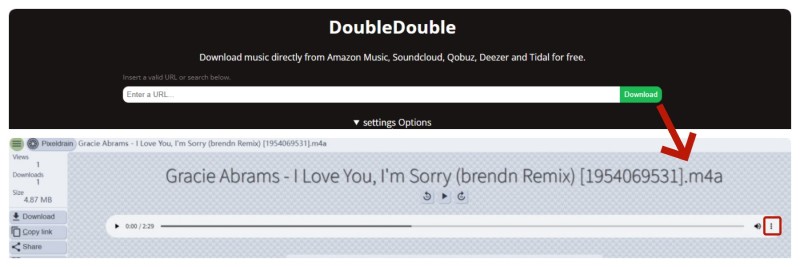
- Step 1. Paste your SoundCloud track URL into DoubleDouble and click Download.
- Step 2. Wait until the message “Your download is now available here” appears, then click the generated download link.
- Step 3. A new window will open. Click the three-dot menu and download the file to your device.
Notes & Limitations
- Output files are typically encoded at 256 kbps, and ID3 tags such as artist and title are generally preserved. However, filenames may include additional numeric identifiers such as [1954069531].
- The service may enforce usage limits, often allowing approximately one track download per day.
- Attempting additional downloads may trigger an error such as “Error: An extractor error occurred”, along with a request ID (e.g., Q9OEQ3g). This usually indicates a temporary restriction or service limitation.
Pros:
- High-quality output up to 256 kbps
- Good audio clarity compared to most free tools
- Basic ID3 tag preservation supported
- Simple and straightforward workflow
Cons:
- Multi-step download process with a redirect window
- Filename may include numeric track ID (e.g. [1954069531])
- Strict usage limit (often ~1 track per day)
- Occasional extractor errors when the limit is exceeded, or service is restricted
Part 3. Best Desktop SoundCloud to M4A Converter Alternative: Macsome Music One
Macsome Music One is a professional desktop SoundCloud converter and downloader that serves as a powerful alternative to online SoundCloud to M4A tools. Unlike browser-based converters that often suffer from ads, unstable performance, limited audio quality, and download restrictions, it provides a clean, stable, and fully offline experience.
It supports converting SoundCloud music to multiple formats, including AAC(.m4a), MP3, WAV, FLAC, AIFF, and ALAC(.m4a). Users can also download full playlists and albums with batch processing, making it significantly more efficient than online tools. In addition, it preserves ID3 metadata such as title, artist, album, and cover art. Macsome also delivers up to 10x faster conversion speed with no ads or interruptions, offering a much smoother workflow compared to web-based converters. It is designed for high-volume and long-term use, especially for users who frequently download music in batches.
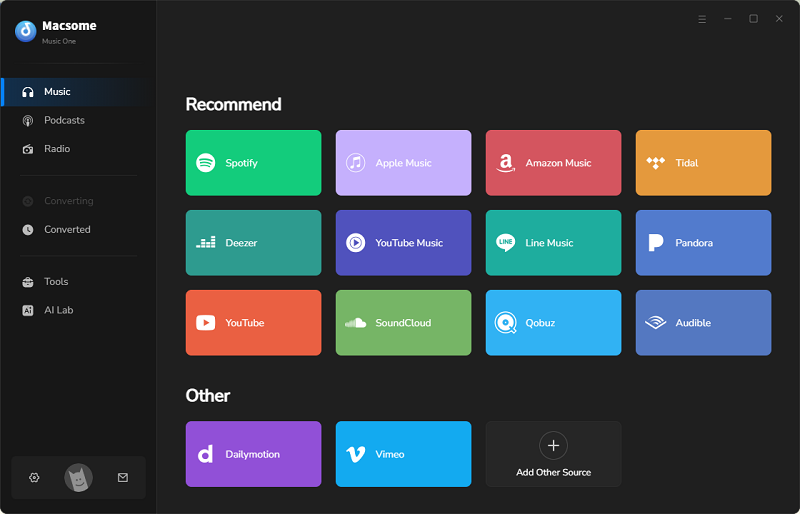
Beyond SoundCloud, it functions as an all-in-one streaming music downloader supporting platforms such as Spotify, Apple Music, Tidal, Amazon Music, YouTube Music, Deezer, and Line Music, as well as media sites like YouTube, Qobuz, Vimeo, and Dailymotion. Available for both Windows and macOS, it is a reliable long-term desktop alternative to unstable online converters.
Macsome Music One — Desktop SoundCloud to M4A Converter Alternative
- Download audio from SoundCloud, Spotify, Apple Podcasts, YouTube, and more platforms
- Convert SoundCloud audio to AAC (.m4a), MP3, WAV, FLAC, AIFF, and ALAC(.m4a)
- Batch download tracks, playlists, and albums
- Export audio in high quality up to 320kbps
- Preserve full ID3 tags including, title, artist, album, and cover art
- Built-in library management tools for organizing music efficiently
- Reliable offline alternative to online SoundCloud to M4A converters
How to Convert SoundCloud Music to M4A with Macsome Music One
Step 1. Launch Macsome Music One on your computer and select SoundCloud from the Music tab. The built-in web player will open automatically. Log in to your SoundCloud account if required.
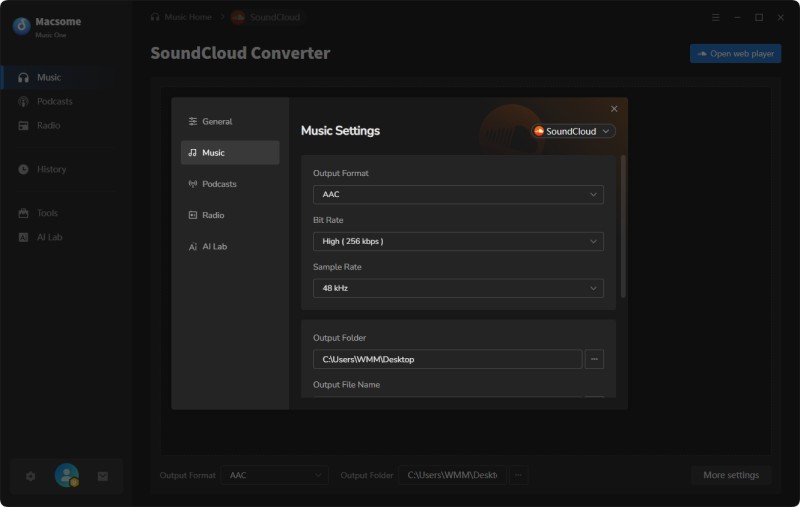
Step 2. Go to Settings and choose M4A (AAC) as the output format. You can also set the audio quality up to 256 kbps, adjust output parameters, and select your destination folder.
Step 4. Click Convert to start processing. All selected files will be downloaded and saved locally in high quality once completed.
Pros:
- Supports multiple formats including, M4A, MP3, WAV, FLAC, AIFF, and ALAC
- Batch download support for tracks, playlists, and albums
- Works with major platforms like Spotify, Apple Music, Tidal, and Amazon Music
- Supports additional sources such as YouTube, Qobuz, and Vimeo
- Maintains original audio quality with up to 10x faster conversion speed
- Includes built-in tools like tag editor and music library manager
Cons:
- Requires desktop installation
Part 4. FAQs About SoundCloud to M4A Converter
- Is it legal to convert SoundCloud to M4A?
- Converting SoundCloud audio is generally only acceptable for personal offline use, and it depends on the copyright status of each track. You should always follow SoundCloud's terms of service and avoid downloading copyrighted content without permission from the content owner.
- Will converting SoundCloud to M4A reduce audio quality?
- M4A uses efficient audio compression and can preserve high sound quality while reducing file size. In most cases, if the original track is high quality, the converted file will maintain clear and balanced audio with minimal loss.
- What is better for SoundCloud downloads: MP3 or M4A?
- M4A is generally preferred for better audio quality at similar bitrates and smaller file sizes, while MP3 offers broader compatibility across devices. For Apple devices and high-quality offline listening, M4A is often the better option.
- Can I convert SoundCloud playlists to M4A format?
- Yes, some desktop converters support batch or playlist processing, allowing you to convert multiple SoundCloud tracks into M4A format at once. However, many free online tools may have limitations on playlist size or batch downloads.
Conclusion
Converting SoundCloud to M4A is a practical way to enjoy high-quality audio with smaller file sizes across different devices, especially for offline listening on mobile and desktop. In this guide, we explored why M4A is a preferred format, reviewed several free online SoundCloud to M4A converters, and introduced a reliable desktop solution for more stable and high-quality conversions.
While free online tools are useful for quick conversions, they often come with limitations such as restricted batch processing, unstable performance, or inconsistent output quality. For users who want a more reliable and efficient experience, a dedicated desktop solution like Macsome Music One provides a more powerful option. It supports converting SoundCloud tracks, albums, and playlists to M4A format in batches, with up to 256 kbps audio quality, and works with both free and SoundCloud Go+ accounts.