



 Belinda Raman
SoundCloud Downloader Extensions are widely used by listeners who want to download SoundCloud music for offline listening. This demand exists because SoundCloud is one of the most popular platforms for discovering music, podcasts, and independent artists, yet it primarily focuses on streaming rather than direct downloads. While a SoundCloud Go+ subscription allows offline listening within the app, direct downloads are limited and depend on whether the artist enables them.
As a result, many users turn to SoundCloud downloader extensions—browser-based tools that make it possible to download SoundCloud songs directly from the browser without installing additional software. These extensions work with popular browsers like Chrome and Firefox, offering a quick and convenient way to save tracks for offline use.
In this guide, we'll review some of the best SoundCloud downloader extensions available today. We'll also introduce Macsome SoundCloud Downloader as a more stable and feature-rich alternative for users who want a reliable way to download SoundCloud music without complicated setups.
- 🎧 Part 1. Best SoundCloud Downloader Extensions (Detailed + Browser Support)
- 1.1 Addoncrop SoundCloud Music Downloader - Cross-Browser
- 1.2 SoundCloud Track Downloader (Chrome-specific)
- 1.3 SCDownloader / SCDL / SoundCloud-DL (Firefox-focused)
- 1.4 SoundCloud Enhanced Pro (Chrome Only)
- 🛠️ Part 2. Limitations of SoundCloud Downloader Extensions
- 🚀 Part 3. Best Alternative to SoundCloud Downloader Extensions - Macsome Music One
- ❓ Part 4. FAQs About SoundCloud Downloader Extensions

Part 1. Best SoundCloud Downloader Extensions (Detailed + Browser Support)
Based on user reviews, features, and compatibility, here are some of the top-rated and most recommended SoundCloud downloader extensions. They allow you to add download buttons for tracks (where permitted by the artist) and enable easy MP3 saves directly in your browser.
1.1 Addoncrop SoundCloud Music Downloader - Cross-Browser
Supported Browsers: Chrome, Firefox, Edge, Opera, Brave, Vivaldi, Yandex (cross‑browser support via extension stores)
The Addoncrop SoundCloud Music Downloader is a third‑party browser extension that adds a download option directly into the SoundCloud interface, allowing users to save tracks and playlists as MP3 files for offline listening. Once installed, it inserts a Download button under SoundCloud tracks and playlist pages so you can save music with a click.
It supports a range of browsers (Chrome, Firefox, Edge, Opera, Brave, Yandex, Vivaldi) via Addoncrop's Crosspilot bridge extension and is designed for casual users who want a simple way to extract MP3 audio from SoundCloud.
How to Use Addoncrop SoundCloud Music Downloader?
Step 1. Visit the official Addoncrop website, and hit on the Add to Chrome. Click "Install with CrossPilot" and follow the prompts to add the CrossPilot extension, which is required for the downloader to function. Grant necessary permissions to complete the installation.
Step 2. Open your browser and navigate to the SoundCloud site, and locate the track, playlist, or page you want to download. You will see a " Download" button that appears with the options in every SoundCloud music playlist.
Step 3. Click the "Download" button. For playlists or pages, the extension will queue all tracks for automatic downloading in the background.
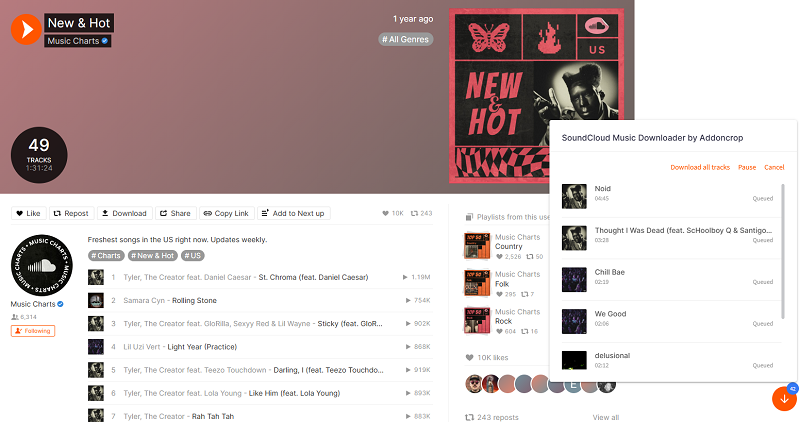
⭐ Key Features of Addoncrop
- Direct Download Button: Adds a "Download" button right on SoundCloud track and playlist pages for easy access.
- Single & Playlist Downloads: Allows downloading both individual tracks and entire playlists with minimal clicks.
- High‑Quality MP3: Saves tracks in MP3 format, with claimed support up to 320 kbps in some builds.
- ID3 Tag Support: Downloads include ID3 metadata like artist, track title, album art, and other information.
- Extended Browser Support: Works across multiple Chromium‑based and other browsers via the Crosspilot helper extension.
- Bulk / Page‑wide Downloads: Can detect and download entire pages of tracks at once in addition to playlists.
Pros and Cons of Addoncrop
Pros
- Integrated Experience: Downloads appear within SoundCloud's own UI — no need for external tools or sites.
- Wide Browser Support: Compatible with many browser types using Crosspilot.
- Playlist & Bulk Downloads: Supports downloading entire playlists or pages of tracks.
- Metadata & ID3 Tags: Saves metadata like artist name and cover art with the MP3 file.
- Free to Use: No cost to install or use the core downloader features.
Cons
- Requires Crosspilot: Some browsers need the secondary Crosspilot extension installed first.
- Format Limitations: MP3 is the only supported output format, with limited control over bitrate.
- Stability Issues: Extensions like this may break or stop working after SoundCloud or browser updates.
- Security & Availability: Not always available in official browser extension stores and may carry risks of outdated code or adware.
- May Not Show Single "Download" for Every Track: In some configurations, only bulk playlist buttons appear, making single‑track downloads less convenient.
1.2 SoundCloud Track Downloader (Chrome-specific)
The SoundCloud Track Downloader Extension is a browser tool that allows users to download SoundCloud tracks directly. The extension integrates with the SoundCloud website, adding a "Download" button to available tracks. This enables users to save their favorite tracks for offline listening without needing additional software or a SoundCloud Go+ subscription.
How to Use SoundCloud Track Downloader?
Step 1. Go to the Chrome Web Store, search for "SoundCloud Track Downloader," and click "Add to Chrome".
Step 2. After installing the extension, go to SoundCloud in your browser and find the track you want to download.
Step 3. When you open the track, you should see a Download icon below the song (this button is added by the extension). If the track is available for download, simply click the "Download" icon. The song will be saved to your computer in MP3 format.
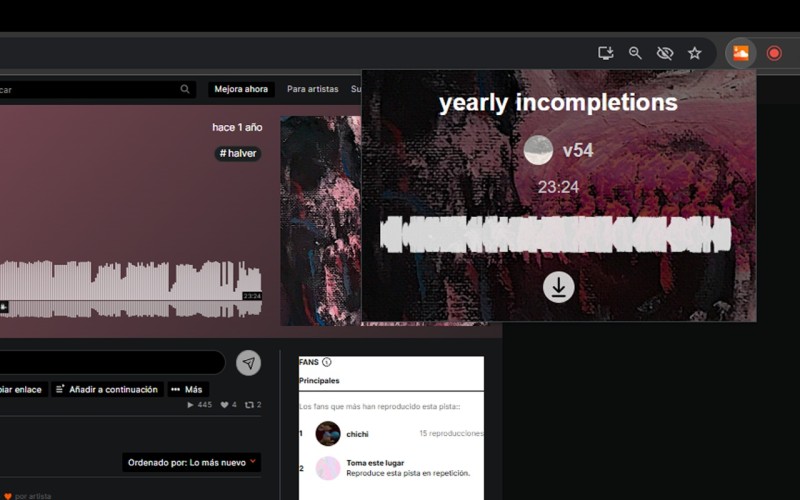
⭐ Key Features of SoundCloud Track Downloader
- Direct Download Button: The extension adds a simple "Download" button below the track, allowing you to download SoundCloud songs directly to your device.
- No Subscription Required: The extension works without needing to upgrade to a Premium account.
- MP3 Format Support: Tracks are downloaded in the popular MP3 format, making them playable on almost all media players and devices.
- Quick Setup: The extension is easy to install and doesn't require complex configurations or extra software.
- Free of Charge: This extension is typically free to use, allowing you to download SoundCloud tracks without paying for third-party tools.
Pros and Cons of SoundCloud Track Downloader
Pros
- Free: You don't need to pay for a SoundCloud Go+ subscription or any other software to download tracks.
- Easy to Use: The extension works directly in your browser and is user-friendly, even for non-technical users.
- No Additional Software: The downloader is fully browser-based, so you don’t need to install heavy applications on your computer.
- Works for Most SoundCloud Tracks: You can download a wide range of tracks, including those not typically available for direct download from SoundCloud.
- Quick and Convenient: After installing the extension, you simply visit SoundCloud, and the download button appears automatically when available.
Cons
- Limited to Available Downloads: If the artist hasn't enabled download options for their track, the extension won't be able to download it.
- Format Limitations: MP3 is the only supported output format, with limited control over bitrate.
- Ad-Supported: Some users might experience ads or popups while using the extension.
- May Not Work with All Tracks: Occasionally, updates to SoundCloud or the extension itself can cause compatibility issues, making it difficult to download some tracks.
- Lack of Advanced Features: The extension is designed for simple downloads, so it lacks more advanced features like batch downloading or saving entire playlists.
1.3 SCDownloader / SCDL / SoundCloud-DL (Firefox-focused)
SCDownloader is a popular browser extension that allows you to easily download SoundCloud tracks from the SoundCloud website. It integrates seamlessly with the Firefox browser, enabling you to download songs without needing extra software or premium subscriptions. It's ideal for users who want to save their favorite tracks for offline listening.
How to Use the SCDownloader Extension?
Step 1. Visit the Firefox Add-ons page, search for SCDownloader, and click on "Add to Firefox."
Step 2. Once the extension is installed, go to the SoundCloud website and find the track you want to download.
Step 3. If the track is available for download, you will see a "Download" button below the track (this button is added by the SCDownloader extension). Click the "Download" button, and the track will be saved in MP3 format to your computer.
Step 4. Once the song is downloaded, you can play it offline using any media player that supports MP3 files.
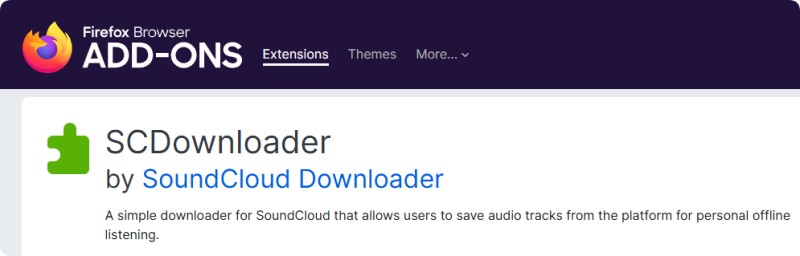
⭐ Key Features of SCDownloader Extension
- Direct SoundCloud Downloads: The extension adds a download button to SoundCloud tracks, allowing you to save them directly to your computer.
- No Subscription Required: You don't need a SoundCloud Go+ or any premium account to download tracks.
- Browser-Based: It works directly in your browser, with no need to install additional software on your computer.
- Supports Multiple Formats: The extension allows downloading songs in MP3 format, which is widely compatible with media players.
- User-Friendly Interface: It's easy to use—simply install the extension, visit a SoundCloud track, and click the download button.
Pros and Cons of SCDownloader Extension
Pros
- Free to Use: You can download SoundCloud tracks without having to pay for a subscription or third-party tool.
- Easy Installation: The extension can be installed in seconds with minimal setup.
- No Software Installation: Everything works directly within your browser, so there's no need to install anything heavy on your computer.
- No SoundCloud Subscription Needed: You can download tracks that aren't available for direct download through SoundCloud’s standard options.
- Supports Multiple Platforms: It works on popular browsers like Google Chrome and Mozilla Firefox, ensuring a wide range of compatibility.
Cons
- Limited to Available Tracks: The extension works only with tracks that are accessible for download via SoundCloud (if the artist allows it). It won’t work for all songs.
- May Not Work with Some Tracks: Occasionally, the extension may not be able to download tracks if they’re protected or if SoundCloud updates its interface.
- Ad-Supported: Some users may experience ads while using the extension, which can be annoying.
- Limited Features: While it’s excellent for basic downloads, it lacks advanced features, such as batch downloading or downloading entire playlists.
1.4 SoundCloud Enhanced Pro (Chrome Only)
SoundCloud Enhanced Pro is a free third-party Chrome browser extension. It enhances the SoundCloud website by adding tools primarily focused on downloading and managing tracks that are publicly available or explicitly permitted for download by the artist (e.g., royalty-free or Creative Commons-licensed music). It's designed for content creators, DJs, podcasters, and music fans who need offline access to legal, license-friendly audio. The extension is available on the Chrome Web Store.
How to Use SoundCloud Enhanced Pro?
Step 1. Go to the Chrome Web Store or Firefox Add-ons site, search for "SoundCloud Enhanced Pro", and install the extension.
Step 2. Once installed, make sure the extension is enabled in your browser's settings.
Step 3. Visit SoundCloud in your browser. You should now see extra features or buttons provided by the extension.
Step 4. If the track is available for download, a download button will appear. Click it to save the track to your device. Use the enhanced interface to manage your playlists more effectively, with features like adding tracks to existing playlists or creating new ones.

⭐ Key Features of SoundCloud Enhanced Pro
- MP3 Downloads: One-click download of tracks in MP3 format, but only for those the artist has made publicly downloadable.
- Download History: A built-in tracker to view, organize, and revisit all your downloaded tracks in one place.
- Enhanced Interface: It offers a more streamlined, customizable user interface with additional options for customizing playback and download settings.
- Playlist Management: Users can easily manage, add, or remove songs from playlists directly through the extension.
- Playback Controls: The extension may provide advanced playback features, such as looping tracks or adjusting playback speed.
Pros and Cons of SoundCloud Enhanced Pro
Pros
- Free to Use: Most features are available without the need to pay for a subscription.
- Simple Installation: It's easy to install as a browser extension.
- Enhanced User Experience: It offers a better, more flexible way to interact with SoundCloud, improving both playback and download features.
- Download Music: Enables downloading of SoundCloud tracks without SoundCloud Go+.
Cons
- Not Official: As a third-party extension, it’s not officially supported by SoundCloud, which means it could be risky in terms of reliability and security.
- Possible Legal Concerns: Downloading tracks without the artist’s consent may breach copyright laws, especially for tracks that are not explicitly made available for download by the creator.
- Compatibility Issues: It might not be compatible with all browsers or operating systems, and updates may not always be seamless.
Part 2. Limitations of SoundCloud Downloader Extensions
Despite their ease of use, the following SoundCloud downloader extensions have some limitations:
- Browser updates: Extensions often stop working with new browser updates. This leaves you unable to download music until an update is available.
- Security issues: Keep in mind that certain free extensions might present security concerns, especially if they request additional permissions.
- Download speeds: In general, extensions are slower than desktop tools and may prevent you from downloading multiple tracks at once.
Part 3. Best Alternative to SoundCloud Downloader Extensions - Macsome Music One
If you're looking for a more powerful and versatile solution, Macsome Music One is an excellent alternative to traditional SoundCloud downloader extensions. Unlike browser-based extensions, Macsome Music One operates independently of your browser, offering a much more reliable and user-friendly experience. You don't need to worry about installing and managing browser add-ons, as Macsome is a standalone desktop tool that simplifies the process of downloading your favorite tracks.
Macsome Music One lets you download SoundCloud tracks in various formats, including MP3, AAC, WAV, FLAC, AIFF, and ALAC. Unlike many downloader extensions, it preserves ID3 tags like titles, artists, and album artwork. With Macsome, you can download entire albums or playlists in bulk with just a few clicks and enjoy faster download speeds. Besides SoundCloud, Macsome supports other streaming platforms, so you don't need separate tools. For a more efficient, reliable, and versatile music downloader, Macsome Music One is the clear choice over unreliable browser extensions.
Key Features of Macsome Music One
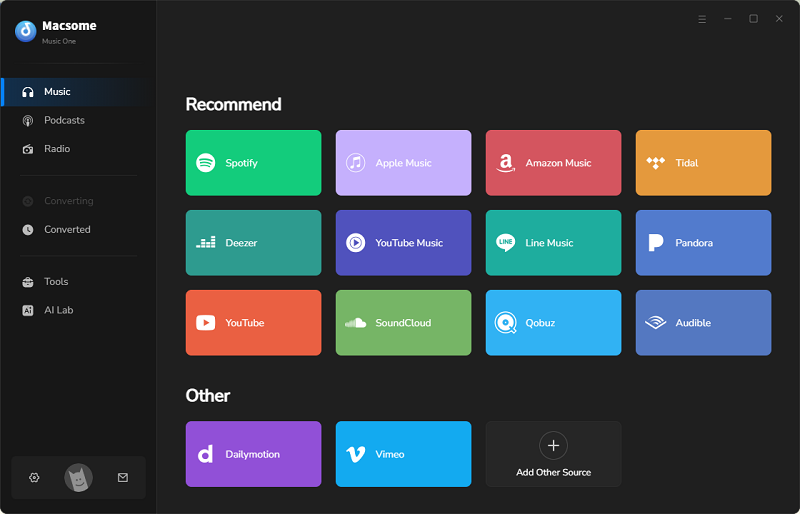
- Support downloading music from SoundCloud, Spotify, Apple Music, Tidal, YouTube Music, Deezer, Vimeo, Dailymotion, etc.
- Convert SoundCloud music to MP3, AAC, WAV, FLAC, AIFF, or ALAC.
- Support batch downloading and 10x faster speed, and remove ads from the free version.
- Almost all the ID3 tags will be preserved, including track number, title, artist, etc.
- Preserve the original quality of the tracks after download.
- Suitable for both SoundCloud Go+ and Free accounts.
- Free download podcasts, radios, convert local files, edit tags, etc.
How to Use Macsome SoundCloud Downloader?
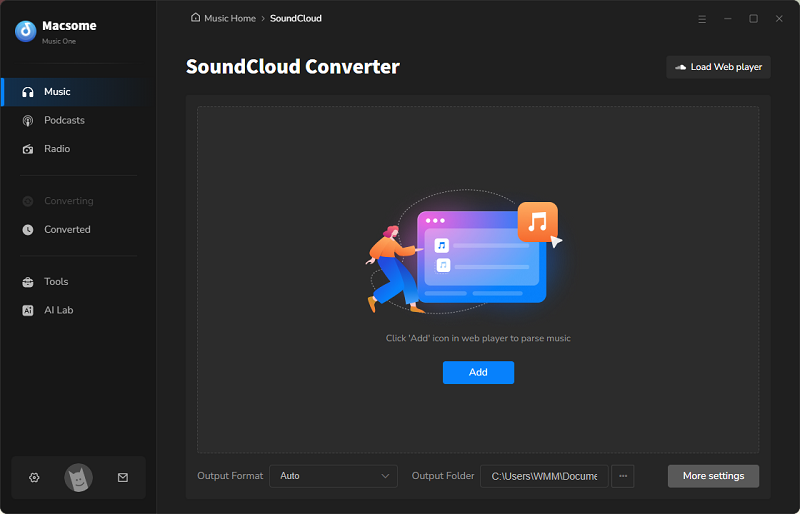
Step 1. Download, install, and launch the Macsome SoundCloud Downloader on your computer. Select the "SoundCloud" module that you want to download from. The SoundCloud website will pop up automatically.
Step 2. To set the output format, click the "Settings" icon in the lower left corner and select MP3, AAC, FLAC, WAV, AIFF, or ALAC. You can also adjust the output quality to 128, 192, 256, or 320 kbps. You can also change the specified local folder as the output path.
Step 3. After adjusting the settings in the SoundCloud web player, select the songs or playlists you want to download. Then, click the "Click to add" button. Macsome supports downloading multiple playlists simultaneously, and you can add more playlists by clicking "Add More."
Step 4. Click the "Convert" button to start the download. Once the download is finished, go to the "History" section on the left and click the folder icon to find your SoundCloud music files.
Part 4. FAQs About SoundCloud Downloader Extensions
1. What is a SoundCloud Downloader Extension?
A SoundCloud downloader extension is a browser add-on that adds a download button to SoundCloud track or playlist pages. This allows you to save MP3 files for offline listening. Popular extensions like Addoncrop and SoundCloud Track Downloader work with browsers such as Chrome, Firefox, and Edge.
2. Is using a SoundCloud Downloader Extension legal?
It is legal to download tracks that the artist has explicitly made available for download, such as those with an official download button or public permission. Downloading copyrighted tracks without permission violates SoundCloud's terms of service and copyright laws. Always respect artists' rights and only use tracks for personal, non-commercial purposes.
3. Are SoundCloud Downloader Extensions safe to use?
Extensions from reputable sources, like official developer sites or browser stores such as the Chrome Web Store or Firefox Add-ons, are generally safe and use client-side processing without third-party data sharing. Stick to well-reviewed extensions, like Addoncrop, and avoid outdated or suspicious ones to prevent malware risks.
4. Can I Download Entire Playlists or Albums Using a SoundCloud Downloader Extension?
Extensions like SCDownloader and SoundCloud Enhanced Pro allow you to download entire playlists or albums. However, other extensions may only allow you to download individual tracks. For more robust options for downloading playlists and albums, consider using a dedicated tool like Macsome SoundCloud Downloader.
5. Why Doesn't My SoundCloud Downloader Extension Work?
Many SoundCloud downloader extensions no longer work due to SoundCloud's shift to AAC-based HLS streams, which broke legacy MP3 download methods. This causes issues like missing download buttons, failed downloads, or corrupted audio. Other common problems include outdated extensions or browser conflicts. To troubleshoot, try refreshing pages, updating or reinstalling the extension, switching browsers, or using tools like Macsome Music One. Always respect artists' permissions and copyright laws by downloading only publicly enabled tracks.
Conclusion
In this guide, we've covered some of the top SoundCloud downloader extensions across various browsers, including Chrome and Firefox. While these browser extensions offer quick solutions, they often come with compatibility issues, download errors, or security risks. For a faster, more reliable, and secure experience, we highly recommend Macsome Music One as the best alternative to traditional SoundCloud downloader extensions. With Macsome Music One, you can effortlessly download SoundCloud tracks and entire playlists in high-quality audio formats, including 320 kbps MP3, without the hassle of browser limitations.
Are you ready to experience hassle-free SoundCloud downloads? Try Macsome Music One and enjoy faster, higher-quality downloads without the limitations of browser extensions. Try it out for yourself by taking advantage of a free trial, and you'll be amazed at how easy it is to save your favorite tracks with just a few clicks!