



 Belinda Raman
"SquidWTF is not working." I am trying to search for a new album to download, but the site is not responding. Does SQUID.WTF still work, or is there a problem with the website? — Reddit user
SQUID.WTF not working? You are not the only one experiencing this issue. Some users have reported problems with SQUID.WTF, including failed searches, unavailable downloads, broken links, or difficulty accessing the service. While SQUID.WTF offers a simple way to find and download music, its availability and performance may change over time.
In this SQUID.WTF review, we will explore what SQUID.WTF is, how it works, its key features, safety concerns, and common issues that may cause it to stop working. We will also introduce reliable SQUID.WTF alternatives for users who want a more stable way to download and manage their music collection.
Part 1. SQUID.WTF Review
1.1 What Is SQUID.WTF?
SQUID.WTF is a browser-based music downloader that allows users to search for and save audio tracks from supported online music sources. Unlike traditional desktop applications, it does not require software installation. Users can access the service through a web browser, search for music, and choose available audio quality options depending on the supported source.
The platform became popular among users who wanted a quick way to access high-quality music files, including lossless formats such as FLAC when available. However, because it relies on online services and third-party integrations, its availability and supported features can change over time.
For users who only need occasional downloads, SQUID.WTF provides a simple and lightweight solution. However, those who manage large music collections may find it lacks some advanced features, such as batch downloading, library management, and consistent support across multiple streaming platforms.
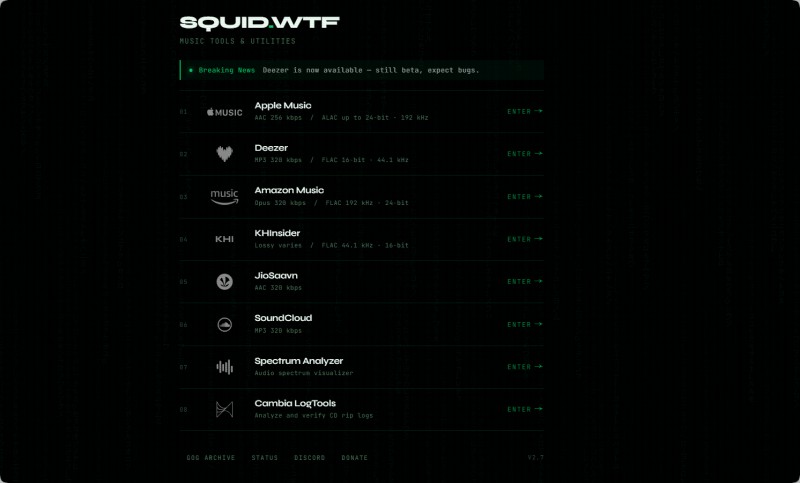
1.2 SQUID.WTF Supported Streaming Platforms
One of the biggest advantages of SQUID.WTF was its support for a wide range of music streaming services, allowing users to access content from multiple platforms through a single website. This made it a popular choice compared to tools that only supported one music service.
However, at the time of writing, most of these streaming platforms have been removed from the SQUID.WTF website. This may also explain why many users are searching for "SQUID.WTF not working" or reporting that the service is no longer functioning as expected. It is currently unclear whether support for these platforms will return in the future.
The table below summarizes the current status of the platforms previously supported by SQUID.WTF.
| Music Service | Quality | Status |
|---|---|---|
| Apple Music | AAC 256 Kbps, ALAC up to 24-bit/192 kHz | Unavailable |
| Deezer | MP3 320 Kbps, FLAC 16-bit/44.1 kHz | Unavailable |
| TIDAL | Lossless FLAC | Unavailable |
| Qobuz | Hi-Res Audio | Unavailable |
| Amazon Music | OPUS 320 Kbps, FLAC 192 kHz/24 bit | Unavailable |
| SoundCloud | MP3 320 Kbps | Unavailable |
| KHInsider | Lossless Game Music | Available |
| Debrid | Unlock links from 80+ hosts | Available |
| JioSaavn | AAC 320 Kbps | Available |
Note: Platform availability is based on our latest review of the SQUID.WTF website and may change in the future if the service is updated.
1.3 Key Features of SQUID.WTF
The main features of SQUID.WTF focus on simplicity and quick access rather than advanced music management. Its notable features include:
- Browser-Based Access: Users can download music directly from a web browser without installing additional software.
- Multiple Audio Sources: Provides access to different music platforms through separate services.
- High-Quality Audio Options: Some supported sources offer lossless FLAC or high-resolution audio options.
- Simple User Experience: The interface is designed for quick searches and individual track downloads.
While these features make SQUID.WTF convenient for casual users, it is not designed as a complete music management solution. Users who need playlist downloads, metadata management, or organized music libraries may require more professional software.
1.4 Pros and Cons of SQUID.WTF
👍 Pros of SQUID.WTF
- ✔ Free online tool with no software installation required
- ✔ Supports multiple music sources in one place
- ✔ Offers access to high-quality audio formats when supported services are available
- ✔ Simple interface suitable for users who need occasional downloads
👎 Cons of SQUID.WTF
- ✘ Many previously supported streaming platforms are no longer available
- ✘ Service availability can be unstable, causing "SQUID.WTF not working" issues
- ✘ Limited features compared with dedicated desktop music download tools
- ✘ No advanced music management features such as batch processing and library organization
- ✘ Reliability depends on third-party music platform availability
Part 2. How Does SQUID.WTF Work?
SQUID.WTF works as a web-based music downloader. Users can select a supported music source, search for songs or albums, and download available files directly through a browser without installing additional software.
The following steps show how to download music with SQUID.WTF using JioSaavn as an example.
Step 1. Open the SQUID.WTF website in your browser and select a supported music service.
Step 2. SQUID.WTF supports multiple music sources, including JioSaavn, KHInsider, and Debrid. In this example, click "JioSaavn" to access the JioSaavn downloader.
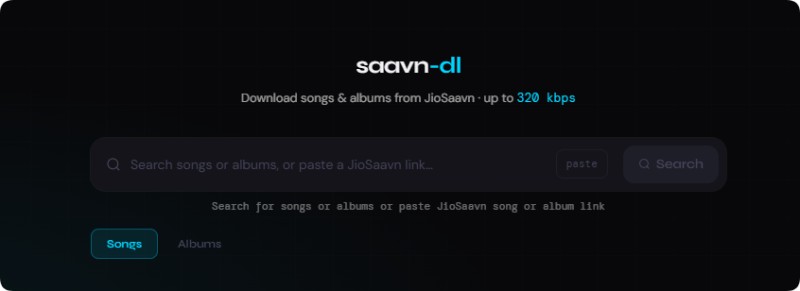
Step 3. Search for songs or albums, or paste a JioSaavn link. SQUID.WTF will process the request and display available download options.
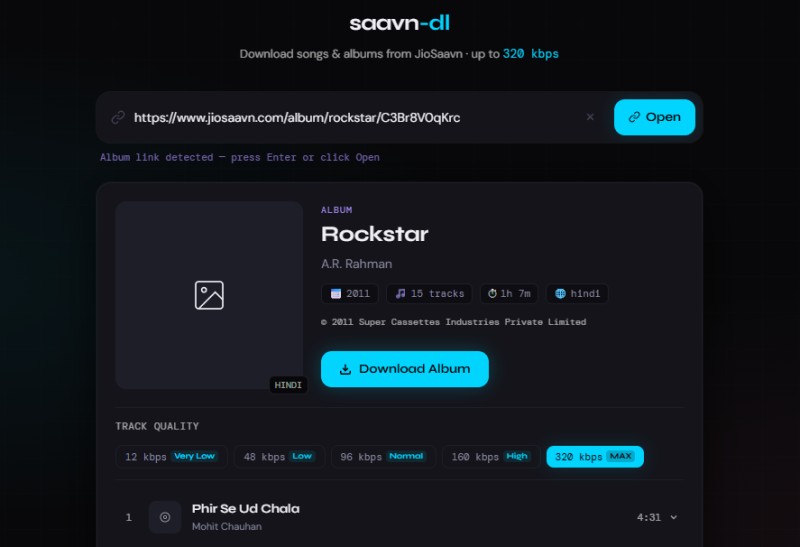
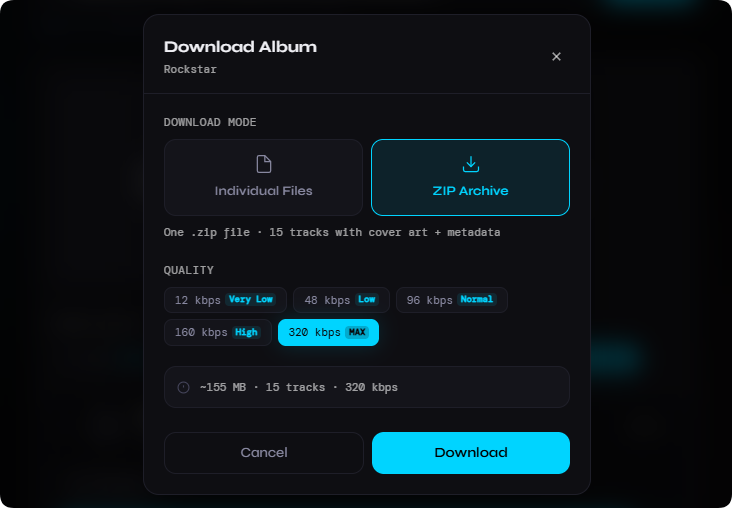
Step 4. Click the "Download Album" button. You can choose to download tracks individually or save the album as a ZIP archive.
Part 3. SQUID.WTF Not Working? Common Issues & Possible Reasons
Although SQUID.WTF was designed as a convenient web-based music downloader, some users may experience problems such as unavailable pages, failed downloads, or missing services. These issues are mainly related to website availability and changes in supported music platforms.
Below are the most common reasons why SQUID.WTF is not working.
❌ Website Is Unavailable
SQUID.WTF is an online service that depends on its website availability. If the server is down or the website cannot be accessed, users may not be able to use its download functions.
🎵 Supported Music Platforms Removed
One of the biggest reasons behind SQUID.WTF not working issues is that many previously supported music platforms are no longer available.
Apple Music, Deezer, TIDAL, Qobuz, Amazon Music, and SoundCloud have been removed from the website at the time of writing.
⚠️ Download Errors
Even when SQUID.WTF loads successfully, users may still encounter failed downloads, missing tracks, or unavailable files when the selected music source is no longer supported.
🌐 Browser or Network Problems
Browser cache, extensions, network restrictions, or temporary connection problems may also prevent SQUID.WTF from working correctly.
⚠️ Summary
SQUID.WTF not working issues are mainly related to changes in supported music services and online service availability. Since SQUID.WTF depends on third-party platforms, its functionality may change over time.
Part 4. Best SQUID.WTF Alternative: Macsome Music One
If SQUID.WTF is not working, becomes unavailable, or no longer supports your preferred streaming services, Macsome Music One is one of the best desktop alternatives. Available for both Windows and Mac, it is an all-in-one streaming music downloader and converter that supports a wide range of platforms, including Spotify, Apple Music, Amazon Music, Deezer, TIDAL, SoundCloud, Qobuz, YouTube Music, and more. It lets you download and convert streaming music while preserving original audio quality.
Unlike web-based tools, Macsome Music One provides a more stable and reliable way to download and manage music. It supports batch downloading and converts streaming songs to MP3, AAC, WAV, FLAC, AIFF, and ALAC while preserving ID3 tags, including titles, artists, albums, and artwork. Whether you want to build an offline music library, transfer songs to a USB drive, edit videos, or find a dependable SQUID.WTF alternative, Macsome Music One offers a complete solution with support for multiple streaming platforms.
Macsome Music One - A Powerful SQUID.WTF Alternative
- Download music from Spotify, Apple Music, Amazon Music, TIDAL, YouTube Music, Deezer, SoundCloud, Qobuz, Pandora, Audible, and more.
- Convert music to MP3, AAC, WAV, FLAC, AIFF, or ALAC while preserving excellent audio quality.
- Save music as MP3 with multiple bitrate options including 128 kbps, 192 kbps, 256 kbps, and 320 kbps.
- Download playlists, albums, and multiple tracks at up to 40x faster speed (Spotify).
- Keep ID3 tags including title, artist, album, cover artwork, and other track information.
- Remove vocals and instruments, edit tags, and export music to iTunes easily.
How to Download Music from Multiple Streaming Platforms with Macsome Music One
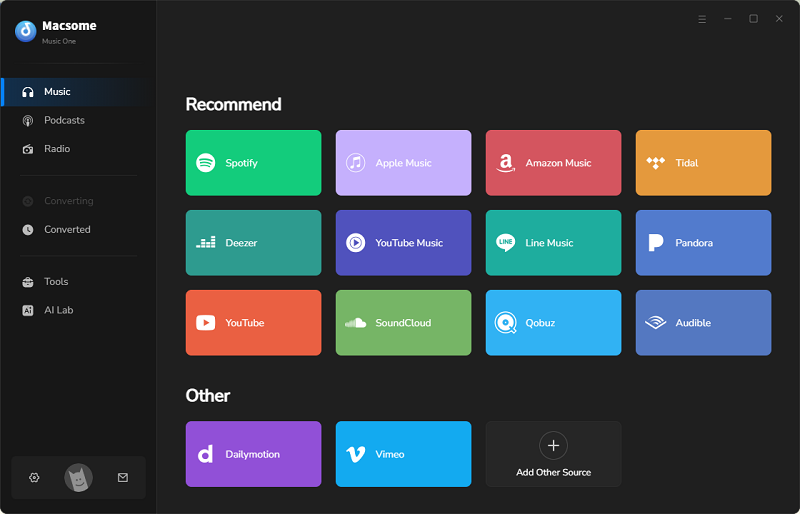
Step 1. Launch Macsome Music One and select the streaming platform you want to download music from, such as Spotify, Apple Music, Amazon Music, TIDAL, or YouTube Music. Log in to your account and access your favorite songs, albums, or playlists.
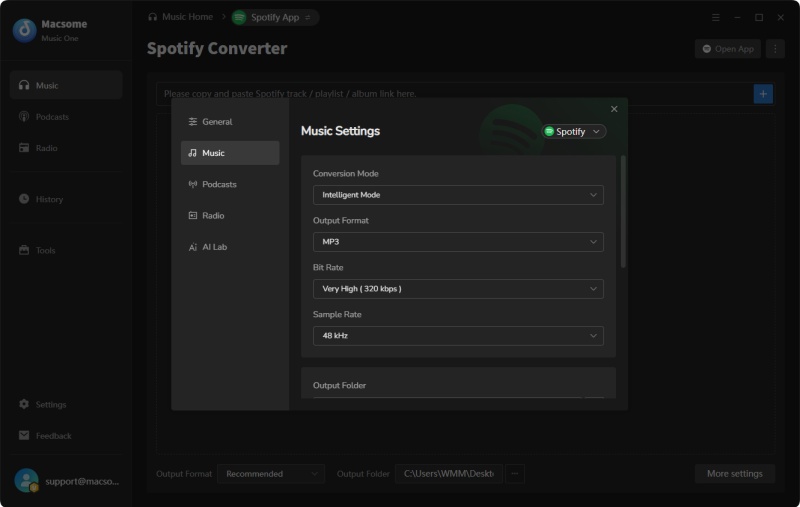
Step 2. Customize your output settings before downloading. You can choose the output format, including MP3, AAC, WAV, FLAC, AIFF, or ALAC, and adjust settings such as bitrate, sample rate, output folder, and file naming options.
Step 3. Open the songs, albums, or playlists you want to save and click the "Click to Add" button. Select the tracks you need and click "Add". Macsome Music One supports batch downloading, allowing you to import multiple playlists or albums at the same time.
Step 4. Click the "Convert" button to start downloading music. After the process is complete, go to "History" > "Folder" to find your downloaded audio files and enjoy offline playback on any compatible device.
Part 5. SQUID.WTF vs Macsome Music One
When comparing SQUID.WTF and Macsome Music One, both solutions allow users to save music for offline listening, but they are designed for different needs. SQUID.WTF is a free browser-based downloader that is suitable for quick and occasional downloads when supported services are available. In comparison, Macsome Music One is a dedicated desktop application focused on reliable music downloading, conversion, and library management across multiple streaming platforms.
| Feature | SQUID.WTF | Macsome Music One |
|---|---|---|
| Type | Free browser-based music downloader | Desktop music downloader and converter for Windows & Mac |
| Supported Platforms | Limited sources, including TIDAL, Qobuz, Amazon Music, SoundCloud, and KHInsider (availability may vary) | Supports Spotify, Apple Music, Amazon Music, TIDAL, YouTube Music, Deezer, Qobuz, SoundCloud, Pandora, Audible, LINE MUSIC, and more |
| Output Formats | AAC, MP3, Opus, and FLAC depending on the available source | MP3, AAC, WAV, FLAC, AIFF, and ALAC |
| Audio Quality | Supports high-quality audio formats when available | Supports high-quality and lossless audio output options |
| Batch Download | Limited availability | Download playlists, albums, and multiple tracks efficiently |
| Music Management | Basic downloading features | Preserves ID3 tags and album artwork, with built-in tag editing and music organization tools |
| Stability & Reliability | Performance depends on online service availability | Dedicated desktop software with regular updates and customer support |
| Best For | Users who need simple and occasional browser-based downloads | Users who want a complete music downloading and management solution |
SQUID.WTF can be a convenient option for users who need quick online downloads. However, if you are looking for a more stable SQUID.WTF alternative with wider platform support, more output formats, batch downloading, and advanced music management features, Macsome Music One provides a more complete solution.
Part 6. FAQ about SQUID.WTF
- Is SQUID.WTF safe to use?
- SQUID.WTF is a third-party unofficial tool, so users should exercise caution. While it generally avoids aggressive malware pop-ups, independent security scanners have flagged the domain as suspicious at times. Avoid entering personal login credentials, and consider using a secure browser environment. For better long-term safety and reliability, many users prefer official desktop software instead.
- Is SQUID.WTF free?
- Yes, SQUID.WTF is completely free to use. There are no paid plans or subscription requirements. However, its free nature also means it has limited support, frequent downtime, and no official customer service.
- Does SQUID.WTF still work in 2026?
- SQUID.WTF works intermittently. Some services (such as JioSaavn or KHInsider) may be available at times, while others like Apple Music, Deezer, Qobuz, Amazon Music, and SoundCloud are frequently blocked or offline. Availability changes without notice due to anti-scraping measures from streaming platforms.
- Is it legal to use SQUID.WTF?
- Downloading copyrighted music without authorization from the rights holders generally violates the terms of service of streaming platforms and may infringe copyright laws in many countries. Users should be aware of the legal risks involved.
- What is the best SQUID.WTF alternative?
- Macsome Music One is currently one of the most reliable SQUID.WTF alternatives. It offers stable downloads from a wide range of platforms, multiple high-quality output formats (including FLAC and ALAC), batch downloading, metadata preservation, and regular software updates.
- Does SQUID.WTF support batch downloading?
- Batch downloading is very limited or often unavailable on SQUID.WTF. Most users can only download individual tracks or single albums when the service is working. Desktop tools like Macsome Music One handle large playlists and libraries much more efficiently.
Conclusion: Is SQUID.WTF Worth Using?
After reviewing SQUID.WTF, it's clear that this browser-based music downloader provides an easy way to download music without installing extra software. It has attracted users interested in accessing high-quality audio from various streaming sources. However, the availability of supported platforms may vary over time.
As discussed in this SQUID.WTF review, the tool has some limitations. Since it relies on third-party streaming services, changes to these platforms can affect its availability and performance when downloading. Users who need a stable solution for building and managing a long-term music library may prefer a more reliable alternative.
For those users, Macsome Music One is a powerful SQUID.WTF alternative that supports multiple streaming platforms, including Spotify, Apple Music, Amazon Music, TIDAL, YouTube Music, Deezer, Qobuz, SoundCloud, Pandora, Audible, and more. It allows users to convert and save music in MP3, AAC, WAV, FLAC, AIFF, and ALAC formats while preserving ID3 tags, album artwork, and original metadata.
Overall, SQUID.WTF can still be a useful choice for users who prefer a free browser-based downloader for occasional use. However, for users who want a more stable way to download and manage music from different platforms, Macsome Music One offers a more dependable long-term solution.