



 Belinda Raman
SoundCloud is one of the most popular platforms for discovering new music, remixes, and podcasts. If you're using an Android phone, you may have noticed that downloading SoundCloud music directly for offline listening isn't straightforward. While users with a SoundCloud Go or Go+ subscription can save tracks for offline use, this feature is often limited and restricted to the app.
Many users want a simple way to download SoundCloud songs to Android as MP3 files without restrictions. In this tutorial, you'll learn multiple methods to download SoundCloud music to Android, including the official option and a few trusted tools that make the process fast, safe, and beginner-friendly.
- 🎵 Part 1. Can You Download Music from SoundCloud on Android?
- 📲 Part 2. Official Method: Download SoundCloud Music on Android for Offline Listening
- 🌐 Part 3. Using Online Tools to Download Songs from SoundCloud to Android
- 🆓 Part 4. Free Download: SoundCloud Songs on Android via Mod APKs
- 🤖 Part 5. Download SoundCloud Songs on Android via Telegram Bots
- 🚀 Part 6. Transfer SoundCloud Songs to Android with Macsome Music One–Highly Recommended
- ❓ Part 7. FAQs About Downloading SoundCloud Songs to Android
Part 1. Can You Download Music from SoundCloud on Android?
Not exactly - at least, not the way most people expect. SoundCloud does let you listen offline on your Android, but here's the catch: it only works inside the app. Even if you have a SoundCloud Go or Go+ subscription, the tracks you download aren't saved as regular audio files, so you can't share, transfer, or play them outside the app. And that's not all—a lot of tracks on SoundCloud don't even have an official download button.
But don't worry! In this guide, we'll show you how to save your favorite tracks for offline listening. We'll cover the official offline streaming method and other safe, easy-to-use tools that let you download SoundCloud songs as MP3s. By the end, you'll be able to listen anywhere, anytime—even without the app.
Part 2. Official Method: Download SoundCloud Music on Android for Offline Listening
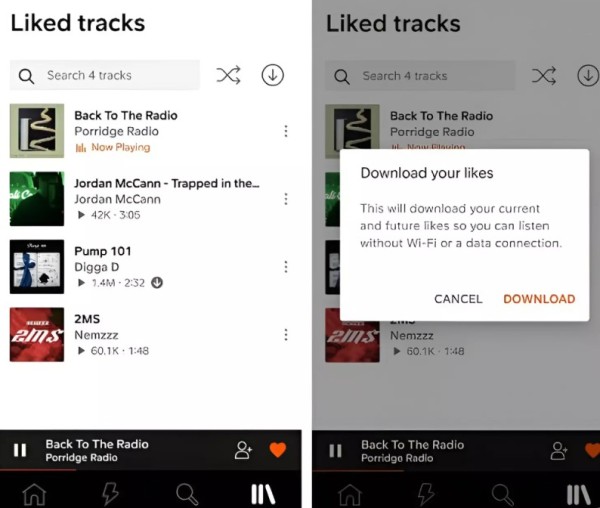
SoundCloud's official app provides a convenient option for offline listening, but it comes with clear limitations. Only users with an active SoundCloud Go or Go+ subscription can save tracks for offline playback, and those tracks are stored exclusively within the SoundCloud app. Free users cannot download songs on mobile devices at all. In fact, even for free users on desktop, downloads are only available when the track uploader has explicitly enabled the download option.
- Step 1. Open the SoundCloud app on Android, go to your profile, and upgrade to Go or Go+.
- Step 2. Search for songs or playlists. Look for the download icon (a downward arrow) on eligible tracks, but only if the artist allows it.
- Step 3. Tap the three-dot menu on a track or playlist, then select "Save for Offline." This caches the content for subscribers.
- Step 4. Go to your Library and select "Offline listening" to play music without an internet connection.
Part 3. Using Online Tools to Download Songs from SoundCloud to Android
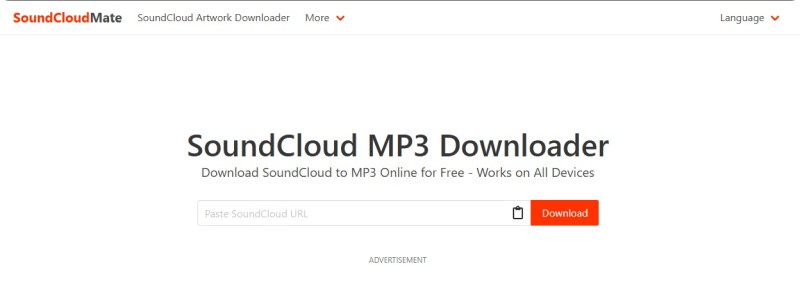
Several online SoundCloud downloader tools claim to let you download music directly to your Android device. These no-install options work in a mobile browser by converting SoundCloud URLs into MP3 files, with sites like ScloudDownloader, SoundCloudRips, and SoundCloudMate being common examples. However, such tools are often unstable, heavily ad-supported, and may pose risks such as malware infections or data privacy concerns.
Next, we will use SoundCloudMate as an example to show you how to download SoundCloud music to your Android devices using free online tools.
- Step 1. Find the track or playlist you want to download on SoundCloud.
- Step 2. Visit SoundCloudMate.com. And paste the copied URL into the input field. Click the "Download" button. The website will process the link and convert the audio into an MP3 file.
- Step 3. Once the conversion is complete, a download link will appear. Click "Download MP3" to save the file to your device. Use an antivirus app, such as Avast, to scan the file.
Part 4. Free Download: SoundCloud Songs on Android via Mod APKs
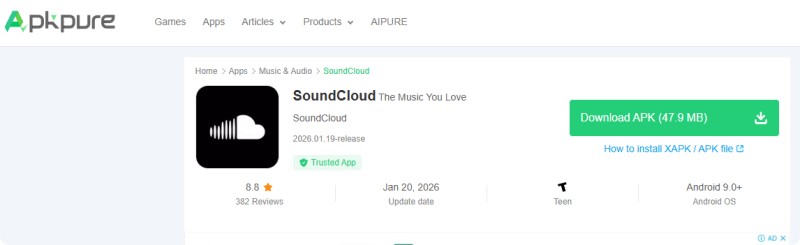
Some users turn to modified (Mod) SoundCloud APKs to unlock free download features. These unofficial apps claim to enable premium functions, such as offline listening, without requiring a SoundCloud Go+ subscription, and are often distributed on sites like APKDone or APKPure. However, using SoundCloud Mod APKs requires sideloading cracked software, which carries significant security risks and may violate copyright laws and SoundCloud's terms of service.
Step-by-Step Guide to Download SoundCloud Songs via SoundCloud Mod APKs
- Step 1. Go to Settings > Security > Install Unknown Apps and enable your browser.
- Step 2. Search for "SoundCloud Mod APK" and download it from a semi-trusted site, such as APKPure.com. Open the APK file and install it. Uninstall the official SoundCloud app first, if needed.
- Step 3. Open the Mod APK on your Android device and log into your account. Search for tracks and tap "Download" for offline access. The files are saved within the app.
Part 5. Download SoundCloud Songs on Android via Telegram Bots
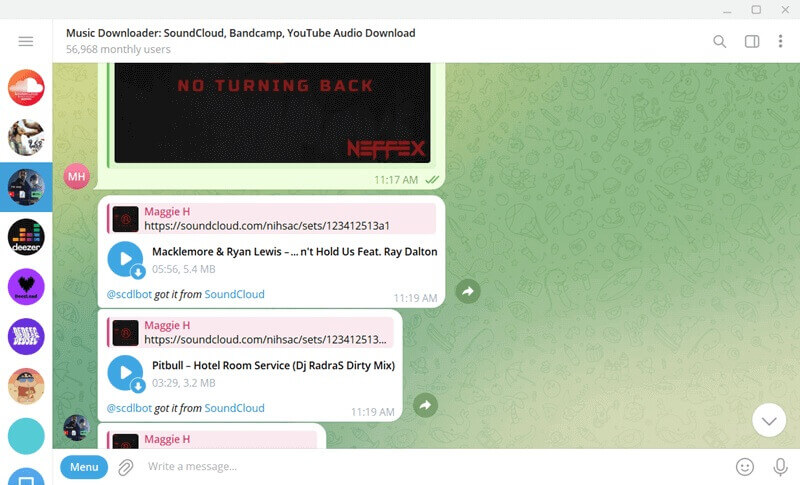
Another workaround is to use Telegram bots, such as @scloud_bot or @scdlbot, which provide a chat-based way to download SoundCloud tracks. They're free and work on Android without requiring any additional installations beyond Telegram.
- Step 1. Download and install Telegram from Google Play on your Android device if not already installed.
- Step 2. Search for a SoundCloud downloader bot, such as @scdlbot, @MusicsHuntersBot, or @scloud_bot.
- Step 3. Send the URL of the SoundCloud track to the bot. The bot will then send you an MP3 file. Tap the download arrow to save the file to your device. Then, move the file to your music library.
Part 6. Transfer SoundCloud Songs to Android with Macsome Music One
Unlike online downloaders, Mod APKs, or Telegram bots, Macsome Music One offers a stable, secure, and professional solution for downloading SoundCloud music and transferring it to Android devices. Instead of relying on unreliable third-party websites or pirated apps that often fail or pose security risks, Macsome functions as a dedicated desktop SoundCloud downloader. It enables you to download SoundCloud tracks, albums, and playlists in bulk and save them as high-quality MP3 files at up to 320 kbps while fully preserving ID3 tags, album artwork, and track information. With no ads, pop-ups, or download interruptions, Macsome delivers a smooth and consistent experience and gives you full control over your SoundCloud music library on Android.
In addition, Macsome Music One supports both SoundCloud free and paid accounts and allows you to download music in multiple lossless and high-quality formats, including AAC, WAV, FLAC, AIFF, and ALAC, without quality loss. This makes it easy to transfer your downloaded SoundCloud music not only to Android phones but also to other mobile devices and media players. Beyond SoundCloud, Macsome Music One also supports downloading music from other major streaming platforms, such as Spotify, Apple Music, Tidal, Qobuz, and Amazon Music, making it an all-in-one solution for managing offline music across devices.
Key Features of Macsome Music One
- Support downloading songs from SoundCloud, Spotify, Apple Music, Tidal, YouTube Music, Qobuz, etc.
- Convert SoundCloud music to MP3, AAC, WAV, FLAC, AIFF, or ALAC.
- Support batch downloading at up to 10x faster speed and remove ads from the free version.
- Almost all the ID3 tags will be preserved, including title, album, and artist.
- Preserve the original quality of the tracks after download.
- Suitable for both SoundCloud Go+ and Free accounts.
- Free download podcasts, radios, convert local files, edit tags, etc.
How to Download SoundCloud Music and Transfer It to Android with Macsome Music One?
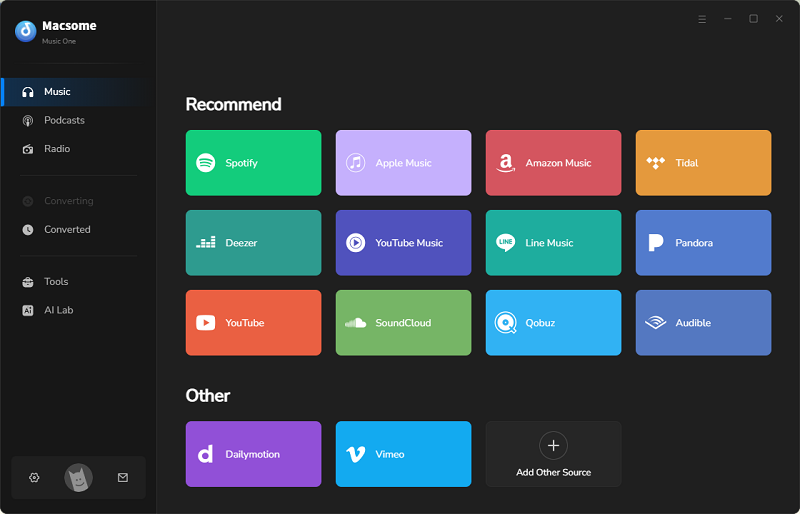
- Step 1. Download, install, and launch Macsome Music One on your Windows or macOS computer. Choose SoundCloud as the music source. The SoundCloud web player will open automatically. If it does not, click "Open Web Player" and sign in to your SoundCloud account.
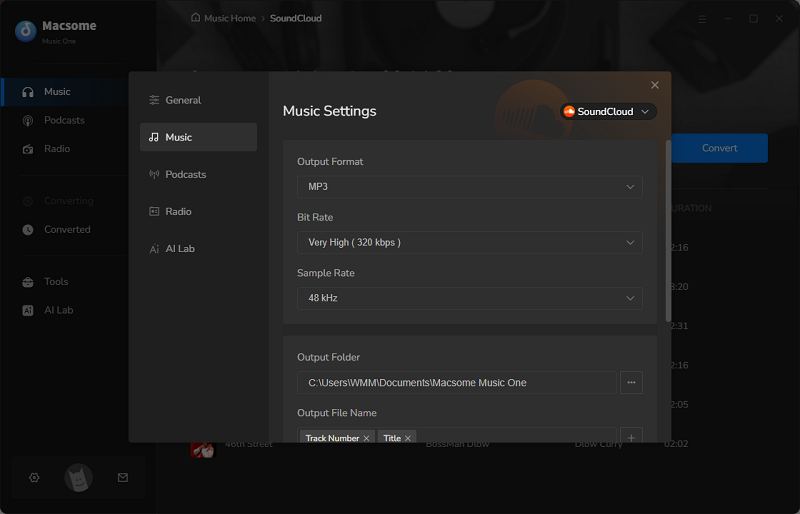
- Step 2. Click the Settings icon in the lower-left corner to configure the output settings. Select MP3 as the output format and choose your preferred audio quality (128 kbps, 192 kbps, 256 kbps, or 320 kbps). You can also set a local folder as the download destination for easy transfer later.
- Step 3. In the SoundCloud web player, browse and select the tracks, albums, or playlists you want to download. Click the "Click to add" button to add them to the conversion list.
- Step 4. Click "Convert" to start downloading SoundCloud music to your computer. Once the download is complete, open the "History "section and click the "Folder" icon to locate the downloaded files.
- Step 5. Connect your Android device to the computer via USB cable, or use cloud storage to transfer the downloaded SoundCloud music to your Android phone or tablet. After transferring, you can listen to the songs offline on Android using any music player—no SoundCloud app or subscription required.
Part 7. FAQs About Downloading Songs from SoundCloud to Android
- Can I download songs directly from SoundCloud to my Android phone?
- Yes, but only in limited cases. Some artists allow the download option for their tracks on SoundCloud. If this option is available, you can download the song directly. However, most tracks do not offer direct downloads.
- Is it possible to download SoundCloud songs as MP3 files on Android?
- SoundCloud does not offer an option to download tracks as MP3 files on Android unless the artist enables downloads. Users typically rely on third-party tools like Macsome Music One on a computer to save songs as MP3 files for permanent offline use and then transfer the files to Android.
- Why can't I find a Download button on most SoundCloud tracks?
- The download button only appears when the uploader enables downloads. Since most artists choose to stream their content only, this option is often unavailable.
- What should I do if SoundCloud downloads are not working?
- Try checking your internet connection and confirming that the track allows downloads. You can also clear your browser's cache, switch browsers, or use a more stable desktop solution instead of an online downloader.
Conclusion
There are several ways to download SoundCloud songs on Android, including the official offline listening feature, online downloaders, Mod APKs, and Telegram bots. However, each method has its limitations. The official SoundCloud app restricts downloads to in-app playback, while many third-party tools may be unstable, offer limited audio quality, or pose security and copyright risks.
For a stable, high-quality, and long-term solution, Macsome Music One is a reliable choice for downloading SoundCloud music on Android. It allows you to download SoundCloud tracks in high-quality formats (320 kbps MP3 and lossless FLAC), store them locally, and transfer them to any Android phone or tablet for unrestricted offline playback—without app limitations or subscription dependency.
Download SoundCloud music in high quality and enjoy true offline playback on Android with Macsome Music One.