



 Wyatt Maxwell
Want to convert Spotify to MP3 and enjoy your favorite tracks offline anytime, anywhere?
Spotify is one of the world's most popular music streaming platforms, offering millions of songs, albums, and podcasts. But streaming alone doesn't always match how listeners want to enjoy music. Many users wish they could save tracks permanently, transfer them between devices, and play them without opening the Spotify app.
Although Spotify Premium supports offline listening, downloaded songs are stored in encrypted Ogg Vorbis format. They remain locked within the Spotify ecosystem and cannot be exported, shared, or used with MP3 players, car audio systems, or professional DJ software. For this reason, more users are seeking practical ways to save Spotify tracks as MP3 for offline listening.
This guide walks you through the most practical methods to convert Spotify to MP3, explains how each approach works, compares their pros and cons, and helps you choose the most efficient solution to enjoy your music anytime, anywhere.
- 🎧 Why Do People Want to Convert Spotify to MP3?
- 🏆🛡️ Method 1: Convert Spotify to MP3 Using Professional Spotify Converter (Recommended)
- 🌐 Method 2: Convert Spotify to MP3 Using Online Spotify Converters
- 🤖 Method 3: Download Spotify to MP3 via Spotify Telegram Bots
- 💻 Method 4: Convert Spotify to MP3 Using GitHub Open-Source Tools
- 🎙️ Method 5: Save Spotify Music as MP3 via Audio Recorder Software
- ❓ Common FAQs About Converting Spotify to MP3
- 🏁 Conclusion: What Is the Best Way to Convert Spotify to MP3 in 2026
Why Do People Want to Convert Spotify to MP3?
Spotify Premium allows offline listening, but downloaded songs are not standard audio files. They are encrypted cache files that can only be played inside the Spotify app, and once your subscription expires, those downloads become inaccessible.
For this reason, many users look for ways to convert Spotify music to MP3. Spotify does not offer official MP3 downloads, and all tracks are streamed in encrypted Ogg Vorbis format. This prevents direct use on MP3 players, car audio systems, or other devices.
Fortunately, it is possible to convert Spotify to MP3 using third-party tools. Each method works differently, offering varying levels of speed, quality, and reliability. Understanding these options is essential before choosing the solution that best fits your needs.
Method 1: Convert Spotify to MP3 Using Professional Spotify Converter
The most efficient way to convert Spotify music is by using a professional Spotify to MP3 converter. Tools like Macsome Spotify Downloader let you quickly download your favorite songs, playlists, albums, podcasts, and audiobooks directly from Spotify to standard MP3, AAC, FLAC, WAV, AIFF, or ALAC files. You can preserve high-quality output (up to 320 kbps and Spotify HiFi), keep album art, lyrics, and other metadata intact, and even download multiple tracks at once. Best of all, these tools work for both free and Premium Spotify users, making offline access and cross-device playback simple and hassle-free.
Key Features of Macsome Spotify Downloader
- Download Spotify songs, playlists, audiobooks, and podcasts with high quality.
- Convert Spotify songs to MP3, AAC, WAV, FLAC, AIFF, or ALAC.
- Download music from both the Spotify app and the Spotify web player.
- Download music from the Spotify web player without logging in.
- Customize the quality of your output of Spotify songs at up to 320 kbps.
- One-click to burn CDs & Import Spotify songs to Apple Music.
- Play Spotify music offline with both Spotify Free and Premium users.
- Support batch downloading Spotify music at up to 40x faster speed.
- Almost all the ID3 tags will be preserved.
How to Convert Spotify Music to MP3 with Macsome Spotify Downloader
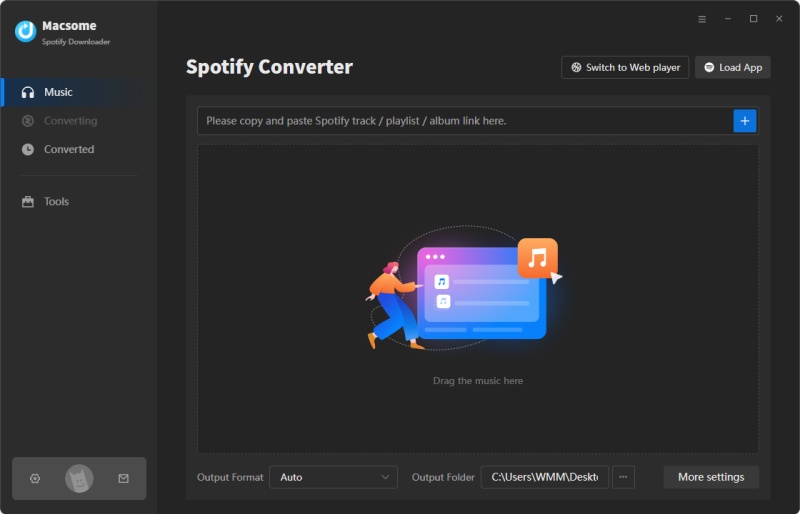
- Step 1. Download, install, and launch the Macsome Spotify Downloader on your computer. It supports converting Spotify music to MP3 from both the desktop application and the web player. Here, we'll use the app mode as an example. Once selected, the app will open automatically. Simply sign in to access your library.
- Step 2. Open the Spotify app and select the playlist you want to download. Click the "Click to add" button to load the tracks into Macsome. Then, click "Add" to include them in the conversion list. To download multiple playlists at once, click "Add More" and repeat the process for each additional playlist.
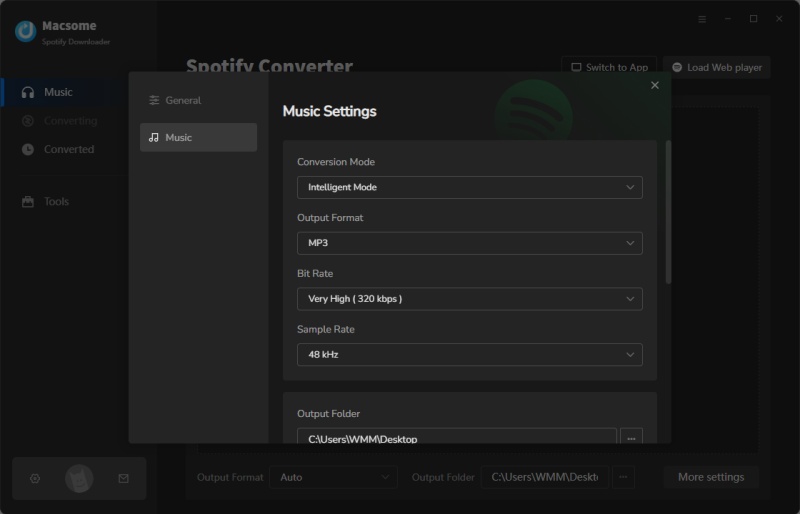
- Step 3. Click "Settings" in the lower left corner, and then choose MP3 as the output format. You can also choose from other formats, including AAC, WAV, FLAC, AIFF, and ALAC. Customize your Spotify files by adjusting audio parameters such as the bit rate (up to 320 kbps). Macsome also allows you to change the output folder, file names, and file organization for easier management.
- Step 4. Finally, click "Convert" to start downloading your Spotify tracks as MP3s. Once the conversion is complete, open the "History" tab to view your downloaded songs. Click the "Folder" icon to find the files on your computer. Now, you can transfer your Spotify MP3s to any device and enjoy them offline anytime.
🛠️ If you use the Spotify web player mode, you can download Spotify to MP3 without logging in.
Pros:
- Download Spotify songs, albums, playlists, audiobooks, and podcasts locally.
- Convert Spotify music to MP3, FLAC, WAV, AIFF, AAC, or ALAC.
- Preserves original audio quality; supports 320kbps MP3, FLAC, ALAC, etc.
- Free tools: CD burner, ID3 tag editor, audio converter, and more.
- Converted Spotify songs can be transferred to various devices for offline playback.
- Clean, secure, and professional desktop software.
Cons:
- No web-based version, must be installed on a computer.
- The free trial is limited; full features require a paid license.
Method 2: Convert Spotify to MP3 Using Online Spotify Converters
If you want a quick, no-install solution, online Spotify to MP3 converters can be very convenient. Just paste a Spotify track or playlist link into the tool, and you can download MP3 files from Spotify directly through your browser. Most of these tools are easy to use and often free, making them perfect for casual users who only need a few songs.
That said, online converters have some limitations. For example, many don't support downloading entire playlists or albums at once, so you may need to download tracks individually. Common issues include ads, pop-ups, and file size restrictions. Some tools also offer lower audio quality or take longer to process larger playlists. In the next section, we'll highlight the most widely used and reliable online Spotify-to-MP3 converters that can support downloading playlists or albums as ZIP files.
#1. SpotiDownloader.com
SpotiDownloader (formerly SpotifyDown.com) is a free online Spotify to MP3 converter designed for users who want to download tracks without installing software. One of its biggest advantages is the ability to download entire playlists at once. Rather than saving songs one by one, users can download an entire Spotify playlist at once. All tracks are packaged into a ZIP file for easy storage and transfer. The songs are downloaded as MP3s at 320 kbps.
How to Convert Spotify Music to MP3 with SpotiDownloader
- Step 1. Open the Spotify app, or the Spotify website in your browser. Open the songs, albums, or playlists you'd like to download in MP3. Click the "Three Dots" and click "Share" button. Select "Copy link to Track/Playlist/Album."
- Step 2. Visit SpotiDownloader Spotify to MP3 converter. And paste the link, solve the captcha.
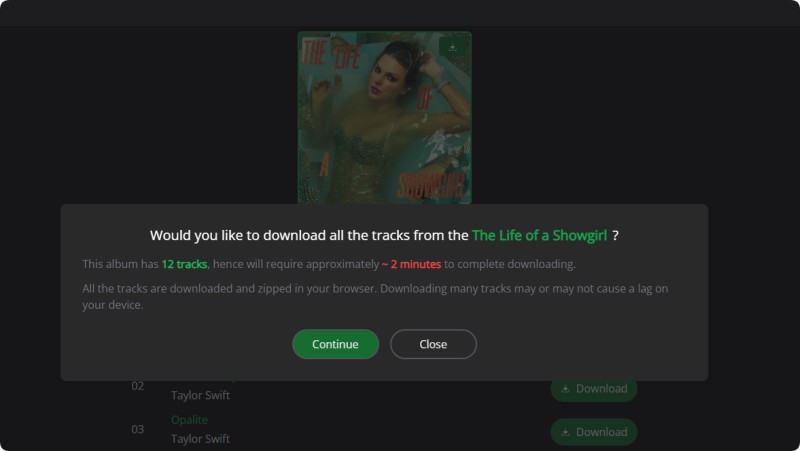
- Step 3. Click the "Download ZIP" button. A window will pop up asking if you would like to download all the tracks from the album/playlist. Click "Continue." The download will begin. Once the download is complete, you can save all the tracks as a ZIP file to your device.
#2. Spotidown.co
Spotidown.co is another free online Spotify to MP3 converter that supports playlist batch downloads. Users can convert Spotify tracks, albums, and playlists into MP3 files directly from their browser. One of its key highlights is the ability to package multiple songs into a single ZIP archive, which makes it easier to download, organize, and back up large music collections. This lightweight tool requires no installation and works across desktop and mobile browsers. The downloaded files include metadata such as album art, title, artist, and year.
How to Use SpotiDown Spotify to MP3 Converter
- Step 1. Open the Spotify app or website and locate the album you want. Copy the Spotify song, album, or playlist URL.
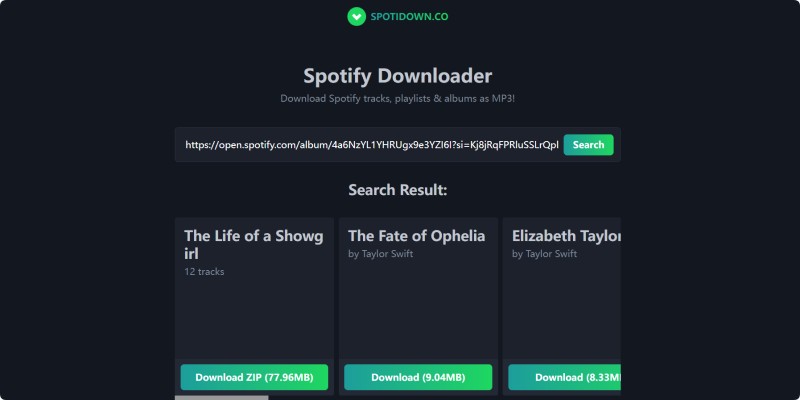
- Step 2. Visit the Spotidown.co converter page. Paste the Spotify link into the search field.
- Step 3. Click "Search" and wait for the tool to process the link.
- Step 4. Once the results appear, click "Download ZIP" to download the entire album or playlist, or click "Download" next to individual tracks. After the process is finished, click "Save ZIP" to save the file to your device.
Pros and Cons of Free Online Spotify Converters
Pros:
- Download Spotify tracks, playlists, and albums as MP3s.
- Downloaded MP3s with metadata retained, such as title, artist, or cover.
- It is free and requires no installation or subscription.
Cons:
- The actual output quality is lower than claimed.
- Most sites include ads and pop-ups, which can be annoying and distracting for users.
Method 3: Download Spotify to MP3 via Spotify Telegram Bots
Spotify Telegram bots offer a quick, no-install method for converting Spotify to MP3, which is especially useful for mobile users. Simply paste a Spotify track or playlist link into a Telegram chat. The bot will process the request and send back downloadable MP3 files. Since Telegram is all you need, there’s no need to use external websites or install desktop software, making this method convenient for casual, on-the-go downloads.
How to Convert Spotify to MP3 Using Spotify Telegram Bots (e.g., @SpotyBot)
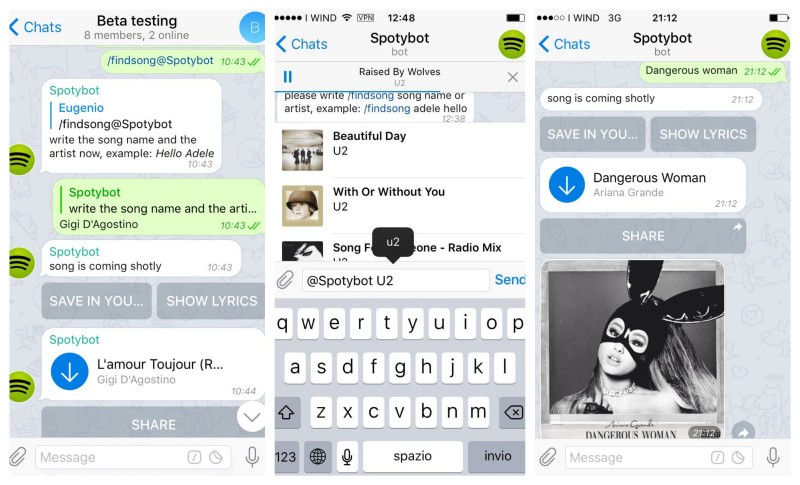
- Step 1. Launch the Telegram app and use the search bar to find a Spotify downloader bot, such as @SpotyBot. Open the bot chat and tap Start to activate it.
- Step 2. Go to Spotify, find the song (or playlist) you want to download, tap Share > Copy Link, and copy the URL.
- Step 3. Paste the Spotify link into the Telegram chat and send it. The bot will analyze the link and begin processing the request.
- Step 4. The bot matches the Spotify track with its audio source, converts it into MP3 format, and prepares the download file.
- Step 5. Once processing is complete, the bot sends the MP3 file directly in chat. You can tap "Download/Save" to store it on your device.
Pros and Cons of Using Spotify Telegram Bots
Pros:
- Works entirely inside the Telegram app without extra software.
- Ideal for downloading Spotify tracks directly on smartphones or tablets.
- Just paste a Spotify link and receive the MP3 file in chat.
- Most Telegram bots do not charge fees.
Cons:
- Bitrate and output quality may vary by bot.
- Many bots restrict daily downloads or file sizes.
- Large playlists may fail or require track-by-track downloads.
Method 4: Convert Spotify to MP3 Using GitHub Open-Source Tools
If you prefer a customizable, developer-driven approach, the open-source Spotify-to-MP3 tools on GitHub provide a powerful alternative. These projects are usually command-line or script-based solutions that allow you to download and convert Spotify tracks using public metadata and external audio sources. After installing the tool and configuring the necessary dependencies, you can paste Spotify track or playlist links to download and convert the music into MP3 files locally. This method appeals to advanced users who want more control over the output format, bitrate, file naming, and automation workflows.
How to Convert Spotify to MP3 with GitHub Spotify Downloader
SpotDL is a free, open-source tool that downloads Spotify playlists and music. Read on to learn how to convert Spotify to MP3 with spotDL.
- Step 1. Install Python (or Node.js, depending on the tool) and FFmpeg. Then install the tool via pip/npm or download it from GitHub.
- Step 2. Some tools require API credentials (e.g., Spotify Developer keys) or initial configuration for audio quality, output folder, and format.
- Step 3. Copy a Spotify track, album, or playlist URL.
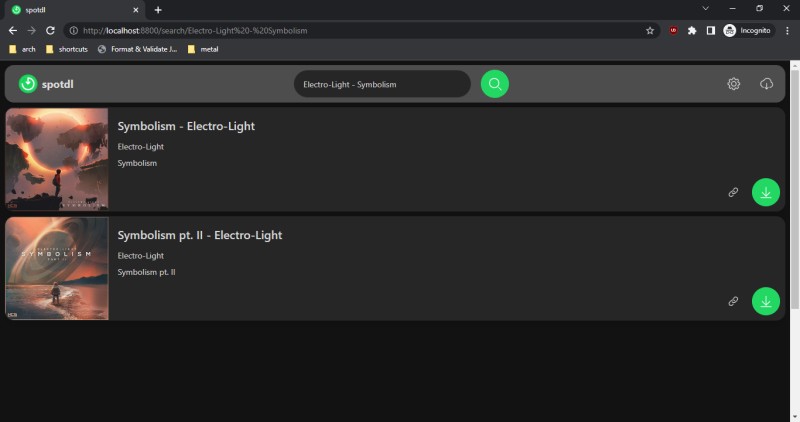
- Step 4. Example with spotDL/spotify-downloader. Run the command
spotdl [Spotify urls]. The tool scans metadata, finds matching audio sources, and queues downloads.- Step 5. Audio is downloaded and transcoded to MP3 locally, with metadata tags, cover art, and filenames applied.
Pros:
- No license fees; source code is transparent and customizable.
- Supports bulk playlist/album downloads via command line.
- Automatically embeds title, artist, album, and cover art.
- Control bitrate, format (MP3, M4A, FLAC), and file structure.
Cons:
- Installation involves Python/Node.js, FFmpeg, and dependencies.
- Not beginner-friendly compared to GUI tools.
- Audio quality depends on matched external sources, not Spotify originals.
- Incorrect versions (remix/live) may be fetched.
Method 5: Save Spotify Music as MP3 via Audio Recorder Software
If you want a universal, source-independent method, audio recorder software offers a reliable way to save Spotify music as MP3. Unlike link-based converters, recorders capture the sound directly from your system as the music plays. The main drawback is that tracks must be recorded in real time, making albums or playlists time-consuming. Output quality depends on your recording settings and system audio, and improper setup can cause noise or interruptions.
How to Save Spotify as MP3 via Audio Recorder
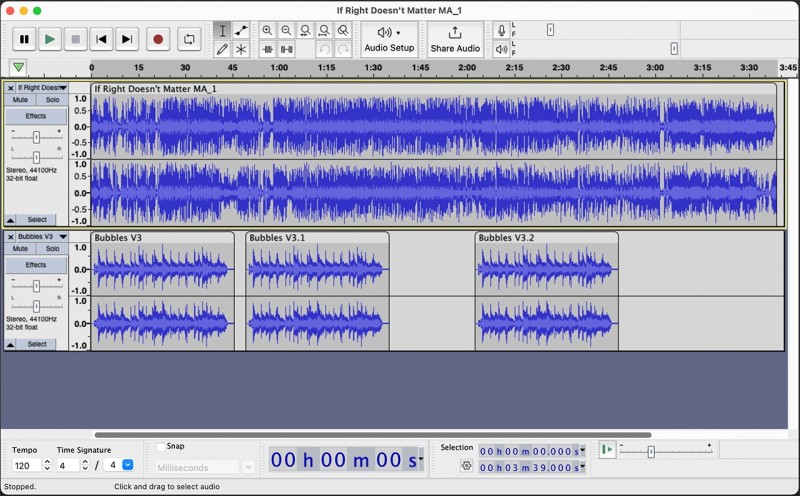
Audacity is one of the most popular audio recording apps. Let's learn how it works.
- Step 1. Download and install Audacity along with the FFmpeg library (optional for additional format export). Launch Audacity after installation.
- Step 2. In Audacity's device toolbar, set the recording input to System Audio / Stereo Mix / WASAPI Loopback (Windows) or use a virtual audio driver like BlackHole / Soundflower (Mac). This allows Audacity to capture Spotify’s playback sound directly.
- Step 3. Set the project sample rate (e.g., 44.1 kHz) and choose your preferred recording channels (Stereo recommended). You can also monitor input levels to avoid clipping.
- Step 4. Press Record in Audacity, then play the Spotify track or playlist. Audacity will capture the audio waveform in real time as the music plays.
- Step 5. After playback ends, click Stop. You can trim silence, split tracks, normalize volume, or apply noise reduction if needed.
- Step 6. Go to File > Export > Export as MP3, choose bitrate settings, edit metadata tags (artist, album, title), and save the final MP3 file locally.
📌 The recording quality depends on the system's audio configuration and the bitrate of the Spotify stream. Using lossless recording settings before exporting to MP3 helps preserve better final quality.
Pros:
- Records directly from playback without link limitations.
- Export Spotify music recordings to MP3, WAV, FLAC, etc.
- Captures the exact audio being played.
- Supports desktop app and web player.
Cons:
- Long recordings may need editing.
- Slow for large playlists or albums.
- Notifications or system sounds may be captured.
- Bitrate and system audio affect output.
Common FAQs About Converting Spotify to MP3
- Does Spotify offer an official way to download MP3 files?
- No, Spotify does not offer MP3 downloads. Even with Spotify Premium, offline downloads are encrypted cache files in the Ogg Vorbis format that can only be played within the Spotify app.
- Do I need Spotify Premium to convert to MP3?
- Not necessarily. Many third-party converters work with both free and premium accounts because they access the stream or metadata instead of relying on official downloads. However, Premium often yields better quality and faster processing with some tools.
- Is it safe to use Spotify to MP3 converters?
- Using Spotify to MP3 converters can be safe if you choose reputable software from official sources like Macsome Spotify Downloader. However, many free online tools and cracked programs carry risks, such as malware, data theft, and account security issues. To stay safe, avoid untrusted websites, don't share your Spotify login information with unknown services, and keep your antivirus software active.
Conclusion: What Is the Best Way to Convert Spotify to MP3 in 2026
After reviewing all five methods, one thing is clear: there is no one-size-fits-all solution. The best way to convert Spotify to MP3 depends on your priorities—audio quality, conversion speed, or the number of songs you need to download. Professional Spotify converters remain the most reliable option. They support the batch downloading of playlists and albums, maintain the original ID3 tags, and export high-quality MP3 files. This makes them ideal for users who want a stable, long-term solution with minimal quality loss.
Other options can still be useful in specific situations. Online converters and Telegram bots are convenient for quick, one-off downloads, but they often come with ads, slower processing, and limited playlist support. For advanced users, GitHub tools and audio recorders offer more control, though they require extra setup and manual work. Overall, if you prioritize speed, bulk conversion, and consistent output quality, a dedicated tool like Macsome Spotify Downloader remains the most efficient and future-proof option, while browser-based tools are better suited for light, occasional use.