



 Wyatt Maxwell
Spotify users who want to download music without installing software may come across SpotiSongDownloader, a free online Spotify downloader that allows users to save Spotify tracks directly from a web browser. Its simplicity and convenience make it an appealing option, but how well does it actually perform? Can it provide reliable downloads and satisfactory audio quality, and are there any limitations or safety concerns users should be aware of?
In this SpotiSongDownloader review, we tested the tool extensively to evaluate its download performance, audio quality, ease of use, safety, and overall reliability. We'll take a closer look at its features, discuss its pros & cons, and help you decide whether it's the right option for your needs. We'll also introduce a desktop alternative that delivers more consistent performance and higher-quality audio output.
Part 1. What is SpotiSongDownloader
🌐 SpotiSongDownloader.com
Recommendation: ★★★★☆ (4/5)
SpotiSongDownloader is a free web-based tool that lets users save Spotify songs, albums, and playlists as MP3 or M4A files without installing software or subscribing to Spotify Premium. It supports five MP3 quality options ranging from 64 kbps to 320 kbps, as well as M4A output. In our tests, downloaded files retained basic ID3 tags, including song title, artist, album, cover artwork, genre, release year, and track number.
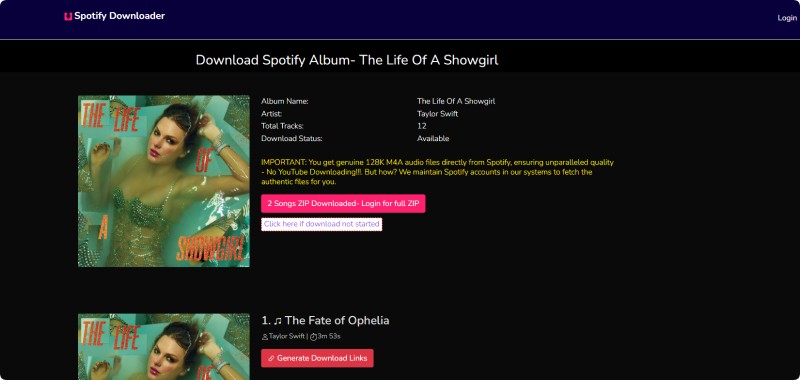
Despite its convenience, the free version comes with several important limitations. Although the website claims to support ZIP downloads for playlists and albums, only the first two tracks in each ZIP archive are available without logging in. The downloaded ZIP file was also empty except for a page prompting us to log in to unlock the "Full ZIP" feature. After signing in, we found that full ZIP downloads require a paid subscription starting at about $7.99 per month. In addition, some newly released albums were unavailable for download during our testing. As a result, free users must download songs individually, one track at a time.
Core Features & Highlights of SpotiSongDownloader
- ✅ Browser-based Spotify downloader with no installation required.
- ✅ Supports downloading Spotify songs, albums, and playlists.
- ✅ Offers MP3 downloads up to 320 kbps, plus M4A output.
- ✅ Compatible with Windows, macOS, Linux, Android, and iOS devices.
- ✅ Easy to use—just paste a Spotify link and download.
- ✅ No Spotify Premium subscription required.
- ✅ Preserves basic song metadata and album artwork.
- ✅ Completely free for basic downloading.
Pros and Cons of SpotiSongDownloader
Pros
- No software installation or Spotify Premium subscription required.
- Supports both MP3 (64-320 kbps) and M4A output formats.
- Allows users to choose from five MP3 quality levels.
- Preserves basic ID3 tags, including title, artist, album, cover art, genre, year, and track number.
- Simple browser-based interface that's easy to use.
Cons
- Free users can only download songs individually.
- Playlist and album ZIP downloads require a paid subscription despite the login prompt.
- Some newly released albums were unavailable during our testing.
- Empty ZIP files may be generated before upgrading to a premium plan.
- Batch downloading is not available in the free version.
Part 2. How to Download Spotify Music Using SpotiSongDownloader
We tested SpotiSongDownloader during our review to evaluate its performance. The tool works well for individual tracks, but playlist and ZIP downloads showed clear limitations. Here's how the process works step by step.
- Step 1. Copy the Spotify Playlist URL: Go to Spotify and copy the link of the song, album, or playlist you want to download.
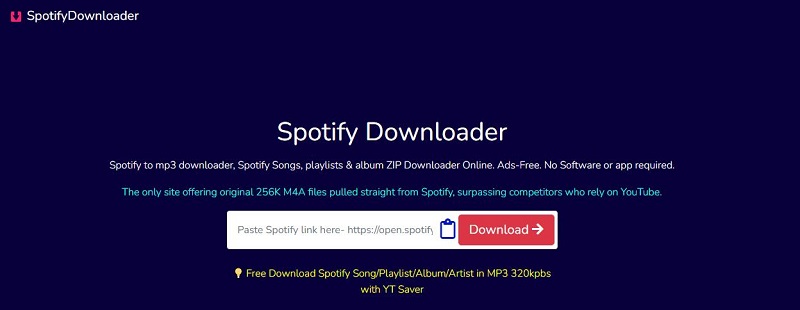
- Step 2. Paste the URL into SpotiSongDownloader: Open SpotiSongDownloader in your browser, paste the Spotify URL into the input box, and click the Download button. Depending on your network environment, you may be required to complete a security check before proceeding.
- Step 3. Process the Download: After processing, SpotiSongDownloader redirects you to a track or playlist page where you can see all available songs. For batch downloads, look for the Download ZIP button. However, in our tests, ZIP downloads were unreliable and often returned an empty file with a login prompt instead of the actual archive. For individual downloads, click Generate Download Link and choose your preferred format, including MP3 (64 kbps to 320 kbps) or M4A.
- Step 4. Save the Files: Once processed, the track is saved to your device automatically. In our testing, individual downloads were generally stable, while batch downloads frequently triggered login or upgrade prompts.
Part 3. Is SpotiSongDownloader Safe to Use?
SpotiSongDownloader is generally safe for basic single-track downloads since it does not require users to install software or enter Spotify login credentials. However, during our testing, we found several usability and safety concerns that users should be aware of before using the service.
1. Third-party redirects during downloads
In some cases, clicking the “Download 320 kbps MP3” button redirected us to external third-party websites instead of initiating a direct download. This can be confusing and may expose users to unrelated pages or additional prompts.
2. Hidden upgrade and login restrictions
Although the tool appears free at first, we frequently encountered prompts requiring account registration or a paid subscription when attempting ZIP or playlist downloads. In some cases, full ZIP access was locked behind a paywall that was not clearly disclosed upfront.
3. No official affiliation with Spotify
Since SpotiSongDownloader is not officially associated with Spotify, there is no guarantee regarding long-term reliability, data handling practices, or service stability. This is common among third-party download tools, but it is still worth considering.
4. Ads and external content risks
Users may also encounter external links during use. These elements do not affect functionality directly but may reduce trustworthiness for some users.
Overall verdict: SpotiSongDownloader is suitable for quick, single-track downloads, but it is not fully transparent or consistent for batch downloading. Users should be cautious of redirects, upgrade prompts, and any third-party interactions during use.
Part 4. Best Alternative for High-Quality Spotify Downloads
During our testing of SpotiSongDownloader, the biggest issue wasn't the interface or download speed—it was the unpredictability of results. Some tracks downloaded successfully in seconds, while others failed, redirected to upgrade pages, or produced empty ZIP files. This inconsistency makes it difficult to rely on for regular Spotify downloading.
Because of these limitations, many users eventually look for a more stable solution that doesn't depend on browser-based workflows or third-party redirects. Macsome Spotify Downloader offers a more consistent approach. Instead of relying on web-based processing, it downloads Spotify music directly from Spotify, which improves stability and reduces failed tasks.
It supports batch downloading of playlists, albums, podcasts, and audiobooks, converts Spotify tracks to MP3, AAC, WAV, FLAC, AIFF, and ALAC formats, and preserves full metadata, including album art and track details. This makes it a more dependable option for users who need large-scale or repeatable Spotify downloads.
Key Features of Macsome Spotify Downloader
- Download Spotify songs, playlists, albums, podcasts, and audiobooks in high quality.
- Convert Spotify music to MP3, AAC, WAV, FLAC, AIFF, or ALAC formats.
- Support downloads from both the Spotify desktop app and Spotify web player.
- Batch download playlists and albums at up to 40x faster speed.
- Customize output quality up to 320 kbps.
- Preserve ID3 tags including title, artist, album, cover art, and track information.
- Built-in tools for CD burning, format conversion, and Apple Music import.
- Compatible with both Spotify Free and Premium accounts.
Step-by-Step Guide to Download Spotify Music to 320 kbps MP3 with Macsome
Unlike browser-based tools such as SpotiSongDownloader, Macsome Spotify Downloader provides a more stable desktop-based workflow that avoids common issues like redirect pages, failed ZIP downloads, or inconsistent playlist processing. Below is how it works in practice.
Step 1. Launch Macsome Spotify Downloader
Download, install, and open Macsome Spotify Downloader on your computer. The tool supports both the Spotify app and web player modes. In this guide, we use the web player mode for convenience. Once launched, the Spotify web player opens automatically, allowing you to sign in and access your library. You can also use the tool without logging in depending on your preference.
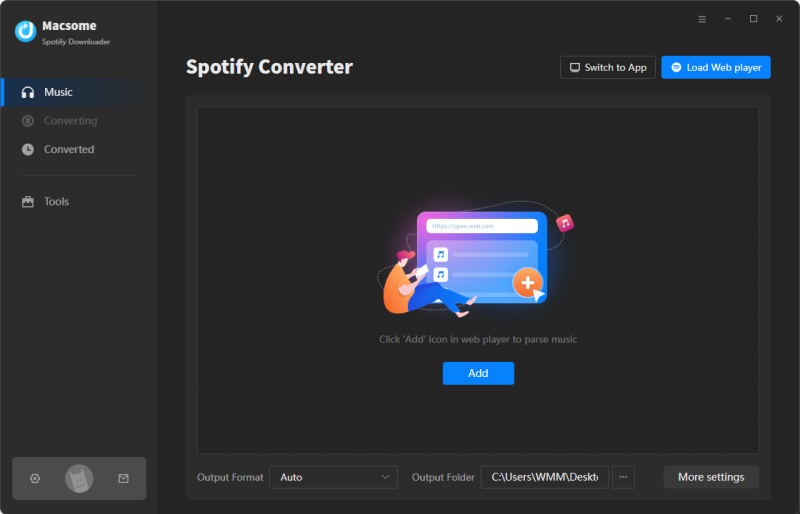
Step 2. Add Spotify Music to Macsome
Browse your Spotify playlists or albums in the built-in web player. Click the "Click to add" button to load tracks into Macsome, then click "Add" to add them to the conversion list. You can also use "Add More" to batch import multiple playlists or albums at once, which is a key advantage over online Spotify downloaders.
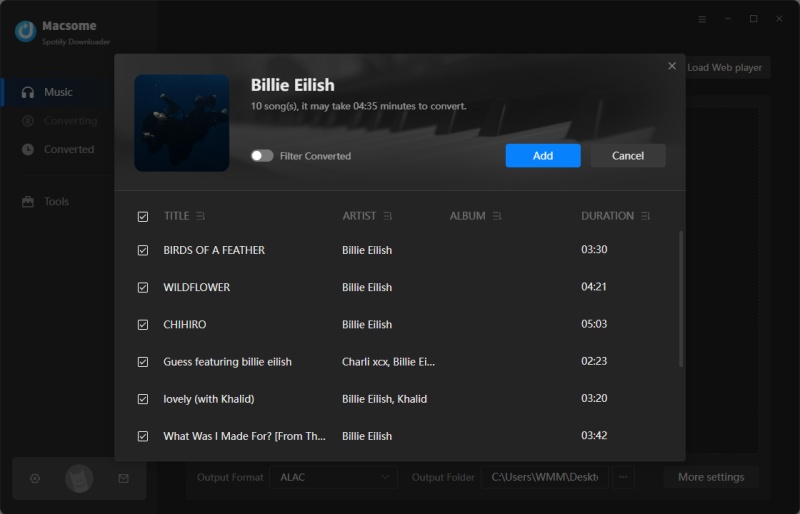
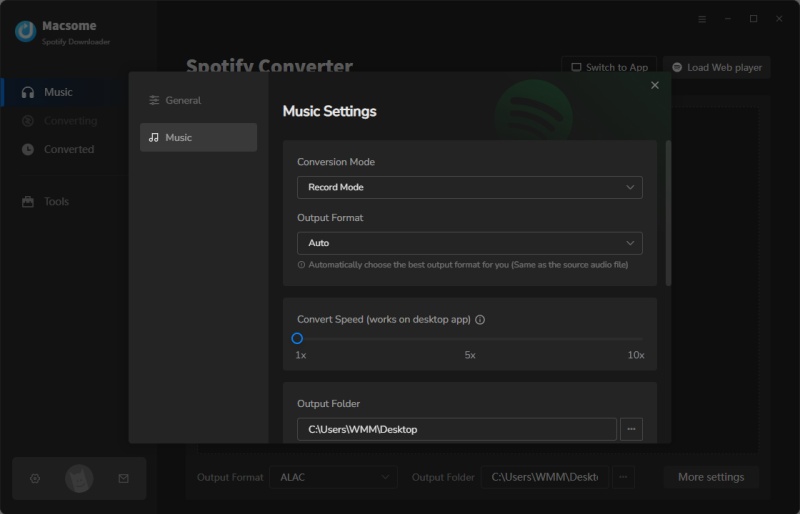
Step 3. Set MP3 as Output Format
Click Settings and choose MP3 as the output format. You can also select AAC, WAV, FLAC, AIFF, or ALAC depending on your needs. Macsome allows you to customize audio quality up to 320 kbps and adjust file naming and output folders for better organization.
Step 4. Start Downloading Spotify Music
Once everything is ready, click Convert to start downloading Spotify tracks. Unlike web-based tools, Macsome processes downloads locally on your computer, which improves stability and reduces failures during batch conversion.
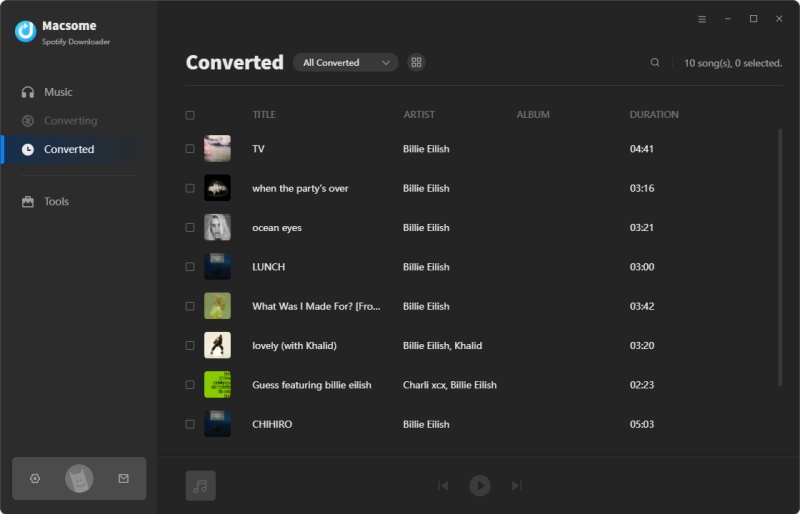
Step 5. Locate and Manage Downloaded Files
After conversion is complete, go to the History tab to view all downloaded songs. Click the Folder icon to locate files on your computer. You can now transfer your Spotify MP3 files to any device for offline listening.
Part 5. FAQs About SpotiSongDownloader
- Is SpotiSongDownloader free to use?
- SpotiSongDownloader offers free access for basic downloads. However, during our testing, we found that some features, such as full playlist and ZIP downloads, may require a login or a paid upgrade.
- Can I download Spotify playlists with SpotiSongDownloader?
- The tool supports playlist downloads in theory, but in practice, the free version is limited. Users may only be able to download individual tracks, and full playlist ZIP downloads can be restricted or require payment.
- Does SpotiSongDownloader support 320 kbps MP3 downloads?
- Yes, it provides multiple quality options up to 320 kbps MP3, along with M4A format. However, availability may vary depending on the track and processing results.
- Why are some Spotify songs not available for download?
- During our testing, we found that some newly released songs or albums were not available. This is likely due to limitations in how the tool processes and matches Spotify content.
- Why does the ZIP download not work properly?
- In some cases, ZIP downloads may be incomplete, restricted, or redirect users to a login or upgrade page. Full ZIP functionality often requires a paid subscription.
- Is it legal to use SpotiSongDownloader?
- The legality of using SpotiSongDownloader depends on local copyright laws and Spotify's terms of service. In many regions, downloading copyrighted music without proper authorization may fall into a legal grey area. Users are responsible for ensuring compliance with applicable laws before using such tools.
- What is the best alternative to SpotiSongDownloader?
- For users who need more stable performance, batch downloading, and full metadata support, desktop tools like Macsome Spotify Downloader offer a more reliable long-term solution compared to browser-based downloaders.
Final Verdict
In this SpotiSongDownloader review, our testing shows that the tool can handle basic single-track downloads reasonably well, especially for users who only need occasional access to Spotify music without installing any software. However, the overall experience is not consistent. During our evaluation, we encountered failed downloads, restricted or empty ZIP files, unexpected redirects to external pages, and upgrade prompts that were not always clearly communicated. These issues become more noticeable when attempting to download playlists or albums.
For light or occasional use, SpotiSongDownloader may still be acceptable. However, it is not a reliable choice for users who need stable batch downloading or long-term Spotify music management.
For users who want a more reliable and long-term solution, Macsome Spotify Downloader is a dedicated desktop application that supports batch downloading of playlists, albums, podcasts, and audiobooks, converts Spotify tracks into multiple formats, and preserves full ID3 metadata. This makes it ideal for building a complete offline Spotify library without interruptions or failed downloads.