



 Wyatt Maxwell
Spotify is one of the world's most popular music streaming services, offering millions of songs, albums, and playlists. However, Spotify does not provide a direct way to export music as standard audio files, which has led many users to explore third-party tools like SpotDL. As one of the most popular open-source Spotify downloaders on GitHub, SpotDL allows users to download Spotify tracks, playlists, and albums through a command-line interface.
But is SpotDL really worth using? Is SpotDL safe and legal? How does SpotDL work, and what should you do if SpotDL is not working? In this comprehensive SpotDL review, we will explore its features, advantages and disadvantages, installation process, common problems, and limitations. We will also compare SpotDL with a user-friendly SpotDL alternative for those looking for an easier way to manage and download their music.
Table of Contents
Part 1. SpotDL Review
1.1 What is SpotDL
SpotDL (also known as spotdl) is a free, open-source Spotify downloader hosted on GitHub. Built with Python, it is a command-line tool designed for Windows, macOS, and Linux users who want to manage their Spotify music libraries locally. SpotDL allows users to process Spotify tracks, albums, and playlists, making it a popular choice among developers and advanced users who prefer lightweight and customizable solutions.
Unlike traditional desktop music converters, SpotDL works through a command-line interface instead of a graphical user interface. It retrieves Spotify metadata, including song titles, artists, album information, cover artwork, and lyrics, while creating organized local music files. With playlist support, metadata preservation, and automatic synchronization features, SpotDL provides a practical solution for users who want offline listening and local music management.
Overall Rating
Ease of Use
Features
Performance
Compatibility
8.1
Overall Score
Recommended for advanced users| Project Type | Open-source Spotify downloader |
|---|---|
| Hosting | GitHub |
| Platforms | Windows, macOS, Linux |
| Pricing | Free |
| Main Function | Download Spotify tracks, albums, and playlists |
| Audio Formats | MP3, M4A, OPUS |
| Metadata | Song title, artist, album art, lyrics |
| Playlist Support | Yes |
| Playlist Sync | Yes |
| Best For | Developers and advanced users |
1.2 How Does SpotDL Work?
Unlike traditional music converters, SpotDL does not work by directly downloading audio streams from Spotify. Instead, it uses Spotify links to identify songs and retrieve track information, then searches for matching audio sources to create local music files.
During this process, SpotDL can preserve important music details such as song titles, artists, album information, cover artwork, and lyrics. This makes it easier for users to organize their downloaded music libraries.
How SpotDL Processes Spotify Music
1
Spotify Metadata
SpotDL reads Spotify URLs and collects information such as track names, artists, albums, and artwork.
2
Audio Matching
It searches available sources for a matching audio version of the requested track.
3
Local Music File
The downloaded file is organized with metadata, cover artwork, and other information.
Because SpotDL relies on external audio sources, download availability and audio quality may vary between different tracks. This is one of the main limitations users should consider when evaluating SpotDL.
1.3 Key Features of SpotDL
SpotDL includes a wide range of features that make it one of the most popular open-source Spotify downloaders. Below are its most notable capabilities.
- ✅ Download Spotify Songs, Albums, and Playlists - Easily download individual tracks, complete albums, and entire Spotify playlists for offline listening.
- ✅ Preserve Metadata - Automatically saves song titles, artists, album names, cover artwork, and lyrics to keep your music library well organized.
- ✅ Multiple Audio Formats - Supports MP3, M4A, and OPUS output formats, with audio quality depending on the available source.
- ✅ Playlist Synchronization - Detects changes in Spotify playlists and downloads only newly added tracks instead of downloading the entire playlist again.
- ✅ Cross-Platform Compatibility - Works on Windows, macOS, and Linux, allowing users to enjoy the same experience across different operating systems.
- ✅ Free and Open Source - Hosted on GitHub, SpotDL is completely free to use and continuously improved by the open-source community.
1.4 SpotDL Pros and Cons
Like any Spotify downloader, SpotDL has both strengths and limitations. While its open-source nature and flexibility make it appealing to advanced users, its command-line interface and setup process may not be ideal for everyone. Here's a quick overview of the main advantages and disadvantages of SpotDL.
Pros
- Completely free and open-source.
- Supports downloading Spotify songs, albums, and playlists.
- Preserves ID3 tags, album artwork, and metadata.
- Supports batch downloading for playlists and albums.
- Available on Windows, macOS, and Linux.
- Lightweight with flexible command-line options.
- Actively maintained by the open-source community.
Cons
- Requires Python and command-line knowledge to install and use.
- No graphical user interface, making it less beginner-friendly.
- Download success depends on external audio sources.
- Audio quality may vary depending on the available source.
- May occasionally fail to download certain songs or playlists.
- Only supports Spotify and does not work with other streaming services.
- Troubleshooting can be difficult for non-technical users.
Part 2. How to Use SpotDL to Download Spotify Music
After learning what SpotDL is and how it works, the next step is setting up the tool and downloading Spotify music. Since SpotDL is a command-line application, users need to install Python and complete a few configuration steps before downloading songs, albums, or playlists.
2.1 How to Install SpotDL on Windows, macOS, and Linux
SpotDL is built with Python, so Python must be installed before setting up SpotDL. The installation process is similar across Windows, macOS, and Linux.
Step 1. Install Python
First, check whether Python is already installed on your computer. Open Command Prompt on Windows or Terminal on macOS/Linux, then run:
python --versionIf Python is not installed, download the latest version from the official Python website and complete the installation.
Step 2. Install SpotDL
After Python is installed, open your command-line tool and run the following command:
pip install spotdlStep 3. Verify SpotDL Installation
To make sure SpotDL has been installed successfully, check the installed version:
spotdl --versionIf the version number appears, SpotDL is ready to use.
2.2 How to Download Spotify Songs, Albums, and Playlists with SpotDL
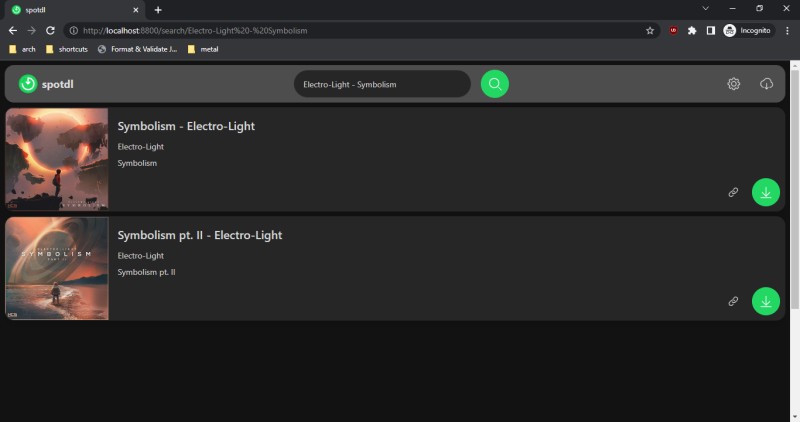
SpotDL can download Spotify tracks, albums, and playlists by using Spotify links. After installation, simply copy a Spotify URL and run the corresponding command.
Download a Spotify Song
Copy the Spotify song URL and enter:
spotdl "Spotify song URL"Download a Spotify Playlist
To download an entire Spotify playlist, use:
spotdl "Spotify playlist URL"Download a Spotify Album
SpotDL also supports downloading complete Spotify albums:
spotdl "Spotify album URL"View Advanced Settings
Advanced users can customize output formats, file naming, and other download options with additional commands.
spotdl --helpThis command shows all available SpotDL options and configuration settings.
2.3 Common SpotDL Problems and Fixes
Although SpotDL is a powerful open-source Spotify downloader, some users may encounter installation errors, compatibility issues, or download failures. Here are common problems and solutions.
| Problem | Possible Solution |
|---|---|
| SpotDL command not found | Make sure Python and SpotDL are installed correctly. You may need to reinstall SpotDL or add Python to your system PATH. |
| SpotDL installation failed | Update Python and pip, then run the installation command again. |
| Spotify playlist download failed | Check the Spotify URL, network connection, and whether the playlist is publicly accessible. |
| Downloaded audio quality is lower than expected | SpotDL quality depends on available audio sources and configuration settings. |
| SpotDL stops working | Update SpotDL to the latest version because changes to external services may affect compatibility. |
Part 3. Is SpotDL Safe and Legal?
Before using any Spotify downloader, many users want to know whether it is safe, trustworthy, and legal. Since SpotDL is an open-source command-line tool, it is important to understand how it works and what potential risks users should consider.
3.1 Is SpotDL Safe to Use?
SpotDL is generally considered safe to use when downloaded from trusted sources, such as the official project repository. As an open-source application, its source code is publicly available for review.
However, users should avoid downloading SpotDL from unofficial websites or unknown sources, as modified versions may include unwanted software or security risks. The official SpotDL project is available on GitHub, where users can access the latest releases and source code: SpotDL official GitHub repository.
To keep your computer safe, follow these basic precautions:
- Download SpotDL only from trusted sources.
- Keep Python and SpotDL updated to the latest versions.
- Avoid unofficial installers or modified versions.
- Use reliable antivirus software when installing third-party applications.
3.2 Is SpotDL Legal?
The legality of using SpotDL depends on how you use the downloaded content and the copyright laws in your country.
SpotDL itself is only a software tool. However, downloading copyrighted music without permission may violate copyright laws or the terms of service of music platforms.
Users should make sure they have the necessary rights or permissions before saving and using downloaded audio files.
3.3 Does SpotDL Contain Malware or Viruses?
The official version of SpotDL does not contain malware or viruses when obtained from trusted sources. Because it is open-source, the code can be reviewed by the community.
Most security concerns come from unofficial downloads, fake installers, or modified versions distributed by unknown websites.
| Question | Answer |
|---|---|
| Is SpotDL a virus? | No. The official SpotDL project is not known to contain malware when downloaded from trusted sources. |
| Is SpotDL free? | Yes. SpotDL is a free and open-source Spotify downloader. |
| Does SpotDL require Spotify Premium? | SpotDL works differently from Spotify's official offline download feature and is not a replacement for Spotify Premium downloads. |
| Is SpotDL beginner-friendly? | Not always. Since SpotDL uses command-line commands, beginners may find the setup process more complicated than desktop applications. |
3.4 Should You Use SpotDL?
SpotDL is a powerful option for users who are comfortable with command-line tools and want a free, open-source Spotify downloader.
However, it may not be the best choice for everyone. Users who prefer a simple interface, batch downloads, audio format conversion, and easier music management may prefer a desktop Spotify downloader.
Our Verdict
SpotDL is a safe and useful open-source tool for advanced users, but its command-line workflow may feel complicated for beginners. If you want a simpler way to download and manage Spotify music, exploring a user-friendly SpotDL alternative may be a better choice.
Part 4. Best SpotDL Alternatives for Spotify Downloads
Although SpotDL is a powerful open-source Spotify downloader, it may not be the best option for every user. The command-line interface, Python installation requirements, and troubleshooting process can be challenging for beginners.
For users who prefer a simpler solution, a desktop Spotify downloader with a graphical interface can provide a more convenient experience. Macsome Spotify Downloader is one of the best SpotDL alternatives, offering an easier way to download Spotify songs, playlists, audiobooks, and podcasts without using complicated commands.
With Macsome Spotify Downloader, users can convert Spotify music to MP3, AAC, WAV, FLAC, AIFF, and ALAC formats, export high-quality audio up to 320kbps MP3, and preserve important music information, including ID3 tags, lyrics, and album artwork. Its batch downloading feature also allows users to save multiple Spotify tracks and playlists efficiently.
Why Choose Macsome Spotify Downloader?
- Download Spotify songs, playlists, audiobooks, and podcasts in high quality.
- Convert Spotify music to MP3, AAC, WAV, FLAC, AIFF, and ALAC formats.
- Support both the Spotify app and the Spotify web player modes.
- Export audio up to 320kbps MP3 with customizable output settings.
- Preserve ID3 tags, lyrics, and album artwork for better music organization.
- Batch download Spotify playlists with organized output files.
SpotDL vs Macsome Spotify Downloader: Which Is Better?
| Feature | SpotDL | Macsome Spotify Downloader |
|---|---|---|
| User Interface | Command-line based | Simple graphical interface |
| Installation | Requires Python and dependencies | Standard software installation |
| Ease of Use | Better for advanced users | Suitable for beginners |
| Output Formats | Depends on configuration | MP3, AAC, WAV, FLAC, AIFF, ALAC |
| Batch Downloads | Supported through commands | One-click playlist and album downloads |
| Music Management | Requires additional configuration | Preserves ID3 tags, lyrics, and album artwork |
How to Download Spotify Playlists with Macsome
Follow these simple steps to download Spotify playlists and songs with Macsome Spotify Downloader.
Step 1. Launch Macsome Spotify Downloader
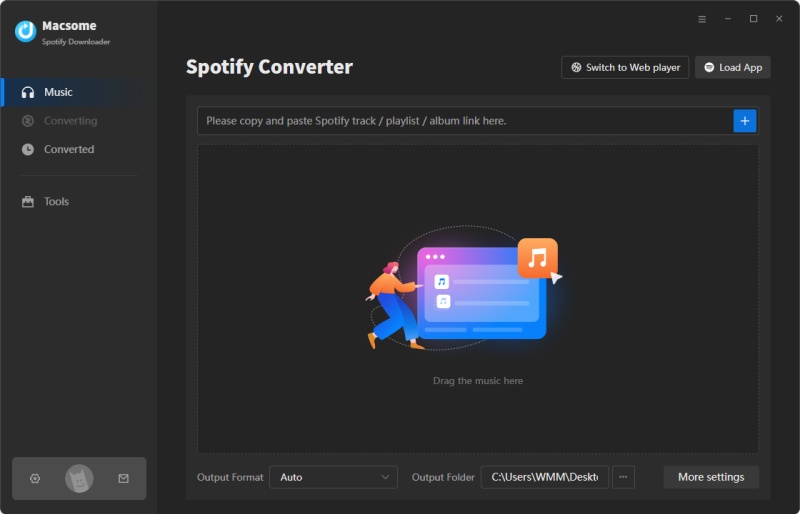
Install and open Macsome Spotify Downloader on your computer. You can choose either Spotify app mode or Spotify web player mode. This guide uses Spotify app mode as an example.
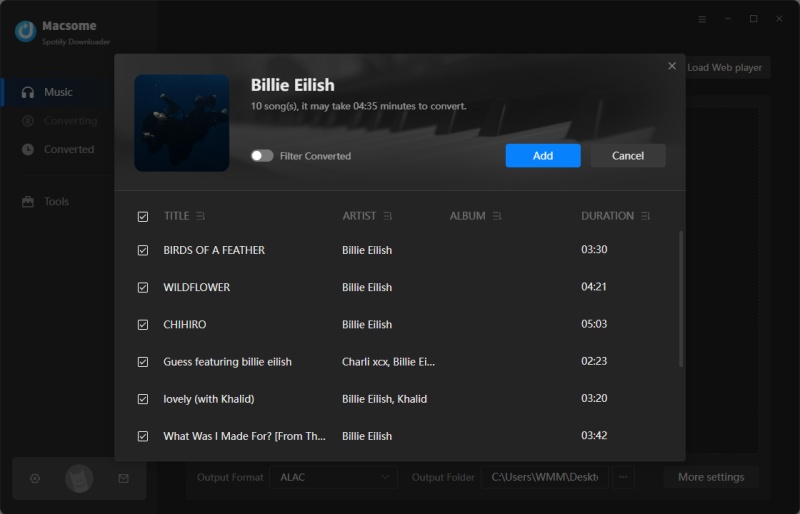
Step 2. Import Spotify Playlists
Open Spotify and select the playlist you want to download. Click Click to add inside Macsome, then press Add to import tracks. To download multiple playlists in batches, use the Add More option.
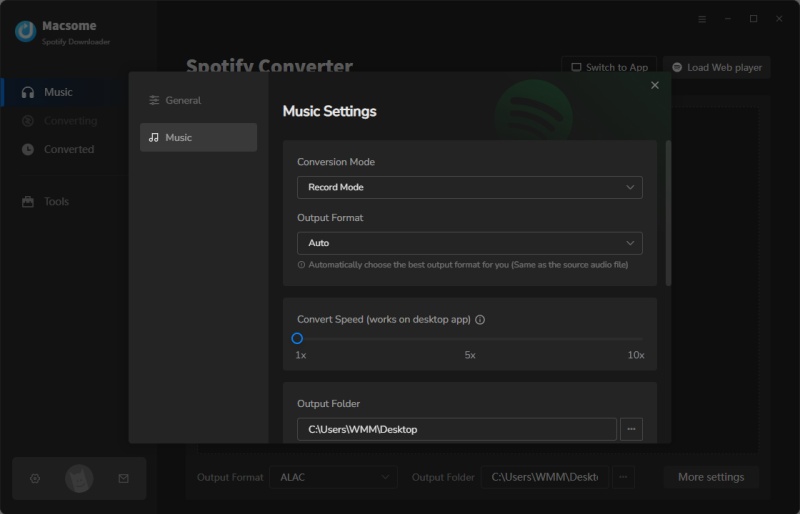
Step 3. Choose Output Settings
Go to Settings to select your preferred output format, including MP3, AAC, WAV, FLAC, AIFF, or ALAC. You can also customize bitrate, sample rate, file naming rules, and output folder location.
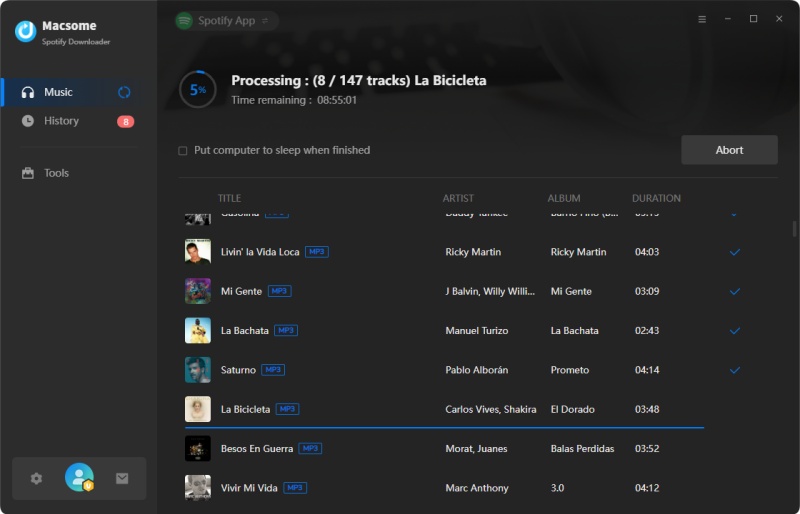
Step 4. Start Downloading Spotify Music
Click Convert to start downloading Spotify music. After completion, open the History tab or click the Folder icon to locate your downloaded files.
SpotDL is an excellent choice for advanced users who prefer command-line tools. However, if you want a simpler way to download Spotify music without Python setup or complex commands, Macsome Spotify Downloader provides a more beginner-friendly and convenient solution.
Part 5. SpotDL FAQ
- Does SpotDL download songs directly from Spotify?
- No. SpotDL does not download audio directly from Spotify servers. Instead, it uses Spotify links to retrieve track information and searches for matching audio sources to create local music files. Because it depends on external sources, download availability and audio quality may vary between tracks.
- Is SpotDL free to use?
- Yes. SpotDL is completely free and open-source. Users can install and use it without paying for a license. However, since SpotDL is a command-line application, beginners may need some technical knowledge during installation and configuration.
- Can SpotDL download Spotify songs as MP3?
- Yes. SpotDL can save Spotify tracks in formats such as MP3, M4A, and OPUS. However, the final audio quality depends on the matched audio source and configuration settings.
- Does SpotDL work with Spotify playlists?
- Yes. SpotDL supports Spotify songs, albums, and playlists. Users can provide a Spotify URL, and SpotDL can process multiple tracks while preserving available metadata such as song titles, artists, and album information.
- Why is SpotDL not working?
- SpotDL may stop working due to outdated versions, Python dependency problems, incorrect configuration, or unavailable audio sources. Updating SpotDL and checking your installation environment can help resolve common issues.
- What is the best SpotDL alternative for beginners?
- The best SpotDL alternative depends on your needs. SpotDL is suitable for advanced users who prefer open-source command-line tools. For users who want a simpler experience with a graphical interface, batch downloading, and more flexible output options, Macsome Spotify Downloader is a beginner-friendly alternative.
Final Verdict: Is SpotDL Worth Using?
After reviewing SpotDL, it is clear that this open-source Spotify downloader is a capable tool for users who are comfortable with command-line applications. Its support for Spotify songs, albums, and playlists, combined with customizable settings, makes it a flexible choice for advanced users.
However, SpotDL is not the easiest solution for everyone. The Python-based installation process, command-line workflow, and occasional troubleshooting requirements may be challenging for beginners who simply want a quick and straightforward way to download Spotify music.
Overall, SpotDL is an excellent choice for advanced users who want a free and customizable Spotify downloader. For beginners or users who prefer a simpler workflow, a desktop solution such as Macsome Spotify Downloader provides a more intuitive experience with a graphical interface, batch downloading support, and flexible output options without requiring command-line setup.
Want a simpler alternative to command-line tools? Try Macsome Spotify Downloader today.