



 Wyatt Maxwell
Want to download entire Spotify albums for free on any device?
An album represents an artist's original creative vision, complete with carefully curated track sequencing, cohesive album artwork, and detailed metadata. If your favorite artist has released a new album on Spotify, you'll no doubt want to treasure it for years to come, right? While Spotify Premium allows streaming and offline downloads, these saved albums are only accessible within the Spotify app—and you'll lose all access the moment your subscription expires.
That's why countless music lovers want to keep their downloaded Spotify albums permanently: to play them on non-Spotify devices, burn tracks to CDs, or enjoy music without subscription fees. This is where a reliable Spotify Album Downloader becomes indispensable. In 2026, plenty of free online and desktop tools let you download Spotify albums as MP3 or other universal formats—no Premium needed. In this ultimate guide, we'll break down the best free Spotify Album Downloader options, show you how to use them safely, and highlight key factors to pick your ideal tool.
- Part 1. Top 10 Best Free Spotify Album Downloaders (Online & Desktop)
- #1. Macsome Spotify Downloader - Best Spotify Album MP3 320 kbps Downloader on Desktop 👍🛡️
- #2. spotidown.app
- #3. spotdown.org
- #4. spotidownloader.com
- #5. spotmate.online
- #6. spotimate.app
- #7. spotisongdownloader.com
- #8. spotidown.co
- #9. Spotdl.io
- #10. Spotisaver
- Part 2. Top 10 Best Free Spotify Album Downloaders (Online & Desktop) Comparison
- Summary: Which Is the Best Spotify Album Downloader of 2026
Part 1. Top 10 Best Free Spotify Album Downloaders (Online & Desktop)
#1. Macsome Spotify Downloader - Best Spotify Album MP3 320 kbps Downloader on Desktop
Recommend: ⭐⭐⭐⭐⭐
First, we'll recommend Macsome Spotify Downloader, which is one of the best desktop solutions for downloading Spotify albums to MP3, making it ideal for heavy users who want to save multiple albums efficiently. It supports batch downloading of Spotify albums, playlists, podcasts, and audiobooks, eliminating the need to download songs one by one. With support for multiple output formats, including MP3, AAC, WAV, FLAC, AIFF, and ALAC, along with customizable bitrate and sample rate, Macsome ensures high-quality audio downloads suitable for both casual listeners and audiophiles.
Compared with free online Spotify downloaders, Macsome offers faster, more stable performance and preserves complete ID3 metadata, such as track title, artist, album, cover art, and release year. As a full-featured desktop app, it also includes advanced tools like an ID3 tag editor, audio format converter, CD burning, and export to Apple Music or iTunes. All downloaded Spotify songs are saved as local files that can be played on any device or media player, making Macsome a reliable long-term solution for Spotify album downloads.
Key Features of Macsome Spotify Downloader
- Download Spotify albums, playlists, audiobooks, and podcasts with high quality.
- Convert Spotify albums to MP3, AAC, WAV, FLAC, AIFF, or ALAC.
- Download albums from both the Spotify app and the Spotify web player.
- Download music from the Spotify web player without logging in.
- Customize the quality of your output of Spotify albums at up to 320 kbps.
- One click to burn CDs & import Spotify albums to Apple Music.
- Play Spotify music offline with both Spotify Free and Premium users.
- Support batch downloading Spotify music at up to 40x faster speed.
- Almost all the ID3 tags will be preserved.
How to Use Macsome Spotify Album Downloader?
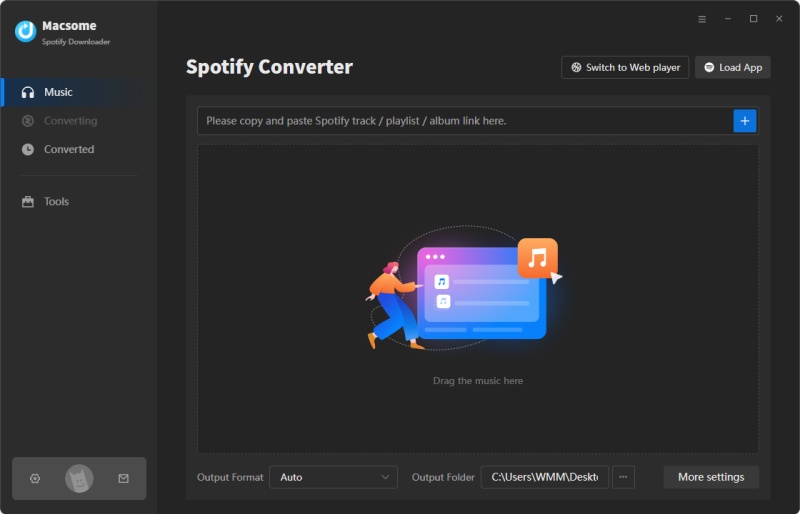
- Step 1. Download, install, and launch the Macsome Spotify Album Downloader app on your computer. The program supports downloading albums from the Spotify app or web player. Select the download mode you need.
- Step 2. To set the output format, click the Settings icon in the lower left corner and select MP3, AAC, FLAC, WAV, AIFF, or ALAC. You can also adjust the output quality to 128, 192, 256, or 320 kbps. You can also change the specified local folder as the output path.
- Step 3. After adjusting your settings in the Spotify app or web player, select the albums you want to download and press the "Click to add" button. Macsome supports downloading multiple albums at once, and you can add more by clicking the "Add More" button.
- Step 4. Click the "Convert" button to start the download. Once the download is finished, go to the "History" section on the left and click the folder icon to find your downloaded Spotify music files.
Pros:
- Download Spotify albums, playlists, podcasts, individual tracks, and audiobooks while keeping the ID3 tags.
- Convert Spotify albums to MP3, FLAC, WAV, AIFF, AAC, or ALAC.
- Preserves original audio quality; supports 320 kbps MP3, HiFi FLAC, ALAC, etc.
- Both Spotify Free and Premium accounts support downloading albums.
- It is clean, secure, and professional desktop software.
Cons:
- It is not a web-based version, so it must be installed on a computer.
- The free trial is limited. Full features require a paid license.
#2. SpotiDown.app - Free Online Album Downloader with Zip Support
Recommend: ⭐⭐⭐⭐
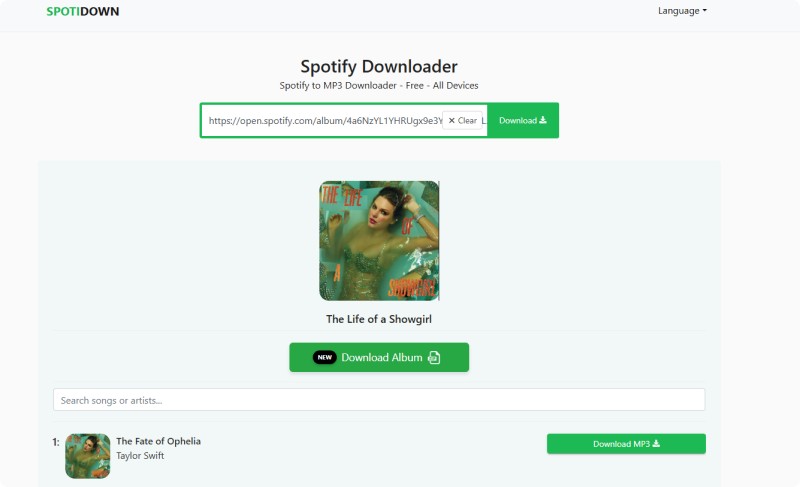
SpotiDown.app is a browser-based Spotify downloader that allows you to paste the URL of a Spotify album, song, or playlist and receive downloadable MP3 files. You don't need to install software or log into your Spotify account to use it. It runs directly in browsers on Windows, macOS, Android, and iOS. SpotiDown essentially retrieves song metadata from Spotify and sources or creates an MP3 file for you to save. However, these downloads do not come from Spotify’s official servers. Many such sites fetch audio from sources like YouTube, which leads to unreliable results.
How to Use SpotiDown Free Album Downloader
- Step 1. Open the Spotify app or website and locate the album you want. Click the three dots, then click "Share", and then click "Copy link to Album."
- Step 2. Open the SpotiDown website in your browser. Paste the album URL into the input box on the site.
- Step 3. Click "Download" and the site will attempt to fetch the songs. For albums, the site may offer a ZIP archive.
- Step 4. Click "Download Album" to save the album to your device. Please note, however, that SpotiDown only offers free downloads of up to five tracks. To download full albums with more than five tracks, you need to subscribe to Premium.
Pros:
- Download Spotify albums, playlists, and tracks as MP3s.
- Convert Spotify albums to MP3 at up to 320 kbps.
- It preserves the artist, album, and year ID tags.
Cons:
- The free version has a download limit of five tracks per album.
- It has redirects, pop-ups, and possible malware risks on unofficial sites.
- The downloaded tracks have a "SpotiDown.app" suffix in their filenames.
#3. Spotdown.org - Free Full Online Album Downloader
Recommend: ⭐⭐⭐⭐
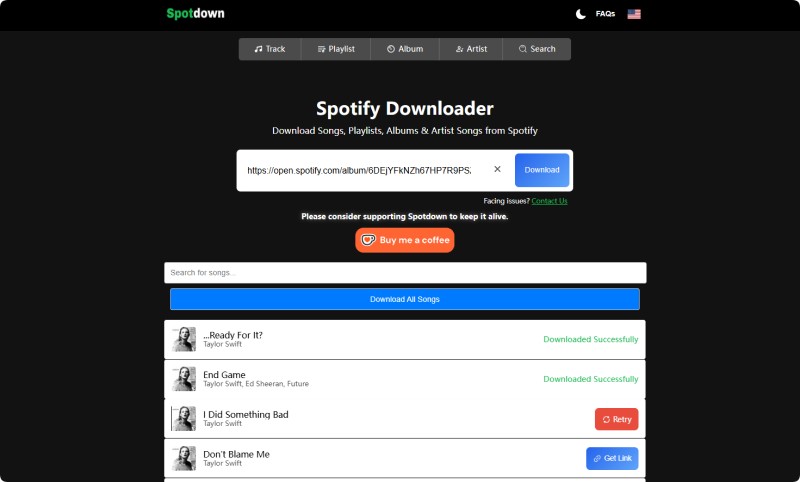
Spotdown.org is another free online Spotify album downloader. With Spotdown, you can download Spotify albums, songs, playlists, and artists' songs as audio files directly through a web browser. Unlike SpotiDown.app, Spotdown can download full albums, but it doesn't support ZIP files. Tracks from an album will download one by one, and you need to manually save them separately.
How to Download Album from Spotify with Spotdown
- Step 1. Firstly, open the Spotify app on your device or the Spotify website. Now, copy the URL of your favorite album that you want to download.
- Step 2. Go to the Spotdown website. Paste the copied link into the provided input field. You can also click the Paste button to insert the URL.
- Step 3. Simply click the "Download" button, and you will be redirected to an unknown site. Just close the pop-up window. Then, click the "Download All Songs" button. You'll encounter the same situation. Click "Download All Songs" again, and the tracks will start downloading. You'll then need to save each track to your device manually. Alternatively, you can choose any song from the results and click "Get Link" to download it.
Pros:
- Download Spotify albums, playlists, individual songs, and artist tracks for free.
- Convert Spotify albums to MP3.
- Accessible on phones, tablets, laptops, desktops via any modern browser.
Cons:
- The output quality is unsatisfactory, with a maximum of only 234 kbps.
- The sites have malware risk or fake popups.
- The downloaded tracks have a "spotdown.org" suffix in their filenames.
#4. Spotidownloader.com - Download Spotify Album via ZIP
Recommend: ⭐⭐⭐⭐
SpotiDownloader (formerly SpotifyDown.com) is a web-based Spotify music downloader. Paste a link to a Spotify track, album, or playlist, and the program will attempt to provide an MP3 download. It also supports downloading Spotify albums and playlists as ZIP files. The site is ad-free. When I tried downloading an entire album, it downloaded the songs as MP3s at 320 kbps.
How to Download Spotify Albums to MP3 with SpotiDownloader
- Step 1. Open the Spotify app, or the Spotify website in your browser. Open the album you'd like to download in MP3. Click the "Three Dots" and click "Share" button. Select "Copy link to Album."
- Step 2. Visit SpotiDownloader Spotify album downloader. And paste the link, solve the captcha.
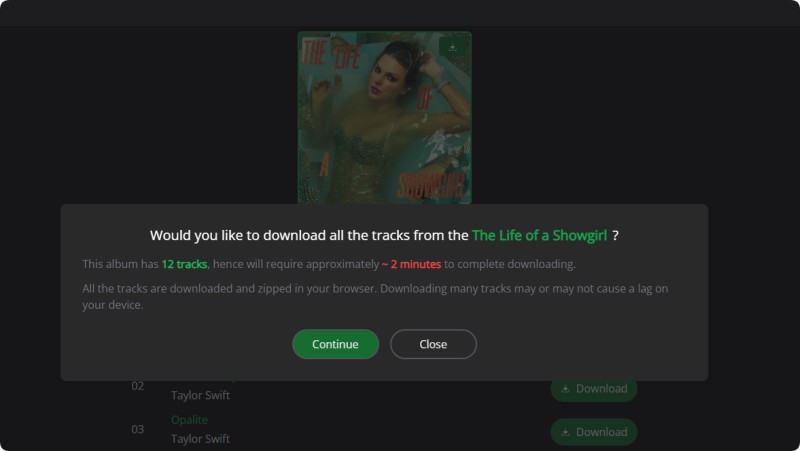
- Step 3. Click the "Download ZIP" button. A window will pop up asking if you would like to download all the tracks from the album. Click "Continue." The download will begin. Once the download is complete, you can save all the tracks as a ZIP file to your device.
Pros:
- Download Spotify albums and playlists to MP3 for free.
- Supports albums/playlists with ZIP output.
- Works on multiple devices and platforms.
Cons:
- Downloads can fail, skip tracks, or produce empty or corrupted files.
- The audio quality may be overstated (e.g., 192 kbps instead of 320 kbps).
- Downloaded files may contain incorrect tags, such as the year.
#5. Spotmate.online - Download Spotify Album to 320 Kbps MP3
Recommend: ⭐⭐⭐
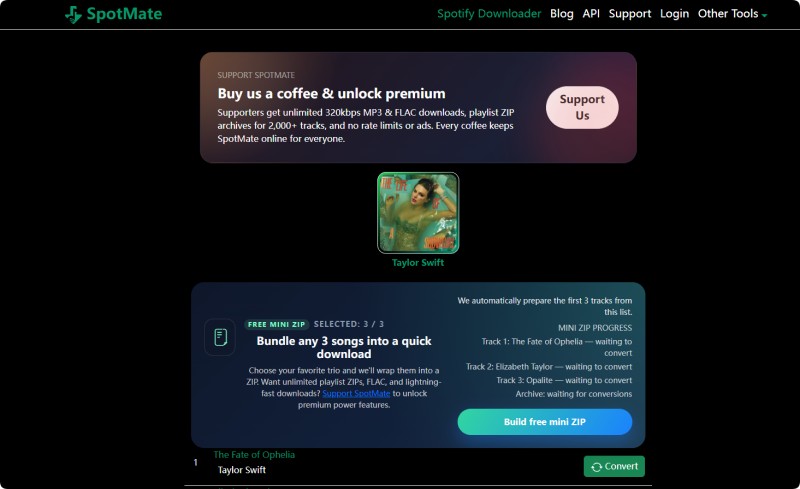
SpotMate.online is a free, web-based Spotify music downloader. It claims to allow users to convert and download Spotify tracks, playlists, and albums into MP3 audio files simply by pasting a Spotify link into its interface. SpotMate does not require account signup or software installation and is designed to work entirely in the browser. SpotMate also provides an Android app for quickly downloading Spotify songs, playlists, albums, and tracks in MP3 format. The free version supports downloading up to three tracks as a ZIP file. To remove the limits, you need to purchase the Premium version. Otherwise, you can download tracks one by one.
How to Download Spotify Albums to MP3 Using SpotMate
- Step 1. Open the Spotify app or web player and find the album you want. Click the "Three Dots" and click the "Share" button. Select "Copy link to Album."
- Step 2. Go to spotmate.online. Paste the link into the input box on the site.
- Step 3. Click the "Start" button. Once processing is complete, click "Build free mini ZIP" to save the MP3 file. The first three tracks of your selected album will then be saved into a ZIP file. Save it to your device. You can also continue downloading other songs by clicking "Convert" and saving them one by one.
Pros:
- Copy-paste Spotify links and download MP3s.
- No upfront cost, account creation, or login required.
- Accessible on Windows, macOS, Android, iOS, etc.
Cons:
- Only allow individual downloads, not full batch album or playlist exports.
- Downloaded files may lack proper tags like album art, accurate titles, and artist.
- The free version is limited.
#6. Spotimate.app - Save Spotify Album Tracks One by One
Recommend: ⭐⭐⭐
Spotimate.app (formerly SpotifyMate) is a web-based Spotify music downloader that allows users to convert Spotify songs, albums, and playlists into MP3 files directly through a browser. No software installation or account creation is required. It supports parsing links to Spotify albums but doesn't support batch downloads; you must download each track individually. Spotimate matches Spotify tracks to downloadable MP3s, which are often obtained from platforms like YouTube. This provides a convenient method for enjoying music offline.
How to Use SpotiMate to Download Spotify Albums
- Step 1. Open the Spotify app or website on your device and locate the song, playlists, or albums that you want to download. Then copy the URL of your favorite album.
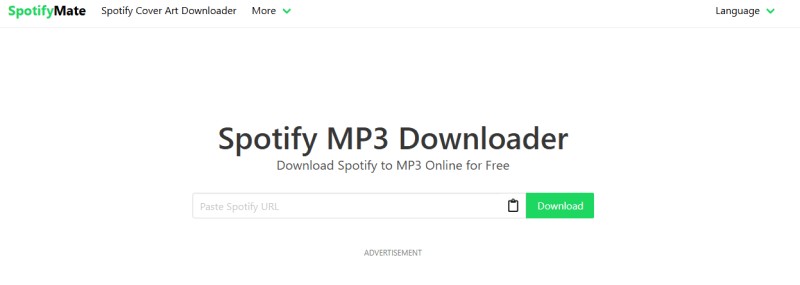
- Step 2. Open a web browser and go to the official SpotiMate website. On the homepage, you will see a text box labeled 'Paste URL from Spotify.' Paste the copied Spotify link into the text box. Click the "Download" button to start the conversion process.
- Step 3. SpotiMate will process the link and match the Spotify track with an MP3 file. Then, it will list all the tracks on the album. However, you can only download one track at a time. Once the process is complete, SpotiMate will display a "Download MP3" button or link for the file. Click it to save the file to your device.
Pros:
- Download Spotify albums to MP3 for free.
- It retains basic metadata, such as song title and artist.
- Works through a web browser on Android, iOS, Windows, macOS, etc.
Cons:
- Despite claims of 320 kbps MP3s, real results may vary.
- It includes ads that may be intrusive or potentially unsafe.
- Batch downloading is not supported.
#7. Spotisongdownloader.com - Spotify Album ZIP Downloader Online
Recommend: ⭐⭐⭐⭐
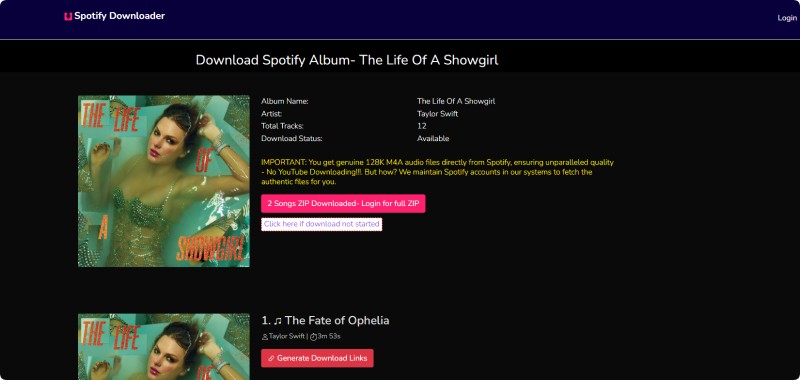
Spotisongdownloader.com (formerly Spotisongdownloader.to) is a website where you can paste a link to a Spotify song, album, or playlist and generate downloadable MP3 files. The site also claims to support downloading cover art and exporting albums and playlists in various bitrates as ZIP files. You can download Spotify albums in 320 kbps MP3 format for free. You can also download original 256 kbps M4A files directly from Spotify. However, when I tried to download an album of eight songs, I only received two songs in the ZIP file. The ZIP folder contains HTML files for the website. When I clicked on the folder, my McAfee WebAdvisor intercepted it and said it was risky.
How to Use Spotisongdownloader Spotify Album ZIP Downloader
- Step 1. Open the Spotify page or app with a track or playlist that you want to save. Copy its link (three dots-share-copy link).
- Step 2. Paste the URL into the input field, click the "Download" button, and wait for 2 seconds.
- Step 3. Then, you'll be directed to a new window where all the tracks from this album will be listed. Click "Download ZIP" and select the output quality. The download process will then begin. The ZIP file contains two tracks. To download the full ZIP file, you need to log in. You can also click the "Generate Download Links" button next to each track to download songs one by one. Wait for the download to finish, and then you can save it to your device.
Pros:
- Download Spotify albums to MP3 and M4A for free.
- Offers MP3 (up to 320 kbps) and M4A formats.
Cons:
- Can't download full albums or playlists.
- The website may have risks.
#8. Spotidown.co - Spotify Album MP3 ZIP Downloader
Recommend: ⭐⭐⭐⭐
Spotidown.co is a web-based Spotify music downloader that claims to let users download Spotify tracks, albums, and playlists as MP3 audio files through a browser interface. It also offers the ability to download entire playlists or albums as a ZIP archive of MP3 files. The site asserts that no Spotify account, login, or subscription is required and that downloaded files include metadata such as album art, title, artist, and year.
How to Use SpotiDown Spotify Album MP3 ZIP Downloader
- Step 1. Open the Spotify app or website and locate the album you want. Click the menu (three dots) next to the album and select "Share" > "Copy Link."
- Step 2. Go to spotidown.co in your browser. Paste the Spotify link into the search field.
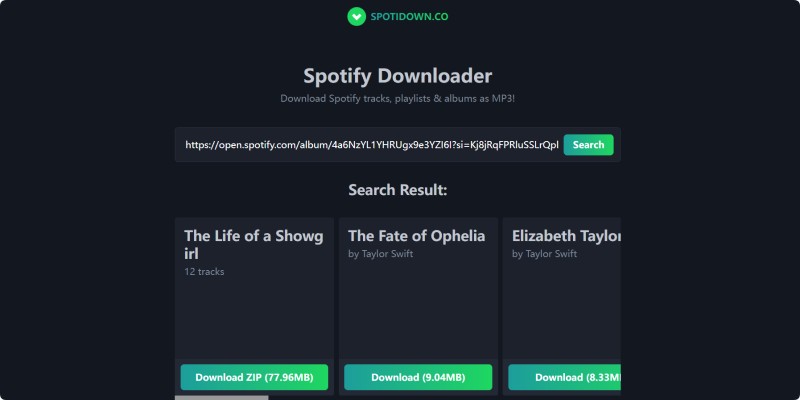
- Step 3. Click "Search" and wait for the tool to process the link.
- Step 4. Once the results appear, click "Download ZIP" to download the entire album, or click "Download" next to individual tracks. After the process is finished, click "Save ZIP" to save the file to your device.
Pros:
- Download Spotify tracks, playlists, and albums as MP3s.
- Support full playlists and albums as a single ZIP download.
- Downloaded MP3s with metadata retained, such as title, artist, and release year.
Cons:
- The site claims to provide MP3 downloads at 320 kbps, but the actual quality is 192 kbps.
#9. Spotdl.io - Download Spotify Albums Online
Recommend: ⭐⭐⭐
Spotdl.io is a web-based service that claims to allow you to download MP3 versions of Spotify songs, albums, playlists, and artist pages for offline listening directly in your browser by pasting the links. Its interface is different from Spotmate.online, but it has the same download restrictions. They only support downloading Spotify albums as quick ZIP files containing three tracks.
How to Download Spotify Albums with Spotdl Spotify Downloader
- Step 1. Open the Spotify app or website and find the album you want. Copy the shareable Spotify link (three dots > "Share" > "Copy link to Album.")
- Step 2. Visit spotdl.io in your browser. Paste the Spotify link into the downloader field.
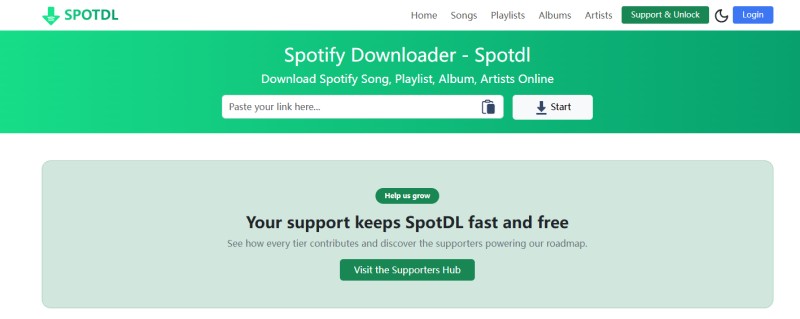
- Step 3. Click "Start" to begin processing.
- Step 4. Once the results appear, click "Build free mini ZIP" to save the MP3 file. The first three tracks of your selected album will then be saved into a ZIP file. Save it to your device. You can also continue downloading all tracks by clicking "Download All" and saving them one by one by clicking the "Download" button.
Pros:
- Download Spotify songs, playlists, albums, and artists as 320 kbps MP3s.
- Support full playlists and albums as a single ZIP download.
- Almost all ID3 tags were retained, such as title, artist, and release year.
Cons:
- Only allow up to three tracks to be downloaded as a ZIP file.
- The free version is limited.
#10. Spotisaver - Free Online Spotify Album to MP3 Converter
Recommend: ⭐⭐⭐⭐
Spotisaver is a free online Spotify downloader that allows users to download Spotify songs, playlists, and albums as MP3 files directly through a web browser. Unlike many similar online tools, Spotisaver offers a clean interface and simple download process without requiring software installation. It is suitable for users who want to save Spotify music quickly on different devices.
How to Download Spotify Albums with Spotisaver
- Step 1. Open Spotify on your app or browser and copy the Spotify song, playlist, or album link you want to download.
- Step 2. Go to the Spotisaver website in your browser. Paste the Spotify URL of the album into the search box and click the "LOAD" button.
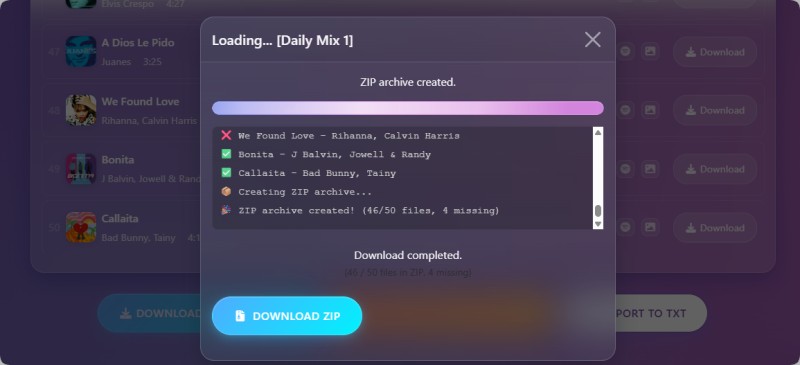
- Step 3. After the tracks are loaded, click "Download Entire Playlist" to save Spotify your album as a ZIP to your device for offline listening.
Pros:
- Download Spotify songs, playlists, and albums online for free.
- Supports MP3 downloads with up to 320kbps audio quality.
- No software installation required and works on multiple devices.
- Simple and beginner-friendly interface.
Cons:
- Download speed may vary depending on server traffic.
- Batch downloading support is limited compared to desktop software.
- Some playlists or tracks may occasionally fail to process.
Part 2. Top 10 Best Free Spotify Album Downloaders (Online & Desktop) Comparison
The table below compares the top 10 best Spotify album downloaders based on essential criteria, including supported output formats, audio quality, batch download capability, ad experience, and overall ease of use, helping you quickly choose the most suitable downloader for your needs.
| Tool | Type | Output Format | 320 kbps Quality | Batch Downloads | ZIP Support | Ads | Install | Stability | Best For |
|---|---|---|---|---|---|---|---|---|---|
| Macsome Spotify Downloader | Desktop | MP3, AAC, WAV, FLAC, AIFF, ALAC | ✅ Yes (Real) | ✅ Yes | ❌ No | ❌ No | ✅ Yes | ⭐⭐⭐⭐⭐ | High-quality & lossless downloads |
| spotidown.app | Web | MP3 | ⚠️ Claimed | ⚠️ Limited | ❌ No | ✅ Yes | ❌ No | ⭐⭐ | Quick single-track downloads |
| spotdown.org | Web | MP3 | ⚠️ Claimed | ✅ Yes | ✅ Yes | ✅ Yes | ❌ No | ⭐⭐ | Free album ZIP downloads |
| spotidownloader.com | Web | MP3 | ❌ Often <320 kbps | ✅ Yes | ✅ Yes | ✅ Heavy | ❌ No | ⭐⭐ | Batch downloads with ads |
| spotmate.online | Web | MP3 | ❌ Low | ❌ No | ❌ No | ✅ Heavy | ❌ No | ⭐ | Fast low-quality MP3 |
| spotimate.app | Web | MP3 | ⚠️ Claimed | ❌ Limited | ❌ No | ✅ Yes | ❌ No | ⭐⭐ | Casual downloads |
| spotisongdownloader.com | Web | MP3, M4A | ⚠️ Claimed | ✅ Yes | ✅ Yes | ✅ Heavy | ❌ No | ⭐ | ZIP downloads (high risk) |
| spotidown.co | Web | MP3 | ⚠️ Claimed | ✅ Yes | ✅ Yes | ✅ Yes | ❌ No | ⭐⭐ | Album ZIP without install |
| Spotdl.io | Web | MP3 | ⚠️ Unverified | ✅ Yes | ⚠️ Partial | ✅ Yes | ❌ No | ⭐⭐ | Simple batch downloads |
| Spotisaver.net | Web | MP3 | ⚠️ Up to 320 kbps | ⚠️ Limited | ✅ Yes | ❌ No | ❌ No | ⭐⭐⭐ | High quality Spotify downloads |
Summary: Which Is the Best Spotify Album Downloader of 2026
After thoroughly testing and comparing 10 of the best free Spotify album downloaders in 2026, you'll find that each tool comes with its own strengths and trade-offs. Online Spotify album downloaders are ideal for quick, installation-free use, but they often suffer from unavoidable drawbacks such as intrusive ads, unstable download speeds, limited batch support, and compromised audio quality.
Among all the options we evaluated, Macsome Spotify Downloader stands out as the best Spotify album downloader for most users. It consistently delivers genuine high-quality audio, including verifiable 320 kbps MP3 and lossless formats, supports batch downloading of full albums and playlists, offers a wide range of output formats (MP3, AAC, WAV, FLAC, AIFF, ALAC), preserves complete metadata, and provides a stable, ad-free desktop experience—advantages that free online tools simply can't match.
Want to download Spotify albums in true MP3 320 kbps or lossless quality? Try Macsome Spotify Downloader today and enjoy fast, reliable, and ad-free Spotify album downloads on your desktop.