



 Wyatt Maxwell
Looking for a free way to download Spotify songs as MP3 files? You've probably come across SpotMate. This online Spotify downloader has gained attention for its simple promise: paste a Spotify link and download songs, albums, or playlists without installing software or paying for Spotify Premium.
But before using it, many users ask the same questions: Is SpotMate safe? Does SpotMate still work in 2026? Can it really download Spotify music in good quality? And more importantly, are there better and more reliable alternatives available today?
In this detailed SpotMate review, we'll explore how SpotMate works, its key features, supported formats, advantages, drawbacks, and potential safety risks. We'll also compare SpotMate with some of the best Spotify downloader alternatives for users who want faster downloads, higher audio quality, batch conversion, and a more stable offline listening experience.
Part 1. What Is SpotMate
🌐 SpotMate Official Website: https://spotmate.online/
SpotMate is a free online Spotify downloader that allows users to convert Spotify content into MP3 files, including songs, playlists, albums, and artist tracks, without requiring a Spotify Premium subscription.
This web-based Spotify downloader works by letting users paste a Spotify URL directly into the SpotMate platform. After processing the link, it generates a downloadable MP3 file that can be saved locally for offline listening.
SpotMate is designed for cross-platform use, working smoothly on Windows, macOS, Android, and iOS devices through a browser. In addition, it also offers an Android app version, giving mobile users a more convenient way to download Spotify music directly on their phones without switching between tabs or browsers.

🔑 Key Features of SpotMate Spotify Downloader
- ✅ Download Spotify tracks, albums, and playlists for free.
- ✅ Convert Spotify tracks to MP3 format with up to 320 kbps audio quality (depending on source availability).
- ✅ Supports direct URL input for fast processing and downloading.
- ✅ No software installation required — works directly in the browser.
- ✅ Compatible with Windows, macOS, Android, iOS, and Linux.
- ✅ Free access with no mandatory registration.
⚖️ Pros and Cons of SpotMate
Pros
- Free to use – Allows users to download Spotify content without requiring payment or an account.
- No installation required – Works entirely in the browser for instant access.
- Supports multiple Spotify content types – Songs, albums, and playlists are all supported.
- Simple and fast workflow – Paste a Spotify link and start downloading in seconds.
- Preserves basic ID3 tags – Keeps key metadata such as song title, artist name, and album information.
Cons
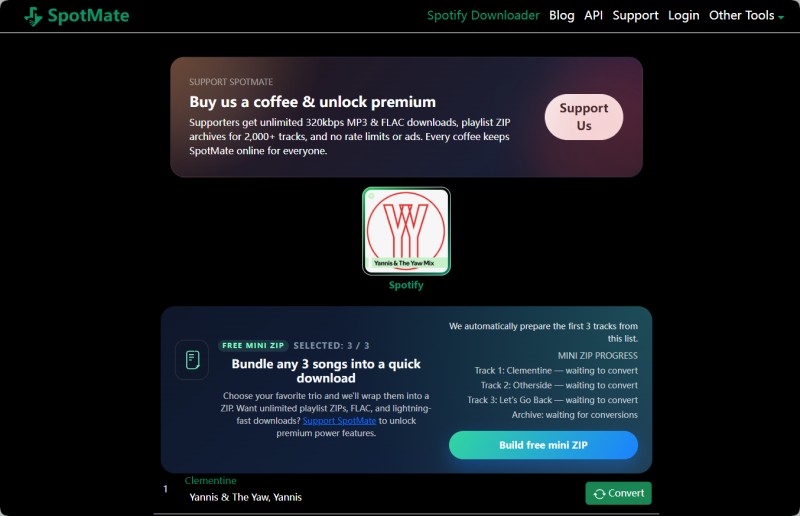
- Free version has strict limits – Only the first 3 tracks of a playlist or album can be downloaded.
- Occasional download failures – Some tracks may not process successfully or may generate incomplete files.
- Partial metadata coverage – ID3 tags such as cover art or extended details may not always be fully preserved.
- No true batch download system – Full playlists often still require manual track handling.
Part 2. How to Use SpotMate to Download Spotify Songs and Playlists in MP3
SpotMate makes it relatively easy to download Spotify songs and playlists as MP3 files directly from your browser. Follow the detailed tutorial below to save Spotify music in up to 320kbps quality for offline listening.
🎵 Step 1. Copy the Spotify Song or Playlist Link
Open the Spotify desktop app, mobile app, or web player and find the song, playlist, album, or artist you want to download. Click the three-dot menu (•••) and select: Share → Copy Link
🌐 Step 2. Paste the Spotify Link into SpotMate
Visit the official SpotMate website using your browser. Paste the copied Spotify URL into the search field, then click the green Start button to continue.
⚡ Step 3. Analyze the Spotify URL
SpotMate will automatically scan and analyze the Spotify link. After processing, it displays the available songs or audio files that can be converted to MP3.
⬇️ Step 4. Convert and Download Spotify Music
If the Spotify link contains multiple tracks, such as an album or playlist, SpotMate will generate a downloadable song list.
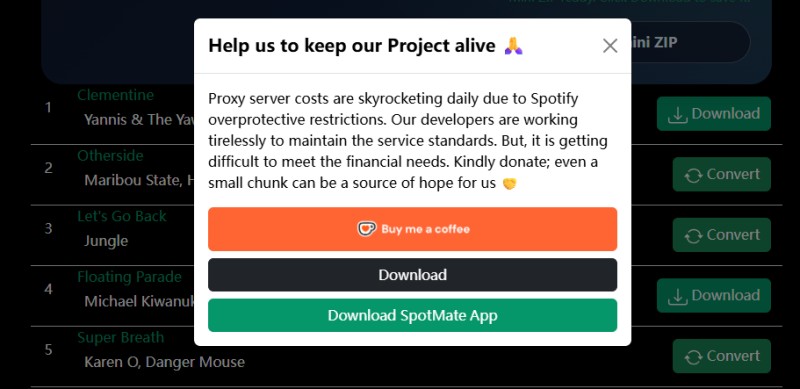
The free version currently supports downloading up to 3 songs at once in ZIP format. To save individual songs, simply click the Convert button next to the track you want, then press Download to save the MP3 file to your device.
👍 Note: Downloaded Spotify tracks usually retain important ID3 metadata tags, including song title, artist name, album, genre, release year, and cover artwork.
Part 3. Is SpotMate Safe and Legal?
When using any online Spotify downloader, safety and legality are key considerations. SpotMate is a free browser-based tool, but users should still understand its limitations and potential risks before using it.
Is SpotMate Safe to Use?
Security overview: SpotMate runs entirely in the browser and does not require software installation, which reduces many common security risks associated with desktop downloads. However, users should still be aware of a few important points:
- ✅ Browser-based usage: No installation required, which reduces exposure to malware from third-party software.
- ⚠️ External redirects: Some download actions may redirect through third-party services, so users should stay alert during the process.
- 🔒 Privacy considerations: Like most free web tools, data handling is not fully transparent, so using private browsing mode is recommended.
- 👍 Improved experience: The platform no longer relies heavily on intrusive ads and mainly uses optional support prompts such as “buy coffee” donations.
Is SpotMate Legal?
Legal considerations: The legality of using SpotMate depends on how and where it is used, as well as local copyright regulations.
- 📜 Spotify Terms of Service: Downloading music outside of Spotify’s official offline feature may violate Spotify’s terms.
- ⚖️ Copyright laws: Regulations vary by country, and using third-party downloaders may not be permitted in certain regions.
- 🎧 Personal use context: Content should generally be kept for personal offline listening and not redistributed or used commercially.
Best Practices for Safe Use
- 🌐 Always use the official SpotMate website: https://spotmate.online/
- 🛡️ Use basic security tools like antivirus protection and private browsing mode.
- 🚫 Avoid interacting with unknown external links during the download process.
- 🎵 Use downloads responsibly for personal offline listening only.
In summary, SpotMate is generally convenient and lightweight to use in a browser, but users should still be mindful of legal restrictions and practice safe usage habits when downloading music.
Part 4. Best SpotMate Alternative – Macsome Spotify Downloader (Safer & More Professional Choice)
If you're looking for a more stable, secure, and feature-rich alternative to SpotMate, Macsome Spotify Downloader is one of the most reliable desktop solutions for downloading Spotify music. Unlike browser-based online Spotify downloaders, it runs in a dedicated desktop environment, offering greater consistency, improved performance, and more precise control over output quality.
Macsome enables users to download Spotify songs, playlists, albums, artists, podcasts, and audiobooks, and convert them into multiple formats, including MP3, AAC, WAV, FLAC, AIFF, and ALAC. It also preserves complete ID3 metadata, such as track title, artist name, album information, cover artwork, and detailed song tags, ensuring a clean and well-organized offline music library.
Compared with web-based tools like SpotMate, Macsome provides a more advanced and scalable Spotify to MP3 downloading workflow. It supports batch downloading, delivers faster and more stable conversion performance, and reduces interruptions commonly caused by browser limitations or server instability. This makes it especially suitable for users who regularly download full playlists or albums, or who require consistent high-quality audio output without relying on unstable online tools.
Key Features of Macsome Spotify Downloader
- Download Spotify songs, playlists, albums, podcasts, and audiobooks in high quality.
- Convert Spotify music to MP3, AAC, WAV, FLAC, AIFF, or ALAC formats.
- Supports both Spotify desktop app and web player integration.
- Batch download full playlists or albums efficiently.
- Preserves complete ID3 tags including artwork, artist, album, and track metadata.
- Customizable output settings up to 320 kbps for high-quality audio.
How to Download Spotify Music to 320 kbps MP3 with Macsome
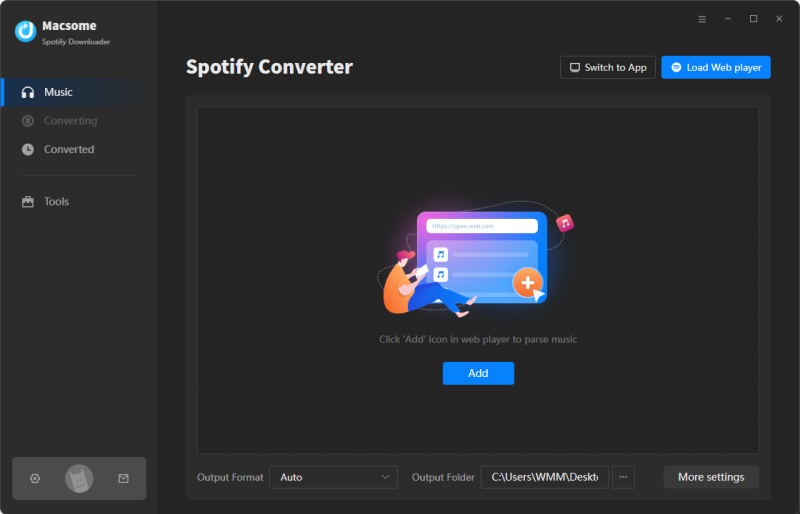
Step 1. Launch Macsome Spotify Downloader
Install and open Macsome Spotify Downloader on your computer. It supports both the Spotify desktop app and web player modes. For this guide, we’ll use the desktop app mode. Once selected, Spotify will launch automatically—simply sign in to access your music library.
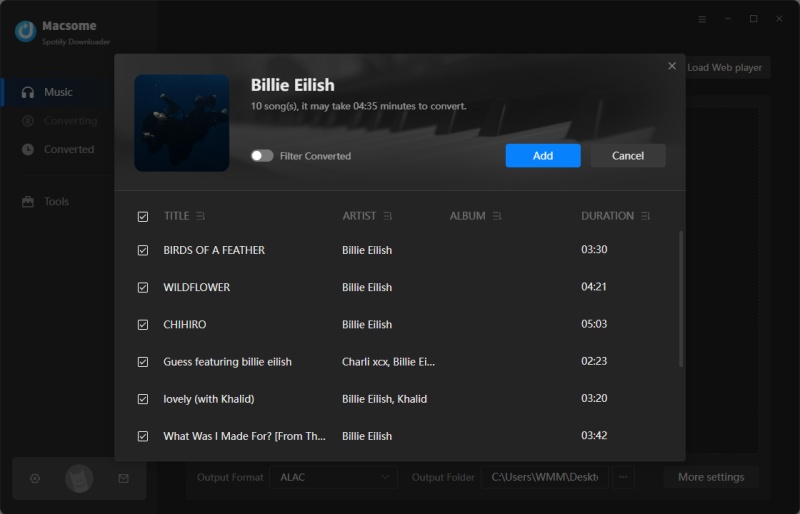
Step 2. Add Spotify Music to Macsome
Open a playlist in Spotify, then click “Click to add” to load tracks into Macsome. After that, select “Add” to move songs into the conversion list. If you want to download multiple playlists, use “Add More” and repeat the process.
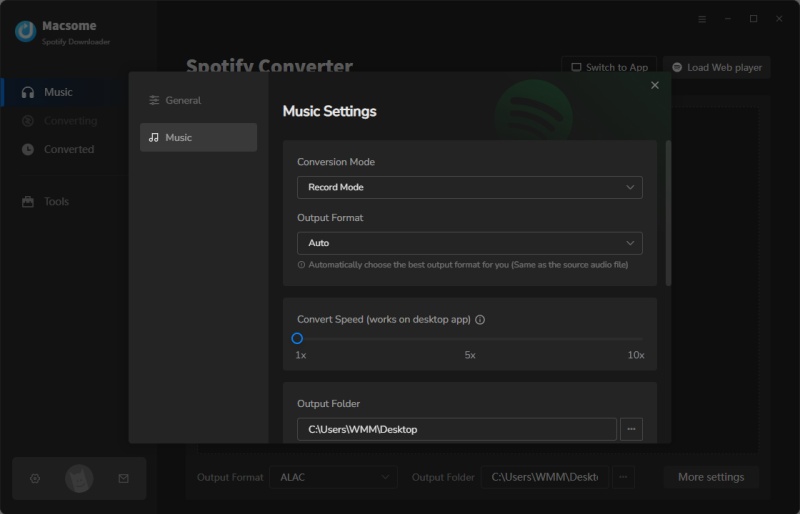
Step 3. Choose MP3 as Output Format
Go to Settings in the lower-left corner and select MP3 as your output format. You can also choose other formats such as AAC, WAV, FLAC, AIFF, or ALAC. For better control, adjust bitrate (up to 320 kbps), output folder, and file naming rules to keep your library organized.
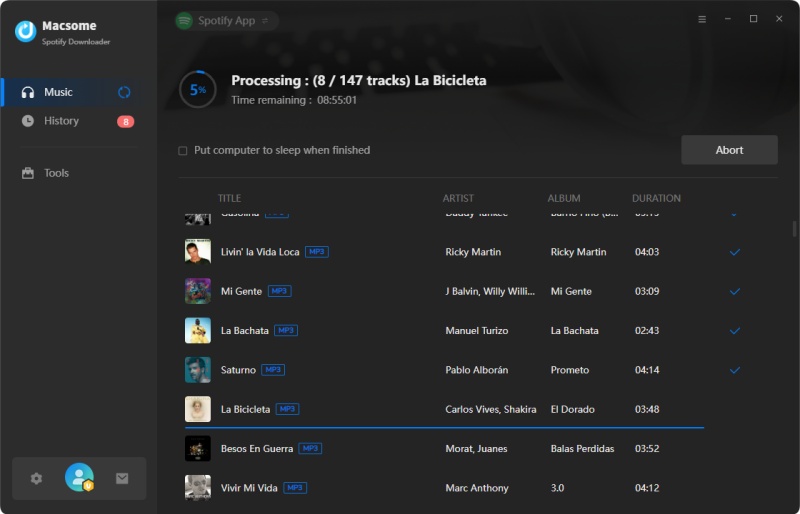
Step 4. Start Converting Spotify Music
Once everything is set, click “Convert” to begin downloading. After completion, go to the History tab to view finished files. Click the Folder icon to locate your MP3 files, which can then be transferred to any device for offline playback anytime.
Part 5. FAQs About SpotMate Spotify Song Downloader
- Do I need a Spotify Premium account to use SpotMate?
- No. SpotMate works with both Free and Premium Spotify accounts. You can convert tracks, albums, and playlists to MP3 without logging in or subscribing to Spotify Premium.
- Can SpotMate download full playlists or albums?
- SpotMate supports playlist and album URLs, but the free version is significantly limited. In most cases, you can only download up to a few songs (e.g., around 3 tracks), and there is no true batch or full-playlist download feature. If you want to download an entire playlist or album, you must manually process and download each song one by one. For a smoother experience with full playlist batch downloading and automation, desktop tools like Macsome Spotify Downloader are more efficient.
- Does SpotMate keep ID3 tags and album artwork?
- SpotMate can generate basic MP3 files, but metadata such as ID3 tags, album artwork, artist names, and track titles may not always be fully preserved. If you need properly organized music libraries with complete metadata, a dedicated tool like Macsome Spotify Downloader is recommended.
- What audio formats does SpotMate support?
- SpotMate mainly converts Spotify music to MP3. If you need additional formats such as WAV, FLAC, AAC, AIFF, or ALAC for higher-quality or professional use, a desktop downloader like Macsome offers broader format support.
Conclusion
In this SpotMate Review, SpotMate can be described as a lightweight online Spotify to MP3 downloader built for users who want fast, no-install access to Spotify tracks. It requires no account or software installation, making it convenient for quick, single-track conversions. Users simply paste a Spotify link and receive an MP3 file within seconds, which suits basic, on-demand downloading needs.
That said, its functionality becomes more limited when used for larger music libraries. Like many online Spotify to MP3 tools, SpotMate is not designed for batch processing or automation. Playlist handling is often restricted, and users typically need to download songs individually, which can be time-consuming when saving full albums or large playlists.
For users who need a more robust workflow, a SpotMate alternative such as Macsome Spotify Downloader provides stronger batch downloading capabilities, better format control, and more stable performance for managing large Spotify libraries.
Bottom line: SpotMate is best suited as a simple entry-level Spotify to MP3 downloader, while users who need reliability, bulk processing, and advanced features will benefit more from a dedicated desktop SpotMate alternative.