



 Wyatt Maxwell
Spotify remains one of the most popular music streaming platforms, offering both free and Premium accounts to users worldwide. However, many Android users seek ways to enjoy Premium features without paying a dime. This has led to the rise of Spotify Premium APKs, which provide access to features like ad-free listening and offline playback for free. In this article, we'll explore the best Spotify Premium APKs available, walk you through how to download and install them on your Android device, compare their features. We'll also shed light on the legal and safety risks of using these APKs. Additionally, we'll introduce a safer and more reliable alternative that lets you enjoy ad-free Spotify music offline—without the need for a Premium subscription.
- 📱 Part 1: Spotify Premium APK for Android: Detailed Overview
- 🌟 Part 2: Top Best Spotify Premium APKs for Android in 2026
- xManager Spotify Premium APK
- SpotiMody Spotify Mod APK
- Spowlo APK
- SpotiFlyer Spotify Mod APK
- Fildo APK for Android
- ReVanced Spotify APK
- Jojoy Spotify Premium Mod APK
- ⚖️ Part 3: Is it Legal and Safe to Use Spotify Premium APK?
- ✅ Part 4: The Safe and Legal Alternative to Spotify Premium APK [Highly Recommended] 🔓🚀
- ❓ Part 5: FAQs About Spotify Premium Mod APK
Part 1: Spotify Premium APK for Android: Detailed Overview
Spotify Premium APK is a modified, third-party version of the official Spotify app designed specifically for Android devices. It gives users access to Premium features for free, eliminating the need for a subscription. Spotify MOD APK is a hacked or cracked version of the original app that is distributed outside the Google Play Store. These modified versions can be found on third-party websites, forums, or APK-sharing platforms.
Key features of Spotify Premium APK Include:
- ✅ Ad-Free Listening: Users can listen to music without interruptions from advertisements.
- ✅ Offline Playback: The ability to download music and listen without an internet connection.
- ✅ High-Quality Audio: Access to higher bitrate music streaming (up to 320kbps).
- ✅ Unlimited Skips and On-Demand Playback: Skip tracks as often as you want and play any song, album, or playlist in full without forced shuffling.
- ✅ Access to Spotify's Full Library: Including features like Spotify's curated playlists and other exclusive content.
Pros and Cons of Spotify Premium APK:
Pros
- Free Premium Features: Ad-free, high-quality audio, unlimited skips, and offline mode enhance enjoyment and convenience.
- No Need for a Subscription: You don't need to provide payment information or subscribe to Spotify Premium.
- High Reliability: Easy to install and use on Android; no payment method linking required.
- Availability: Bypasses regional restrictions for global content access.
Cons
- Security Risks: Downloading and installing APKs from unreliable sources can compromise your device's security.
- Account Suspension: If Spotify detects that you are using an APK, they could suspend or ban your account.
- Lack of Updates: Lack official updates, leading to compatibility problems.
- Unstable Performance: Frequent bugs, crashes, or playback issues.
Part 2: Top Best Spotify Premium APKs for Android in 2026
Several Spotify Premium APKs have become popular choices in 2026, offering features like ad-free listening, offline music access, and high-quality audio without the need for a subscription. In this section, we'll explore the top Spotify MOD APKs for Android, comparing their features and benefits to the official Spotify Premium plan. Whether you're looking to enjoy Spotify's premium features for free or want to test them before committing, these APKs are the perfect solution for Android users.
xManager Spotify Premium APK
| App Name | Compatibility | Download Source | Size | Ad-Free | Unlimited Skips | Offline Playback | On-Demand Streaming |
|---|---|---|---|---|---|---|---|
| xManager | Android 4.1 +, Chrome OS, and Win 11 | xmanagerapp.com | 9.6 MB | ✅ Yes | ✅ Yes | ✅ Yes | ✅ Yes |
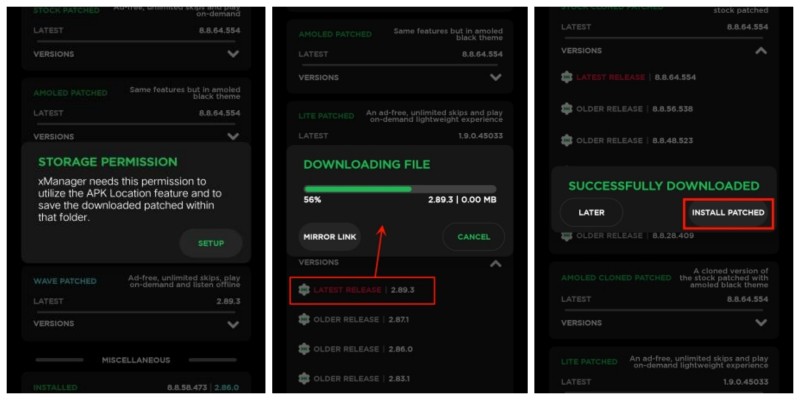
xManager Spotify APK is a third-party Android application, developed by independent creators-xManager, that serves as a version manager and patcher for the official Spotify app. It allows users to download, install, and manage multiple versions of Spotify, including modified (or "cracked") APKs that unlock Premium features without the need for a paid subscription. These modified versions of Spotify bypass the limitations of the free Spotify plan, granting users access to a variety of Premium features.
How to Download and Install xManager Spotify APK
- Step 1. Before downloading the APK, go to your phone's Settings. Scroll down to Security and enable Install from Unknown Sources. This allows you to install apps from sources outside the official Google Play Store.
- Step 2. Visit the official xManager website or its GitHub page to download the latest xManager Spotify APK file to your device. Once the APK file is downloaded, open the file manager app on your Android device and locate the file. Tap the APK file to start the installation.
- Step 3. After installation is complete, you should be able to open the xManager Spotify app. Log in with your existing Spotify account or create a new one. Enjoy all Premium features for free!
SpotiMody Spotify Mod APK
| App Name | Compatibility | Download Source | Size | Ad-Free | Unlimited Skips | Offline Playback | On-Demand Streaming |
|---|---|---|---|---|---|---|---|
| SpotiMody APK | Android 4.4 and Above | spotimody.net & Google Play | 55 MB | ✅ Yes | ✅ Yes | ✅ Yes | ✅ Yes |
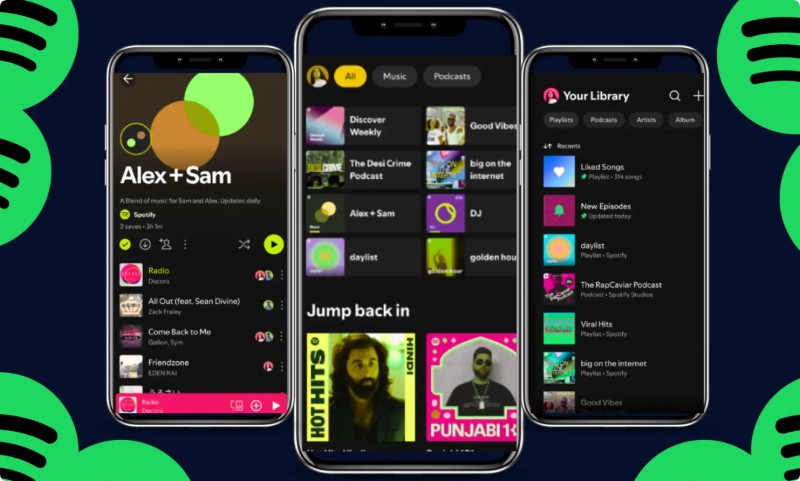
SpotiMody Spotify Mod APK is a popular modified version of the official Spotify Android app, developed by independent creators, Spotify AB. It unlocks all Spotify Premium features for free, with no need for additional patches. You can download it directly from the Google Play Store. With the SpotiMody Mod APK, you can access an expanded library of free music, podcasts, and audiobooks. Stream millions of songs and podcasts on your phone or tablet, create playlists, and enjoy offline listening. The Pro version also offers exclusive features like Spotify Hi-Fi, Spotify Wrapped, Spotify++, Spotify DJ Mode, and high-quality audio.
How to Download and Install SpotiMody Spotify Mod APK
- Step 1. Uninstall the official Spotify app (and any older mod like ReVanced, xManager Spotify, etc.). Go to Settings > Apps > Special app access > Install unknown apps > Allow your browser/file manager.
- Step 2. Download the latest SpotiMody APK from its official site. Open the downloaded APK and install it.
- Step 3. Open SpotiMody. Log in with your real Spotify account (or create a throwaway account to be safe). All Premium features are instantly active.
Spowlo APK
| App Name | Compatibility | Download Source | Size | Ad-Free | Unlimited Skips | Offline Playback | On-Demand Streaming |
|---|---|---|---|---|---|---|---|
| Spowlo APK | Android 5.0 and above | spowlo.com | 60 MB | ✅ Yes | ✅ Yes | ✅ Yes | ✅ Yes |
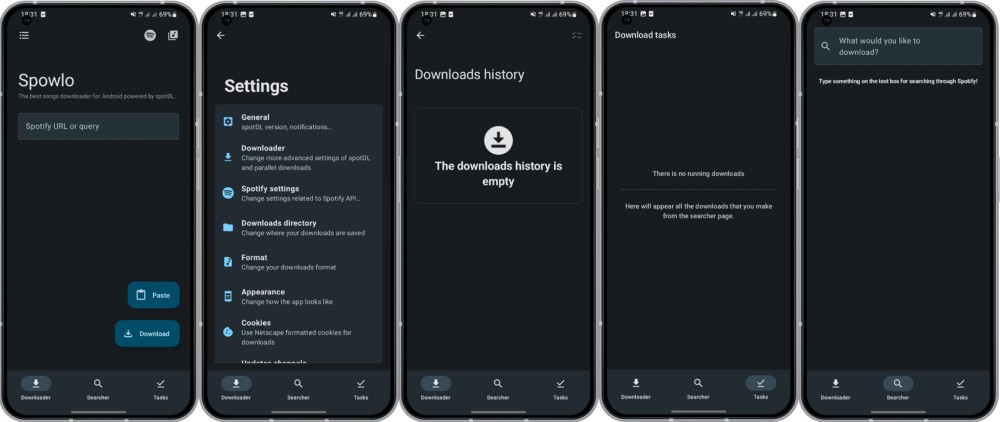
Spowlo APK is a free, open-source Android application designed as a Spotify songs downloader. Unlike xManager and SpotiMody, Spowlo is specifically made for downloading individual tracks, playlists, albums, and podcasts from Spotify as MP3, FLAC, OGG, OPUS, or M4A files. Spowlo matches Spotify's metadata, such as song titles and artists, with available audio from reliable sources like YouTube or YouTube Music. The app then downloads the audio in popular formats, such as MP3, providing a safe and convenient way to enjoy Spotify music offline.
How to Use Spowlo to Download Spotify Music for Offline Playback
- Step 1. Download the Spowlo APK from trusted sources, such as the official mirror site or its GitHub page. Once the APK file is downloaded, open your "File Manager > Install."
- Step 2. Open the Spowlo app from your app drawer. If it crashes, clear the app's data and relaunch it. Choose an audio provider. Select the default format and quality.
- Step 3. Either copy the URL of a Spotify playlist that you'd like to download, or search by keywords. Then, paste it into Spowlo's search bar and tap "Download." The files will be saved to "/Downloads/Spowlo/" with metadata. View your history and downloads via the music icon in the top right corner.
SpotiFlyer Spotify Mod APK
| App Name | Compatibility | Download Source | Size | Ad-Free | Unlimited Skips | Offline Playback | On-Demand Streaming |
|---|---|---|---|---|---|---|---|
| SpotiFlyer | Android 5.0+, Windows, macOS, and Linux | spotiflyer.app | 8.1 MB | ✅ Yes | ✅ Yes | ✅ Yes | ✅ Yes |
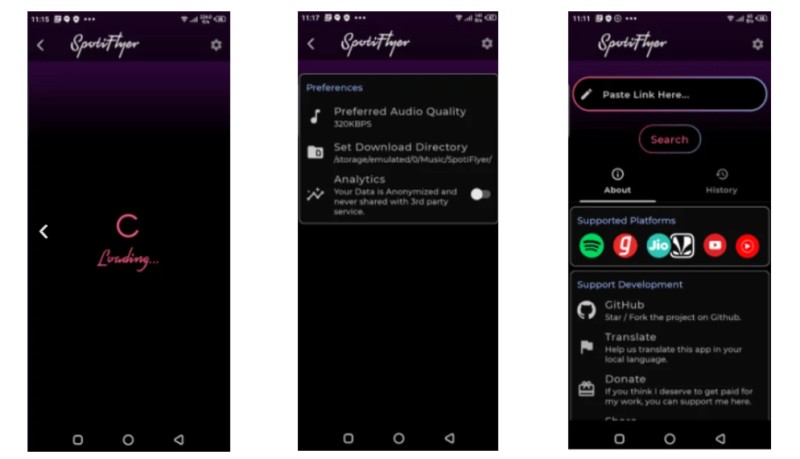
SpotiFlyer is a free, open-source, cross-platform music downloader app written in Kotlin. Users can download songs, albums, and playlists from popular streaming services such as Spotify, YouTube Music, Gaana, JioSaavn, and SoundCloud in MP3 format with quality ranging from 128 kbps to 320 kbps. Unlike official apps, SpotiFlyer bypasses subscription requirements by extracting audio from these platforms' public sources. This enables offline playback without ads or internet access. SpotiFlyer is available for Android (as an APK), Windows, macOS, and Linux and is primarily hosted on GitHub.
How to Download and Install SpotiFlyer APK for Android
- Step 1. Visit the official GitHub page (github.com/Shabinder/SpotiFlyer) or a verified mirror like spotiflyer.app, and download the latest APK file.
- Step 2. Enable "Install from Unknown Sources" in your device settings (Settings > Security > Unknown Sources). Open the downloaded APK file and follow the on-screen prompts to install.
- Step 3. Launch the app. Copy a Spotify song, album, or playlist URL from the Spotify app. Paste the URL into Spotiflyer's search bar and hit "Search."
- Step 4. Select the track and tap "Download." In settings, choose the quality (e.g., 128 kbps or higher) and the download location. You can access your downloaded MP3s via your file manager or the app's library for offline playback.
Fildo APK for Android
| App Name | Compatibility | Download Source | Size | Ad-Free | Unlimited Skips | Offline Playback | On-Demand Streaming |
|---|---|---|---|---|---|---|---|
| Fildo | Android 5.0+ | fildo.net | 54 MB | No | ✅ Yes | ✅ Yes (MP3 downloads) | ✅ Yes (tracks available for free download) |
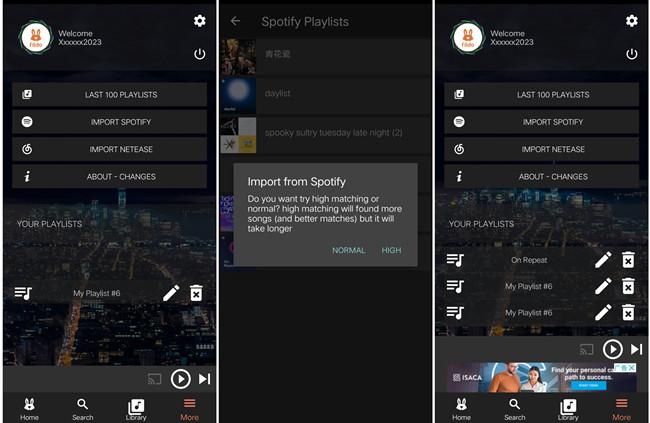
Fildo APK is a free Android application that allows users to stream and download music from a variety of online sources. Unlike traditional music apps, which host their own libraries, Fildo serves as a music aggregator, pulling content from third-party platforms such as NetEase and other public music databases. Fildo is not a modified (MOD) version of Spotify Premium or any other Spotify app. Instead, it is an independent, standalone music aggregator developed by Fildo.net and is not affiliated with Spotify.
How to Download and Install Fildo APK for Android
- Step 1. Download the official APK from the Fildo website to your Android device. It is not available on the Google Play Store. Then, in your Android settings, enable "Unknown Sources." Locate the downloaded APK file in your file manager and tap it. Confirm the installation when prompted. Once installed, the Fildo icon appears on your home screen.
- Step 2. Open the app and search by song, artist, album, or genre. The results show multiple sources with bitrate information, often 320 kbps MP3 or lossless FLAC.
- Step 3. Tap to instantly stream or download single tracks, full albums, or entire discographies. Or go to MORE > Spotify Importer, log in or paste a public playlist link, and Fildo fetches matches for download.
ReVanced Spotify APK
| App Name | Compatibility | Download Source | Size | Ad-Free | Unlimited Skips | Offline Playback | On-Demand Streaming |
|---|---|---|---|---|---|---|---|
| ReVanced Spotify | Android 8.0+ | revanced.to | 85 MB | ✅ Yes | ✅ Yes | ✅ Yes | ✅ Yes |
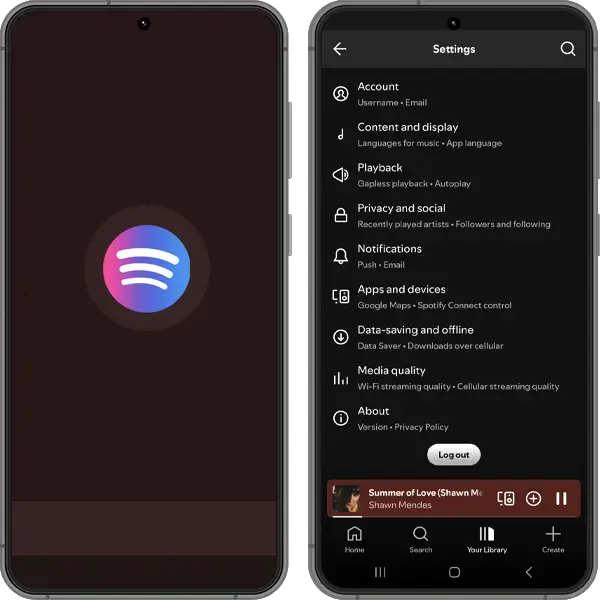
ReVanced Spotify APK is a modified version of the official Spotify app for Android, designed to unlock Premium features for free. Unlike pre-modded APKs, ReVanced allows users to customize the official Spotify app by applying patches that unlock Premium features such as ad-free music, unlimited skips, and high audio quality at no cost. Since it's an unofficial app, it's not available on the Google Play Store, and downloading it requires additional steps.
How to Download and Install ReVanced Spotify APK
- Step 1. If you already installed the Spotify app, uninstall it to avoid conflicts. Go to Settings > Apps > Spotify > Uninstall to avoid conflicts with the patched version. Open the Google Play Store, search for "Spotify," and install the latest non-beta version.
- Step 2. Visit the official AntiSplit-M GitHub releases page, download the latest AntiSplit-M APK, enable "Install Unknown Apps" in Settings, and install it.
- Step 3. Open AntiSplit-M, tap "Select from Installed Apps," and choose Spotify. Enable "Automatically select splits for your device specifications" in the gear icon settings for compatibility. Save the extracted APK (e.g., "com.spotify.music…antisplit.apk") to an accessible folder, like Downloads. This may take a few minutes.
- Step 4. Visit the official ReVanced website or GitHub to download the latest ReVanced Manager APK. Enable "Unknown Sources" in your Android device's settings to install it.
- Step 5. Open ReVanced Manager, go to the "Patcher" tab, tap "Select an app", and then press the "Storage" button to select the extracted Spotify APK (e.g., "Unlock Premium," or "Custom theme").
- Step 6. When the APK loads, press the "Patch" button. You'll know the Spotify APK is patched when it says "Patched." Press the "Install" button, followed by "Install," to install Spotify ReVanced on your device.
Jojoy Spotify Premium Mod APK
| App Name | Compatibility | Download Source | Size | Ad-Free | Unlimited Skips | Offline Playback | On-Demand Streaming |
|---|---|---|---|---|---|---|---|
| Jojoy Spotify APK | Android 4.4+ | jojoyspotify.com | 81.4 MB | ✅ Yes | ✅ Yes | ✅ Yes | ✅ Yes |
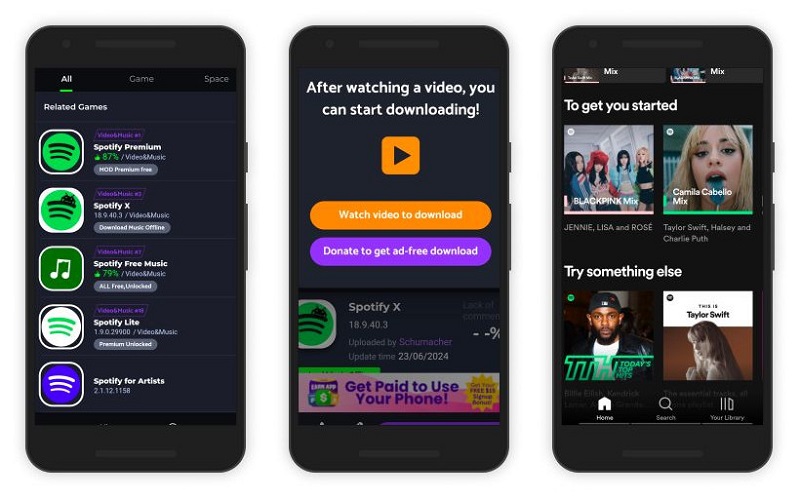
Jojoy Spotify APK is another modified version of the Spotify app, designed to provide users with a way to enjoy Spotify Premium features for free. Like other Spotify APK mods, Jojoy allows users to bypass ads, download songs for offline listening, and enjoy additional Premium features without paying for a subscription. Jojoy doesn't require root access, making it easier for users to install and use.
How to Download and Install Jojoy Spotify APK for Android
- Step 1. Visit a trusted website or app store like the official Jojoy website. Download the latest version of the Jojoy Spotify APK file to your device.
- Step 2. Enable "Install from Unknown Sources" in your device settings (Settings > Security > Unknown Sources).
- Step 3. Open the APK file once the download is complete. Tap Install and wait for the installation to finish.
- Step 4. Once installed, open Jojoy Spotify and log in with your existing Spotify account, or create a new one.
Part 3: Is it Legal and Safe to Use Spotify Premium APK?
Legality:
Spotify Premium APKs are modified versions of the official Spotify app, typically created by third parties. These modifications bypass Spotify’s subscription model and unlock premium features without paying for them. This violates Spotify's terms of service, which prohibit the use of unauthorized modifications. Using such APKs can lead to penalties, including account bans or other legal consequences if Spotify decides to take action.
Safety Risks:
- Malware and Viruses: APKs from unofficial sources may contain malicious code, including spyware, Trojans, and viruses, which can compromise your device’s security.
- Data Privacy Concerns: Some of these APKs may require access to your personal information, which could be exploited for identity theft or other malicious purposes.
- Unstable Performance: These APKs are not officially supported by Spotify, so they may not work properly, which can result in crashes or bugs.
To stay safe, use a reputable APK downloader site and make sure your device has the proper security measures in place. You can also use a safer and more reliable Spotify APK alternative. This will let you download Spotify music for offline playback.
Part 4: The Safe and Legal Alternative to Spotify Premium APK
Many Spotify users are drawn to Spotify Premium APKs because they offer features typically reserved for paid subscribers. However, these APKs often come with significant risks, such as malware and potential account suspensions. In contrast, Macsome Spotify Downloader offers a secure, legal, and simple solution for downloading Spotify music for offline listening. With Macsome, you can easily download Spotify playlists, albums, tracks, audiobooks, and podcasts—even without a Premium account.
Macsome Spotify Downloader preserves key song metadata, such as artist names, album titles, and release years, ensuring your music library remains well-organized. Additionally, it supports high-quality download options, including MP3, AAC, WAV, FLAC, AIFF, and ALAC formats, delivering superior sound quality compared to many APK alternatives. This makes it easy to transfer your music to Android devices, tablets, or other audio players for offline enjoyment.
Key Features of Macsome Spotify Downloader
- Download Spotify songs, playlists, audiobooks, and podcasts with high quality.
- Convert Spotify songs to MP3, AAC, WAV, FLAC, AIFF, or ALAC.
- Download music from both the Spotify app and the Spotify web player.
- Download music from the Spotify web player without logging in.
- Customize the quality of your output of Spotify songs at up to 320 kbps.
- One-click to burn CDs & Import Spotify songs to Apple Music.
- Play Spotify music offline with both Spotify Free and Premium users.
- Support batch downloading Spotify music at up to 40x faster speed.
- Almost all the ID3 tags will be preserved.
How to Use Macsome Spotify Downloader for Safe and Easy Spotify Music Downloads
Here's a step-by-step guide on how to use Macsome Spotify Downloader to easily download your Spotify music.
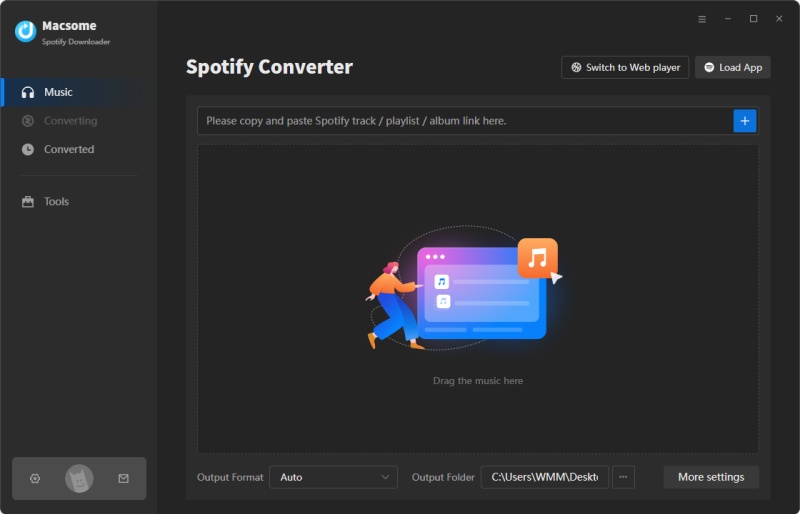
Step 1. Launch Macsome Spotify Downloader.
Download the correct version of Macsome Spotify Downloader for your operating system (Windows or Mac). After downloading, double-click the installer and follow the on-screen instructions to complete the installation process. Once the installation is finished, launch the application. This tool supports both the Spotify application and the web player. We'll use the Spotify app mode here.
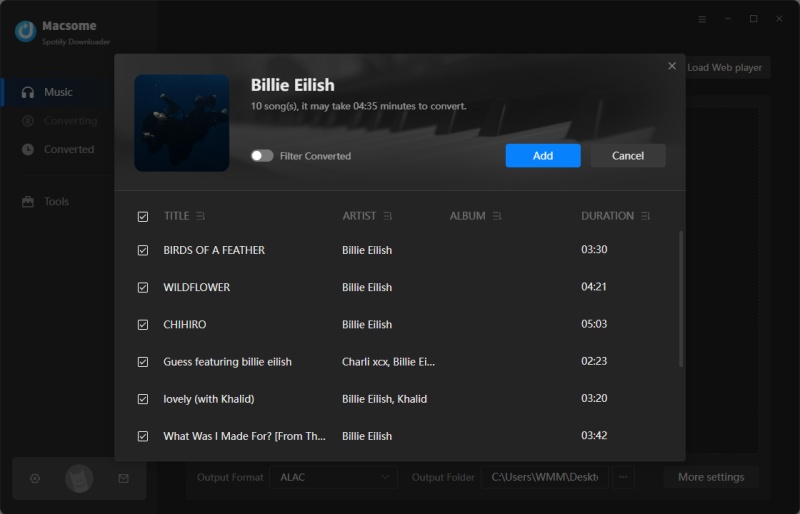
Step 2. Add Spotify Music to Macsome.
In the Spotify app, select the specific tracks, albums, or playlists you want to download. Click the "Click to add" button to load the tracks into Macsome. Then, click "Add" to include them in the conversion list. You can download multiple items at once, so feel free to create a playlist or select a whole album for bulk downloads.
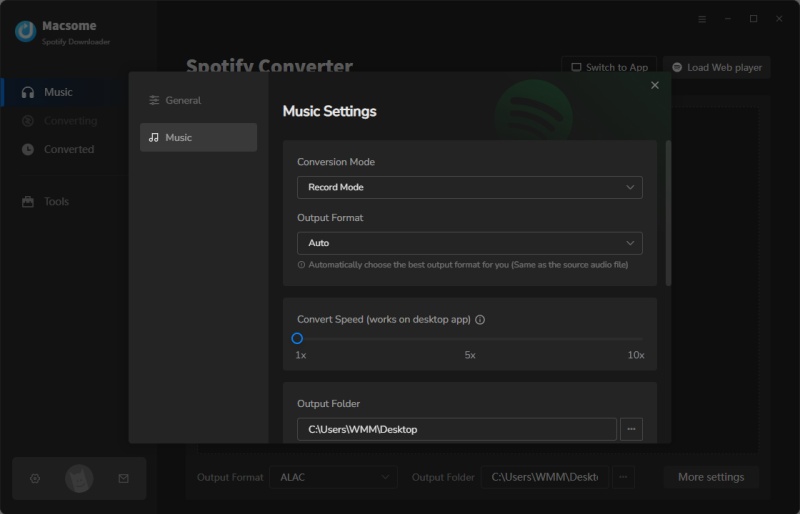
Step 3. Set Output Format.
Click "Settings" on the left, then choose your desired output format: MP3, AAC, WAV, FLAC, AIFF, or ALAC. You can also customize your Spotify files by adjusting audio parameters, such as the bit rate (up to 320 kbps). Macsome also allows you to change the output folder, file names, and file organization for easier management.
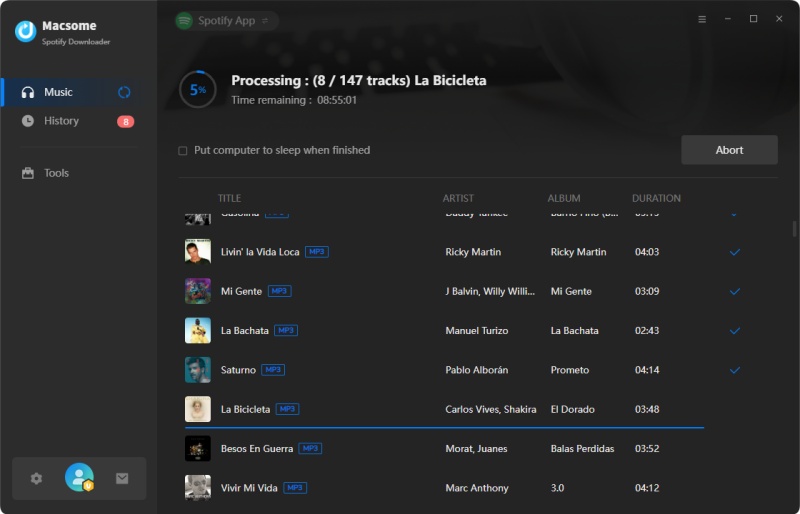
Step 4. Start to Download Spotify Music.
Click the "Convert" button, and Macsome will start fetching and converting the selected Spotify music into your chosen format. Once the download is complete, you can find your music in the designated folder on your computer.
Now, you can transfer the downloaded Spotify tracks to any device, including your Android phone, tablet, or MP3 player. Simply copy the files over via USB or use a file manager app.
Part 5: FAQs About Spotify Premium Mod APK
- Can my Spotify account get banned for using a Mod APK?
- Yes, using a Spotify Premium Mod APK can lead to your account being banned or suspended. Spotify employs various detection methods to find and block accounts using unauthorized versions of the app.
- How can I download Spotify Premium Mod APK?
- Although many websites offer downloads of the Spotify Premium Mod APK, downloading from unofficial sources poses serious risks. To ensure your security, it is highly recommended that you avoid downloading these APKs from unreliable websites.
- How do I install Spotify Premium Mod APK?
- Users typically download the APK file from an external source to install Spotify Premium Mod APK and enable installation from unknown sources in their device settings. However, doing so poses security risks.
- What's the difference between Spotify Premium Mod APK and official Spotify Premium?
- Spotify Premium is an official, paid subscription service offering features such as offline playback, ad-free listening, and high-quality audio. In contrast, the Spotify Premium Mod APK is an unofficial version that provides these features without a subscription. However, it lacks official support and may cause instability or illegal activity.
- What are the legal alternatives to Spotify Premium?
- One legal alternative is to subscribe to Spotify Premium, which grants access to all premium features. Spotify also offers a free trial of Spotify Premium, which lets you enjoy ad-free music, offline playback, and more for one month. Legitimate third-party tools, such as the Macsome Spotify Downloader, allow users to legally download Spotify playlists for offline listening and high-quality audio.
Conclusion
In this tutorial, we've talked about the 7 best Spotify Premium APKs for Android. These APKs offer you the ability to enjoy premium features without a subscription. You can download these APKs via the provided links. However, it's important to weigh the risks. While these modified APKs may be tempting, they pose significant security and legal risks that could endanger your device and personal data.
If you're looking for a safe, reliable, and legal alternative, the Macsome Spotify Downloader is an excellent choice. With this tool, you can easily download Spotify music in popular formats like MP3 or AAC while maintaining the highest quality. Say goodbye to the risks of APKs and start enjoying Spotify your way - safely and legally!
Ready to start? Download Macsome Spotify Downloader today and unlock the full potential of your Spotify experience!