


Ultimate Guide to Move Music from Tidal to Spotify
- Updated on May. 14, 2026
 Russell Doe
- General, Tidal Tips
'Q: Move playlists from Tidal to Spotify? Hi I've decided to switch over to Spotify from Tidal and I'm wondering how I can transfer my playlists. I know there are apps like Stamp or Soundiiz but they are all pay-apps, need a lot of personal information and I don't trust them. Is there any way to just have them transferred (like you can transfer Spotify playlist to Tidal)? Thank you!
Are you ready to transfer Tidal music to Spotify and enjoy a vast podcast library, personalized recommendations, and a free ad-supported tier? Both Tidal and Spotify offer access to millions of tracks, but they cater to different preferences. Tidal excels in high-fidelity (HiFi) and hi-res audio quality with artist-focused payouts, while Spotify shines with extensive podcasts, features like sleep timers and playback speed controls, and superior discovery algorithms.
As of now, Spotify has launched lossless audio (up to 24-bit/44.1kHz FLAC) at no extra cost for Premium subscribers ($11.99/month), closing the gap on sound quality. Combined with Spotify's broader content and free plan, switching can be more versatiles.

The challenge? You can't directly transfer playlists due to platform restrictions. No worries—here's how to transfer Tidal music to Spotify seamlessly using reliable third-party tools.
Part 1. Transfer Playlists from Tidal to Spotify with PlaylistGo
PlaylistGo is a professional playlist transfer service recommended for you. It supports moving your favorite songs, albums, or entire playlists from one service to another with just a few clicks. It supports various music streaming platforms, including Spotify, Apple Music, Amazon Music, Tidal, Deezer, and YouTube Music.
How to Transfer Playlist from Tidal to Spotify with PlaylistGo
Step 1. Download, install, and open PlaylistGo on your computer.
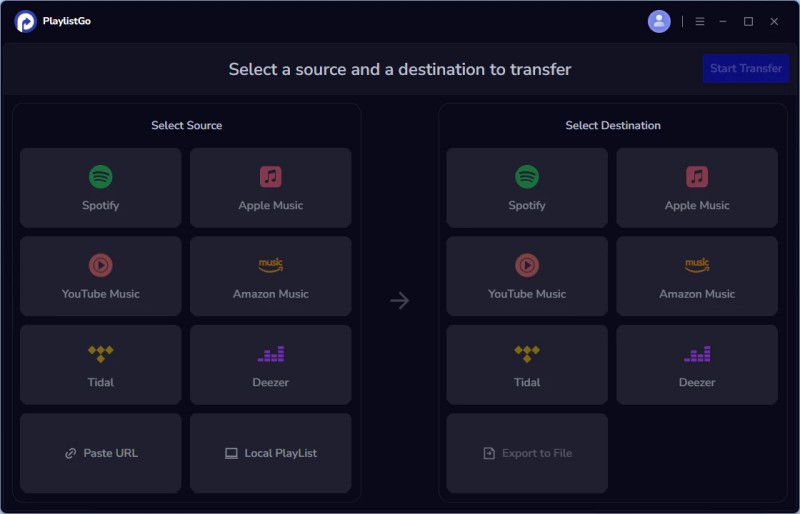
Step 2. Select Tidal as your source platform, and log into your Tidal account, and PlaylistGo will display your library so you can select what to transfer. You can also transfer playlists using a URL. Simply copy and paste the playlist URL into the text box and click Parse to load it.
Step 3. Select Spotify as the destination platform.
Step 4. Select the songs, albums, or playlists from Tidal that you want to transfer. Click the "Start Transfer" button. PlaylistGo will search for matching songs on the Tidal and display the results for confirmation.
Step 5. Click the "Transfer Settings" button on the right to start matching songs. Click "Next" to begin. PlaylistGo will transfer the selected music from the source platform to the specified location on the target platform.
Part 2. Best Tool to Download Tidal Songs to Spotify
We highly recommend Macsome Tidal Music Downloader for you. It is specially designed to download Tidal playlist, albums and tracks with high music quality retained. Plus, as a professional Tidal Music Converter, it enables you to convert Tidal songs to MP3 or other common audio formats with original ID3 tags kept, including track number, title, cover, album, artist, etc. Therefore, you can easily transfer the downloaded Tidal music to Spotify.
With the following guide, you can convert Tidal music to common audio formats, like MP3, then import the converted Tidal songs in the local folder to Spotify. Here we go.
Tips: Download Tidal Music to Spotify with Macsome Tidal Music Downloader
Before we get started, please download, install and run Macsome Tidal Music Downloader on your computer.
Step 1. Please Use your Tidal Account to Login Tidal Web Player
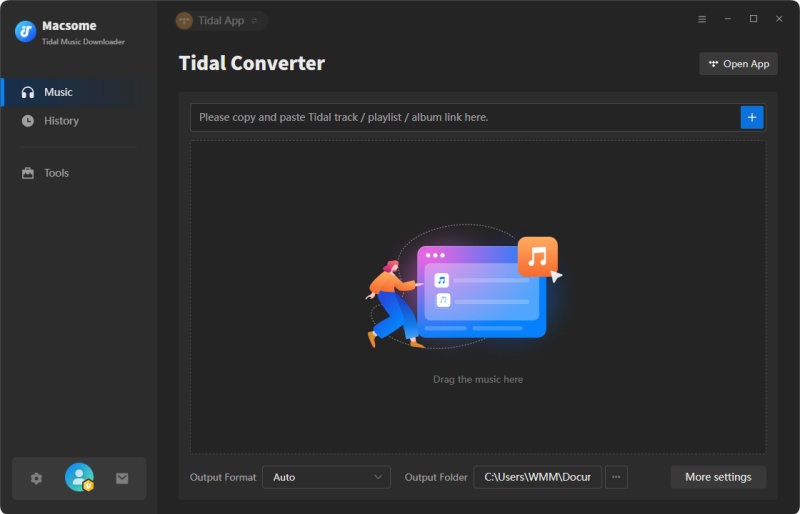
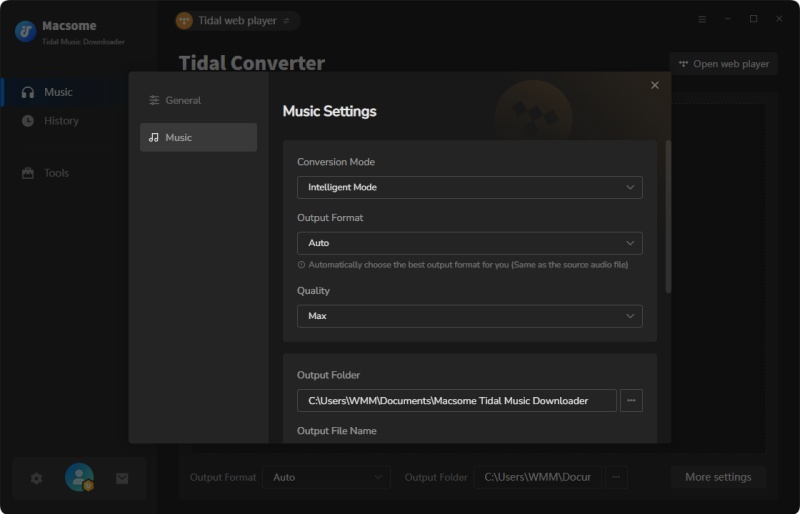
Step 2. Set the Output Formats for Spotify
Simply click on the icon at the top right corner of interface, the Settings window will pop up. You can select MP3 as the output format for Spotify. Besides, you can also change the Output Folder to save the downloaded Tidal audio files.
Step 3. Choose Music or Playlist from Tidal to Download
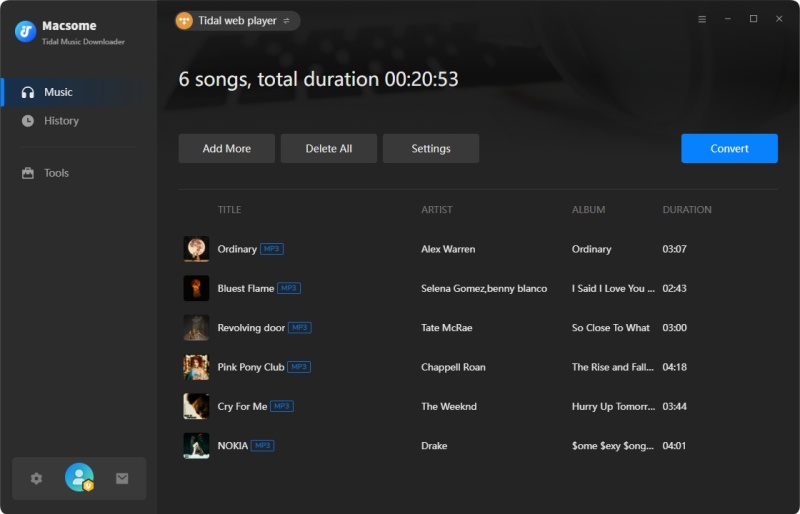
Open a track, album or playlist, then you can click Add button to import the songs you want to download.
Step 4. Download and Convert Tidal Music to Spotify
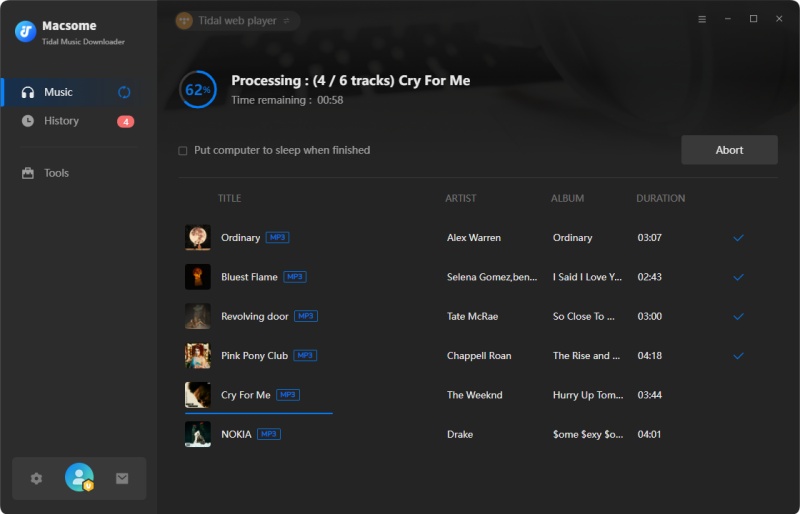
Now, click the Convert button to start downloading Tidal music. After the conversion, you can find the downloaded Tidal tracks on the target folder on your local computer. And then, you can get ready to transfer the downloaded Tidal music to Spotify.
Step 5. Import Tidal Music to Spotify
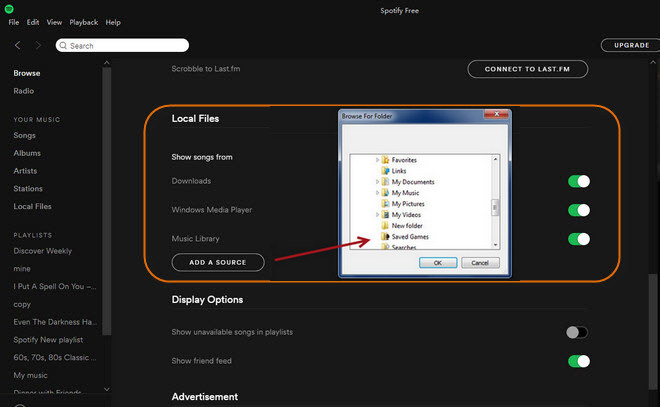
Here are some steps to help to transfer your playlist and favorite tracks from Tidal to Spotify. Firstly, open the Spotify client on your computer, and click Edit - Preferences, or click on the drop-down menu next to your profile at the top on Spotify. Then hit on Settings.
Scroll down to find the Local Files, switch the grey button to green. Click on ADD A SOURCE, now you can locate the downloaded Tidal music files and hit OK. Then all the selected Tidal tracks will be added to Spotify successfully.
Summary
With the methods above, you can move music from Tidal to Spotify. Not only that, Macsome Tidal Music Downloader can also allow you to download Tidal music to MP3, AAC, or other plain audio formats, so you can also transfer Tidal Music to other tablets or devices for playback offline without any limit. This program has a free trial version, please do not hesitate and have a try.