


Two Solutions to Download Spotify Music on Mac
- Updated on Aug. 10, 2026
 Wyatt Maxwell
- General, Spotify Tips
Spotify is one of the world's most popular music streaming platforms, offering access to millions of songs and podcasts. While Spotify Free allows users to stream music with ads, Spotify Premium subscribers can enjoy an ad-free experience and download music for offline listening within the Spotify app. However, offline downloads are subject to Spotify's subscription and device restrictions.
With Spotify Premium, you can download albums, playlists, and podcasts for offline listening on supported mobile devices. On desktop computers, however, Spotify currently limits offline downloads to playlists. If you're using a Mac and want to learn how to download Spotify music on Mac, you're in the right place. In this guide, we'll introduce two practical methods to download Spotify music on your Mac for offline listening. Let's get started.
Solution 1. Download Spotify Music on Mac with Spotify Premium
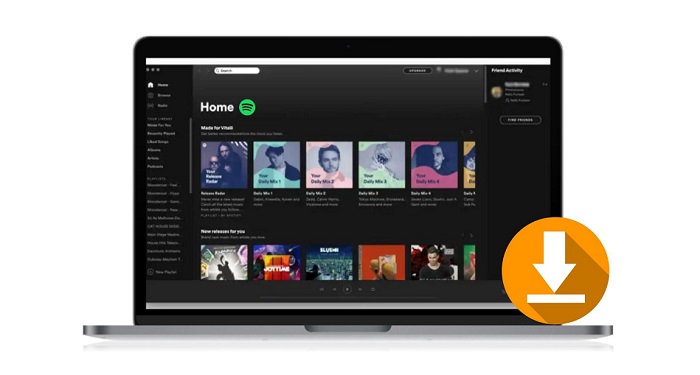
It is easy to download Spotify music for offline listening on your Mac with a Premium account. First of all, you can download the Spotify application available for Mac from Spotify's website. Once downloaded, you can follow the steps below to download music on Spotify with a Wi-Fi connection.
1. Install and launch the Spotify app on your Mac. Log into your Spotify account. Please make sure that your account is on a Premium subscription.
2. Find the playlists you want to download, click the "Download" button to the right so that the toggle turns green. The playlist will immediately start downloading.
3. After you finish downloading your music, the songs in the playlist will be available offline. A green symbol will appear next to a downloaded playlist.
Open Spotify and select Offline Mode, you can see which playlists are available offline. Now you can listen to the downloaded playlists offline on your Mac.
Solution 2. Download Spotify Music on Mac without Spotify Premium
If you have already downloaded the Spotify playlist to Mac, you can locate the offline music in this directory: /Users/"yourusername"/Library/Caches/com.spotify.Client/storage. However, you will find that all the downloaded tracks are cache files. You can only play these files within the Spotify app. Once your Premium subscription expires, all the downloaded files are not available to play offline anymore. Would like to keep the downloaded Spotify music on Mac after your subscription is canceled? Is it possible to download songs from Spotify music without Premium?
That's what Macsome Spotify Downloader can do for you. It is an all-in-one Spotify Music Converter. With it, you can not only download songs, playlists, podcasts, and albums from Spotify on your Mac with a Spotify free account, but also can convert Spotify music to MP3, AAC, WAV, FLAC, AIFF, and ALAC with high quality. In this case, you can play Spotify music offline on your Mac computer or other devices with ease.

Main Features of Macsome Spotify Downloader for Mac
- Download Spotify songs, albums, playlists, podcasts, and artists.
- Convert Spotify music to MP3, AAC, WAV, FLAC, AIFF, or ALAC.
- Support both Spotify Free and Premium accounts.
- Preserve high-quality audio, ID3 tags, and album artwork.
- Batch download multiple Spotify songs, playlists, and albums at once.
- Customize output settings, including audio format, quality, and output folder.
- Download Spotify music for offline listening without being limited to the Spotify app.
- Save converted Spotify music to Mac, Windows PC, iPhone, iPad, iPod, PS5, Apple Watch, and other devices.
- Keep downloaded music organized with customizable file names and folder structures.
Guide: Download Songs from Spotify Music on Mac without Premium
Follow the guide below to learn how to download music from Spotify to Mac using Macsome Spotify Downloader. The program is compatible with the latest macOS versions. Before getting started, download and install the latest version of Macsome Spotify Downloader on your Mac.
Step 1. Customize the Output Settings.
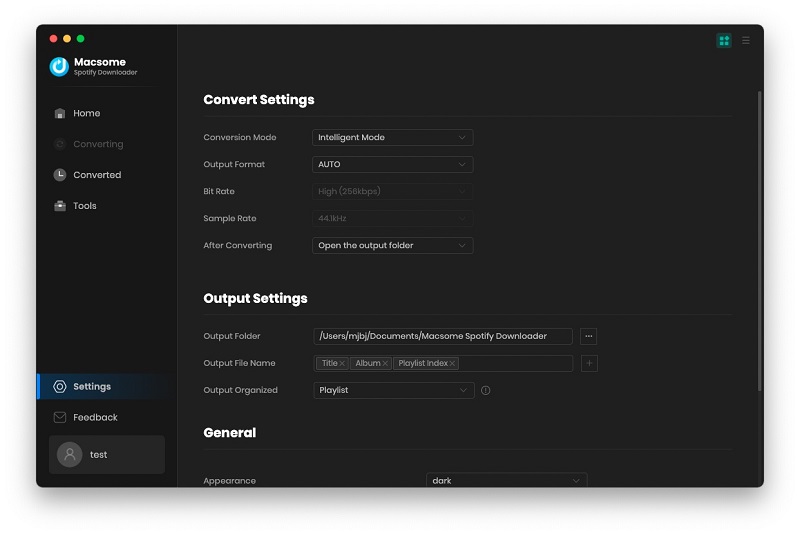
Launch Macsome Spotify Downloader on your Mac. The Spotify app will open automatically. Click the "Settings" icon in the top-right corner to customize your download preferences.
Under "Convert Settings", you can select the output format, including MP3, WAV, AAC, FLAC, AIFF, and ALAC, as well as the desired audio quality, such as 320 kbps, 256 kbps, or 128 kbps. Under "Output Settings", you can choose your preferred destination folder and organize downloaded music by album or artist.
You can also select "WebPlayer Download" mode for faster downloads. After signing in to your Spotify account, you can download music directly through the built-in Spotify web player.
Step 2. Add Spotify Songs or Playlists.
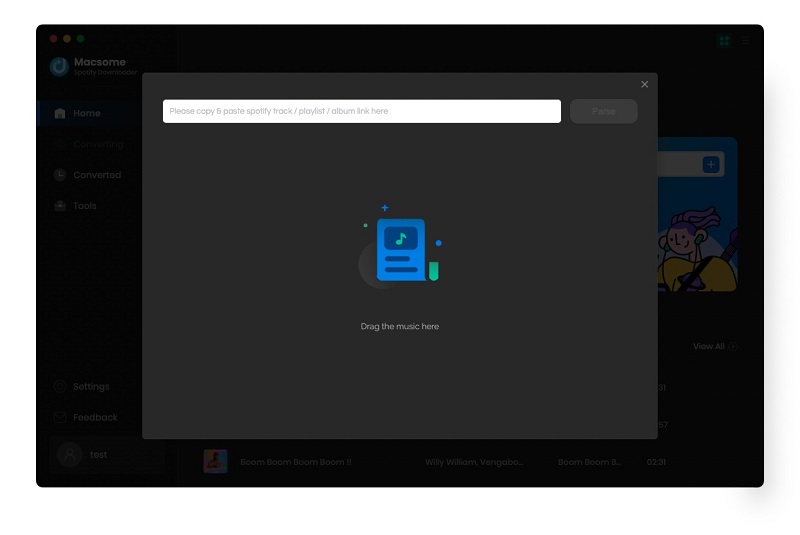
Copy and paste a Spotify song, album, playlist, or other supported content into the search box to add it to the download list. You can also drag and drop Spotify content directly into the program.
Step 3. Download Spotify Music on Mac.
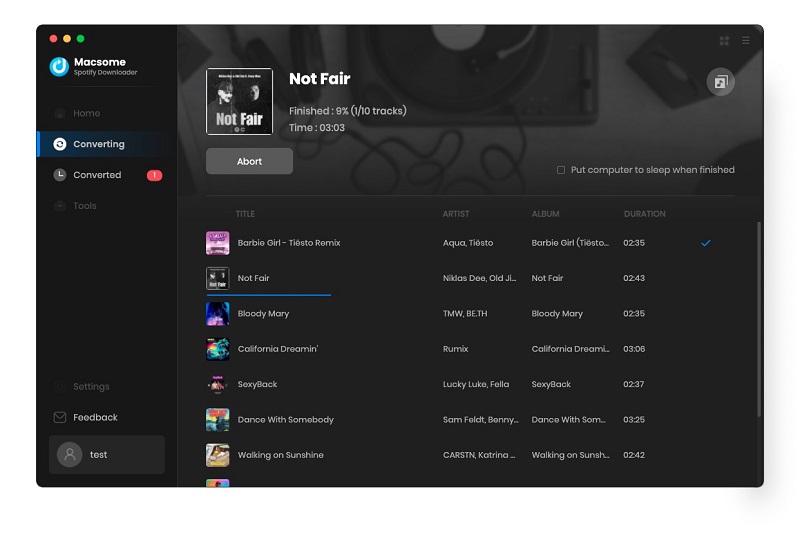
Once everything is ready, click the "Convert" button to start downloading. Macsome Spotify Downloader will download the selected Spotify music to your Mac and convert it to your chosen audio format, such as MP3. The program also preserves important ID3 metadata, including the Title, Artist, Album, Artwork, Track Number, and Year.
Step 4. Find the Downloaded Spotify Music.
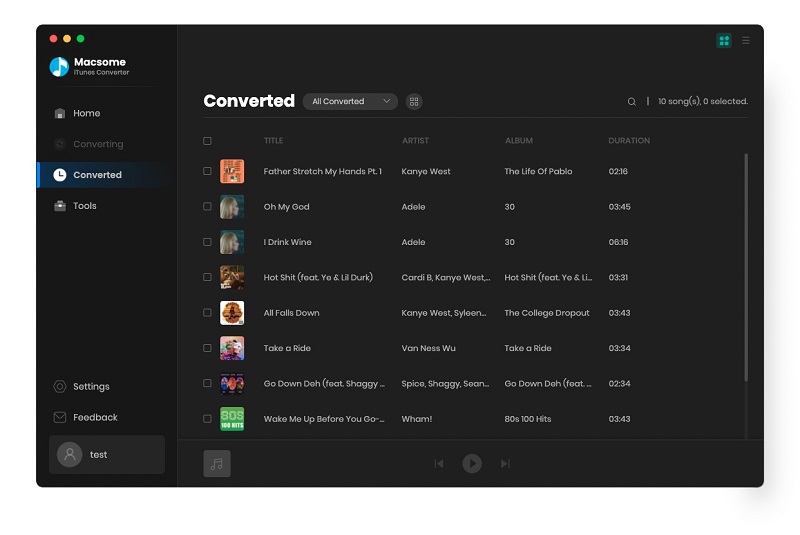
When the download is complete, open the "History" tab to view your downloaded Spotify music. Click the folder icon next to a track to open its location on your Mac. You can then access and manage your downloaded music files locally for offline listening.
Conclusion
There are two solutions introduced in this article for you to download songs from Spotify music on Mac. If you have a Spotify Premium account, you can choose either of them. But if you'd like to download songs, albums, or podcasts as well as playlists, Macsome Spotify Downloader is really a nice tool for you. It enables both Premium and Free users to download Spotify songs, albums, playlists, and podcasts to common audio formats you like and save them to your Mac for use freely. Thus, you can transfer Spotify music files from Mac to any other device or player for offline playing.
Note: Macsome Spotify Downloader has a free trial version, which enables you to convert the first 1 minute of each song. You can buy the full version to convert the full music.